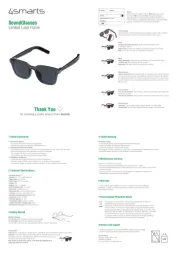
4smarts SoundGlasses Lucid Bruksanvisning
Les nedenfor 📖 manual på norsk for 4smarts SoundGlasses Lucid (2 sider) i kategorien headset. Denne guiden var nyttig for 7 personer og ble vurdert med 4.5 stjerner i gjennomsnitt av 4 brukere
Side 1/2

for choosing a quality product from 4smarts
Thank You
SoundGlasses
Limited Lucid Frame
1.1 General precautions
• Do not drop the product and avoid strong impacts.
• Repairs should only be carried out by qualified personnel.
1.2 Precautions for Electronic Products
• Keep the device away from dirt, moisture, and extreme temperatures, and only use it in dry rooms.
• Do not open the device and do not continue using it if it is damaged.
• Do not apply force when connecting the device or adapter.
• Use the device only within the specified performance limits.
1.3 Precautions for Batteries
• Avoid using and charging the battery under extreme temperatures.
• Regularly charge the battery when storing it for longer periods (at least quarterly).
• Do not open, damage, or dispose of batteries improperly, as they contain toxic heavy metals.
1 Safety Instructions
2 Technical Specifications
• Bluetooth version: 5.3
• Material: PC, TAC + UV400 (Anti-UV)
• Battery type: Li-ion / Li-Po
• USB-C input: DC 3.8V / 100mAh
• Weight: 58g
• Battery: 3.8V / 2 × 100mAh
• Battery charging time: ca. 2 hours
• Driver Size: 16x8x3mm, 0.5W
• Play music time: ca. 6 hours (80% volume)
• Call time: ca. 5 hours (full charge use)
• Bluetooth communication protocols: A2DP
• Frequency: 2.4GHz - 2.48GHz
• Bluetooth distance: ca. 12m
• Transmission power: ≦10dBm (10 mW)
• Length of the USB-C charging cable: 60cm
• Recommended charger: 2.5-5W (not included)
3 Getting Started
Magnetic Charging
The red light is on: This light is always on when charging
The blue light is on: When fully charged, the blue light
turns off after a minute on when fully charged (It takes 90 minutes to fully charge)
Power On/Off
Power on: Put on the glasses, induction sensors automatically switch on the glasses when worn correctly.
Switch off: Take off the glasses and they will switch off automatically after 15 seconds.
Alternatively, the left or right button at the bottom of the temple can be pressed
for about 8 seconds to switch the device off.
Note: If there is sweat on the glasses, it will affect the switching effect,
please pay attention to clean it!
8 Service and Support
For defective products or issues during installation, please contact your retailer
or the 4smarts product support at https://www.4smarts.com/contact
Service Hotline
Monday – Friday: 9 AM – 5 PM
+49(0)821 20708444
Email: customer-service@4smarts.com
5W
5 Maintenance and Care
• Use only dry, soft cloths for cleaning.
• Avoid using moisture to prevent damage to the charging station or cables.
• Always store the SoundGlasses and charging cable dry and away from liquids to prevent short
circuits or corrosion.
• Do not use sharp or chemical cleaners. Such substances can damage the material of the
SoundGlasses or cables and reduce their lifespan.
6 Warranty
4smarts GmbH accepts no liability or warranty for damages resulting from improper
installation, assembly, or misuse of the product or failure to observe the user manual
and/or safety instructions.
7 Environmental Protection Notice
From the time of implementation of the European directives 2012/19/EU and
2006/66/EC into national law, the following applies:
Electrical and electronic devices as well as batteries must not be disposed of with
household waste. The consumer is legally obliged to return electrical and electronic
devices as well as batteries to designated public collection points or the point of sale
at the end of their life. Details are regulated by the respective national law. The symbol
on the product, the user manual, or the packaging indicates these regulations.
By recycling, material recovery, or other forms of disposal of old devices/batteries,
you make an important contribution to protecting our environment.
4 Troubleshooting
Pairing not working:
• Ensure that the glasses are fully charged and within Bluetooth range.
• Temporarily disable other Bluetooth devices nearby.
• Check if the glasses are in pairing mode correctly.
• If the glasses are already connected to another device, disconnect it before attempting to pair again.
• Remove the glasses from the list of paired devices and try pairing again.
Paired Temples
After booting up, the two temple arms are automatically paired. If only one bracket
has connected, briefly close the unconnected bracket and open it again
Phone
Incoming call answer/end call: Click the button at the bottom of the
temple (left or right) 1x
Reject a call: Click the same button (left or right) and hold it for 2 seconds
Note: The volume of the call can be adjusted on the phone
Music
Music pause/play: Click the button at the bottom of the temple (left or right) 1x
Previous song: Click left button down 2x to switch
Next Song: Click right button 2x to switch to the next song
Remote camera
Remote control photo: First make sure that all music apps on your device are closed.
Then open the camera app on your smartphone. Click once or twice on the button at
the bottom of the temple (left or right) and hold the button down for a while to press
the shutter button on your photo app (this may vary depending on the version of the
phone system)
Voice Assistant
Turn on voice assistant: Click the bottom button on both temples (left or right) and
hold it for 2 seconds
Turn off voice assistant: Click the button at the bottom of the temple (left or right) 1x
Volume Control
Volume up: Tap and swipe forward along the outside of the right temple
Volume down: Tap and swipe backward along the outside of the right temple
Pairing
After turning on the glasses, activate Bluetooth on your device.
Search for "G06" and connect. Note: The smart glasses will
automatically turn off when charging, and automatically turn on
when the charger is unplugged or fully charged. It will automatically
recognize the paired device and connect automatically!
GO6
Produkspesifikasjoner
| Merke: | 4smarts |
| Kategori: | headset |
| Modell: | SoundGlasses Lucid |
Trenger du hjelp?
Hvis du trenger hjelp med 4smarts SoundGlasses Lucid still et spørsmål nedenfor, og andre brukere vil svare deg
headset 4smarts Manualer
16 Oktober 2025

10 August 2025
9 August 2025

6 August 2025

6 August 2025

6 August 2025
6 August 2025
headset Manualer
- Omnitronic
- Xiaomi
- Microsoft
- Turtle Beach
- Sven
- Aftershokz
- Snom
- Krüger&Matz
- Defender
- Belkin
- AV:link
- Tellur
- Creative
- Lamax
- Manhattan
Nyeste headset Manualer

21 Oktober 2025

19 Oktober 2025
18 Oktober 2025

18 Oktober 2025

18 Oktober 2025

18 Oktober 2025

18 Oktober 2025
17 Oktober 2025
16 Oktober 2025
13 Oktober 2025