AV:link 500.210UK Bruksanvisning
Les nedenfor 📖 manual på norsk for AV:link 500.210UK (2 sider) i kategorien Webkamera. Denne guiden var nyttig for 10 personer og ble vurdert med 4.9 stjerner i gjennomsnitt av 5.5 brukere
Side 1/2
www.avsl.com 500.210UK
Full HD USB Webcam
with Microphone
Item ref: 500.210UK
User Manual
A full HD USB webcam that delivers on all levels, providing both crystal clear images and high-quality audio at a price that won t hurt ’
your pocket. The 2 Megapixel sensor refreshes at 30fps to produce stunning colour and detail and the 95° viewing angle generates a
natural 16:9 widescreen ratio. The 1.5m, USB lead provides simple plug and play connection and the versatile fixing clip offers
flexibility for both monitor mounting or freestanding on your work surface. Suitable for a wide range of communication applications
and compatible with most Microsoft and MAC operating systems, this compact, well-made webcam is a perfect addition for your home
or office environment.
• Produces crystal clear, FHD images at 1080p resolution
• Built in microphone for crisp, clean audio
• 2.0MP sensor delivers stunning clarity and detail at 30fps
• 95° viewing angle provides true 16:9 screen ratio
• Simple plug and play connection via USB2.0
• Flexible fixing clip for monitor mounting or freestanding on a work surface
• Ideal for use with communication apps such as Microsoft Teams, Zoom, Skype, Cisco Webex, Google Meet and more
Technical Specifications:
Max resolution
1920 x 1080p
Frame rate
30 FPS
Sensor
2.0 Me pixel ga
Viewing angle
95°
Compatible O/S
Windows XP2, Vista, Win7, Win8, Win10, MAC OS
Lead length
1.5m
Dimensions
85 x 58 x 60mm
Weight
122g
Operation guide:
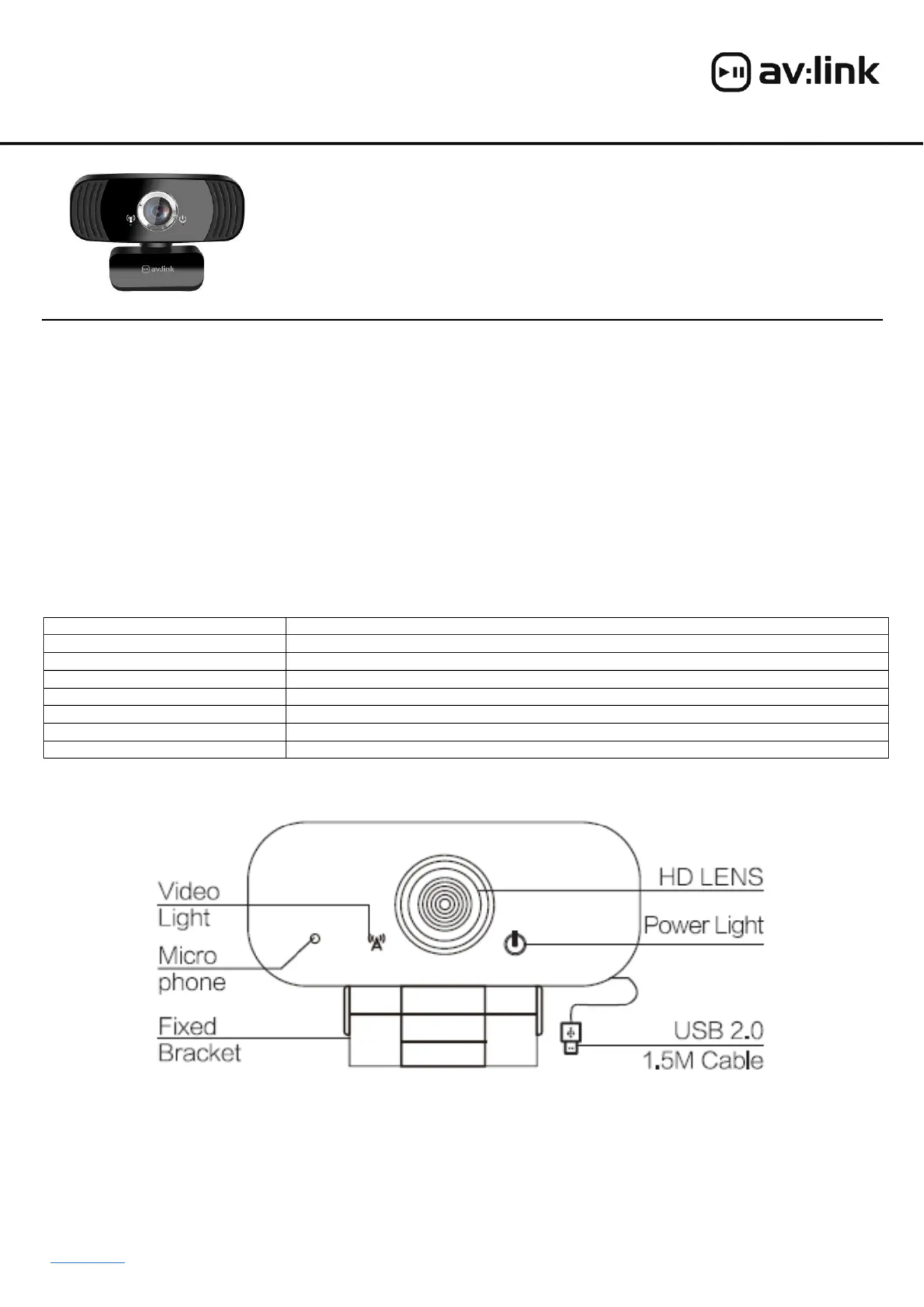
The AV:Link USB Webcam is a plug and play device. connect to your PC or laptop simply insert the USB2.0 adaptor to a vacant To in
USB port and wait for the O/S to install the default drivers. Once this is complete you ll receive a notification from your O/S and the wi
red power light on the camera will be lit. In Microsoft Windows to check the camera and microphone are connected and working
correctly please follow the steps below. These steps are also needed if your PC or laptop has another camera, in which case you will
need to select the correct one in the system settings. Position your camera securely either on the top of your monitor or notebook
screen or on the desktop rface using the adjustable fixing bracket. For additional grip remember to remove the protective plastic film su
from the rubber surfaces on the inside of the bracket.
Produkspesifikasjoner
| Merke: | AV:link |
| Kategori: | Webkamera |
| Modell: | 500.210UK |
| Vekt: | 122 g |
| Bredde: | 85 mm |
| Dybde: | 58 mm |
| Høyde: | 60 mm |
| Bruksanvisning: | Ja |
| Synsvinkel, horisontal: | 95 ° |
| Maksimal bildefrekvens: | 30 fps |
| Maksimal videooppløsning: | 1920 x 1080 piksler |
| Innebygd mikrofon: | Ja |
| Kamera HD-type: | Full HD |
| Kabellengde: | 1.5 m |
| Produktfarge: | Sort |
| Pakketype: | Boks |
| Støttede videofunksjoner: | 1080p |
| Synsvinkel, vertikal: | 95 ° |
| Megapiksel: | 2 MP |
| Oppløsning ved innspillingshastighet: | 1920x1080@30fps |
| USB-strøm: | Ja |
| Støttede Windows operativsystemer: | Ja |
| Videoopptaksgrensesnitt: | USB 2.0 |
| Montasjetype: | Stå |
| Støttede Mac operativsystemer: | Ja |
| Antall: | 1 |
Trenger du hjelp?
Hvis du trenger hjelp med AV:link 500.210UK still et spørsmål nedenfor, og andre brukere vil svare deg
Webkamera AV:link Manualer
29 August 2025
Webkamera Manualer
- Microsoft
- Elgato
- Genius
- Airlive
- Alecto
- Aukey
- Viewsonic
- T'nB
- Kogan
- Creative
- OBSBOT
- HuddleCamHD
- Logitech
- Savio
- Aplic
Nyeste Webkamera Manualer
12 Oktober 2025
12 Oktober 2025
10 Oktober 2025
10 Oktober 2025
10 Oktober 2025
10 Oktober 2025
10 Oktober 2025
10 Oktober 2025
9 Oktober 2025
9 Oktober 2025