Cisco TRC5 Bruksanvisning
Cisco
Fjernkontroll
TRC5
Les nedenfor 📖 manual på norsk for Cisco TRC5 (2 sider) i kategorien Fjernkontroll. Denne guiden var nyttig for 12 personer og ble vurdert med 4.8 stjerner i gjennomsnitt av 6.5 brukere
Side 1/2
Quick Reference Guide TRC 5
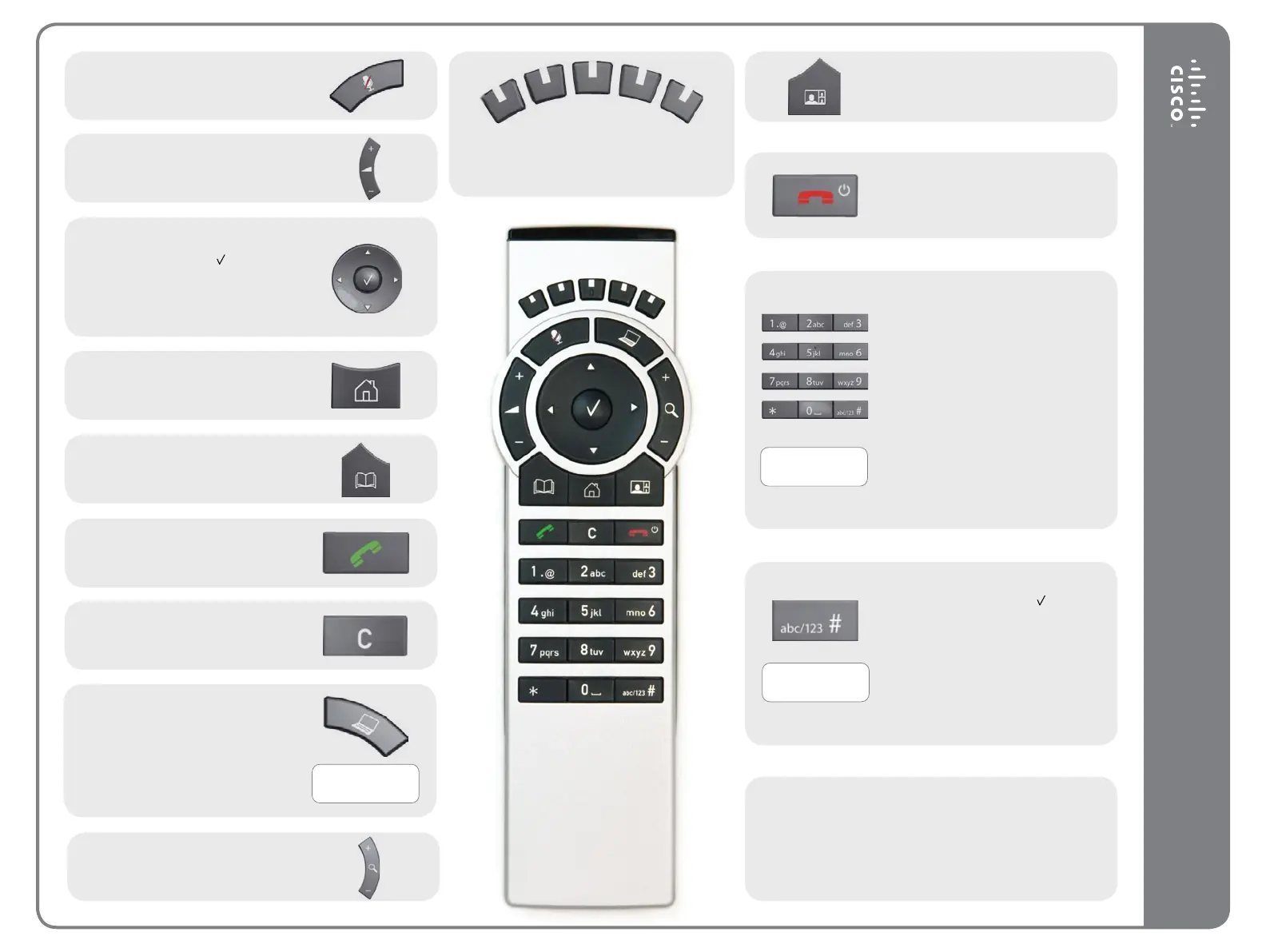
Microphone On/O.
Adjust loudspeaker volume.
Use the Arrow keys to navigate in the
menus and the center
key to conrm
your choice or selection.
When no menu is open, Arrow keys
can be used to move the camera.
Use this key to display the Main
menu on the screen.
Use this key to display the Phone
book (your contacts) on the screen.
Place a call.
Use this key to remove characters in
a text eld.
Switch to show PC screen on the
system. Press again to go back to the
main camera.
Open the Presentation menu to
select other sources.
Press and hold
Press and hold
Press and hold
These keys correspond to the ve context
sensitive softkeys along the bottom
of the screen.
Use this key to change the layout on
the screen.
Use this key to end an ongoing call.
Outside a call, press and hold to enter
the standby mode.
Use the keypad to enter letters and
numbers, as with a mobile phone.
Press a key repeatedly to access the
characters displayed on each key.
Press and hold the # key to switch
between touch tone mode (press
and hold), lower case characters and
numbers.
Use this key to enter touch tone mode
(DTMF) in a call. Press the
key when
done.
When entering text this key is used to
toggle between upper and lower case
letters.
Press and hold to change between
characters and numerics.
Waking up the system
Grab the remote control and make sure your hand
touches the rubber line sensors located on both sides of
the remote control, or just touch any key on the remote
control.
Zoom the camera.
D14844.01 May 2011
Produkspesifikasjoner
| Merke: | Cisco |
| Kategori: | Fjernkontroll |
| Modell: | TRC5 |
| Innebygd skjerm: | Nei |
| Vekt: | - g |
| LED-indikatorer: | Nei |
| Antall knapper: | 29 |
| Maksimal rekkevidde: | - m |
| Klokkefunksjon: | Nei |
| Produktfarge: | Hvit |
| USB nødvendig: | Nei |
| Kalender: | Nei |
| Pakketype: | Boks |
| Kroppsmateriale: | Plast |
| Av/på-bryter: | Nei |
| Videoopptaksgrensesnitt: | IR Kabelfri |
| Antall støttede enheter: | 1 |
| Inngangstype: | Trykknapper |
| Egnet bruk for fjernkontroll: | Spesialfilter |
Trenger du hjelp?
Hvis du trenger hjelp med Cisco TRC5 still et spørsmål nedenfor, og andre brukere vil svare deg
Fjernkontroll Cisco Manualer
2 Oktober 2025
1 Oktober 2025
Fjernkontroll Manualer
- Philips
- DJI
- Interphone
- Sony
- Metronic
- Intermatic
- AV:link
- Pixel
- Vaddio
- Antelope Audio
- Hama
- Compustar
- Irradio
- Velleman
- Metra
Nyeste Fjernkontroll Manualer
20 Oktober 2025
19 Oktober 2025
19 Oktober 2025
18 Oktober 2025
17 Oktober 2025
16 Oktober 2025
16 Oktober 2025
15 Oktober 2025
13 Oktober 2025

10 Oktober 2025