Quantum VS2124 Bruksanvisning
Quantum
Sikkerhetskamera
VS2124
Les nedenfor 📖 manual på norsk for Quantum VS2124 (2 sider) i kategorien Sikkerhetskamera. Denne guiden var nyttig for 17 personer og ble vurdert med 4.8 stjerner i gjennomsnitt av 9 brukere
Side 1/2
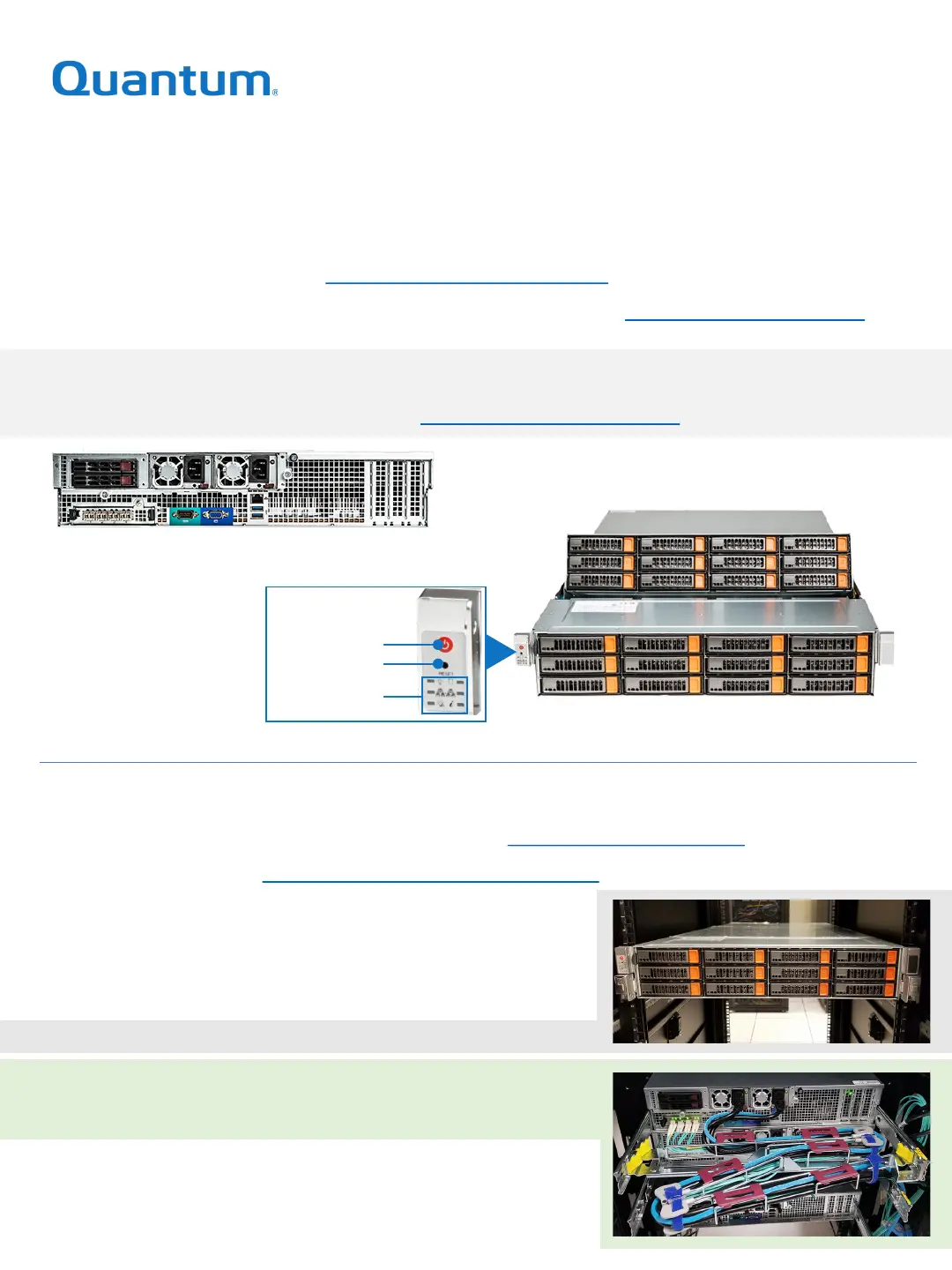
Hardware Overview
For front and rear views of the system, descriptions of the components, and explanations
of what the various LEDs indicate, refer to
Operate > Hardware Overview.
VS2124 QUICK START
The Quantum VS2124 is an efficient, flexible platform designed for video surveillance
applications. It enables you to efficiently record and store surveillance footage and run an entire
security infrastructure on a single cloud-like platform. For complete documentation, refer to the
VS2124 Documentation Center (www.quantum.com/VS2124docs).
Activate your warranty and register your product with Quantum: www.quantum.com/startup
Installing the VS2124
Step 2 Prepare for the installation.
Page 1
Front
Bezel Removed and Internal Drives Shown
All Drives Ship Installed
Rear
Step 1 Choose a location that meets the requirements.
A summary of the steps is below. For details, refer to
Install > VS2124 Installation.
Step 3 Unpack the VS2124.
Step 4 Install the VS2124 system in the rack.
Step 5 Install the cable management arm.
Step 6 Connect the power cords and power on.
Control Panel
Power Button
Reset Button
Status LEDs
Safety Information: See Resources > VS2124 Safety Information
Produkspesifikasjoner
| Merke: | Quantum |
| Kategori: | Sikkerhetskamera |
| Modell: | VS2124 |
Trenger du hjelp?
Hvis du trenger hjelp med Quantum VS2124 still et spørsmål nedenfor, og andre brukere vil svare deg
Sikkerhetskamera Quantum Manualer
13 Oktober 2025
Sikkerhetskamera Manualer
- Abus
- Uniden
- TP Link
- Vimar
- British Telecom
- Nedis
- Ring
- Digital Watchdog
- Speco Technologies
- Vivotek
- Overmax
- Bolin Technology
- Pelco
- Revo
- Philips
Nyeste Sikkerhetskamera Manualer
20 Oktober 2025

20 Oktober 2025

20 Oktober 2025
19 Oktober 2025

18 Oktober 2025

18 Oktober 2025

17 Oktober 2025

17 Oktober 2025

17 Oktober 2025

17 Oktober 2025