StarTech.com IMC1GSFP60W Bruksanvisning
StarTech.com
Ikke kategorisert
IMC1GSFP60W
Les nedenfor 📖 manual på norsk for StarTech.com IMC1GSFP60W (2 sider) i kategorien Ikke kategorisert. Denne guiden var nyttig for 22 personer og ble vurdert med 4.9 stjerner i gjennomsnitt av 11.5 brukere
Side 1/2
Quick-Start Guide
To view manuals, FAQs, videos, drivers, downloads, technical drawings, and more, visit www.startech.com/support.
Manual Revision: June 2, 2020 2:48 PM
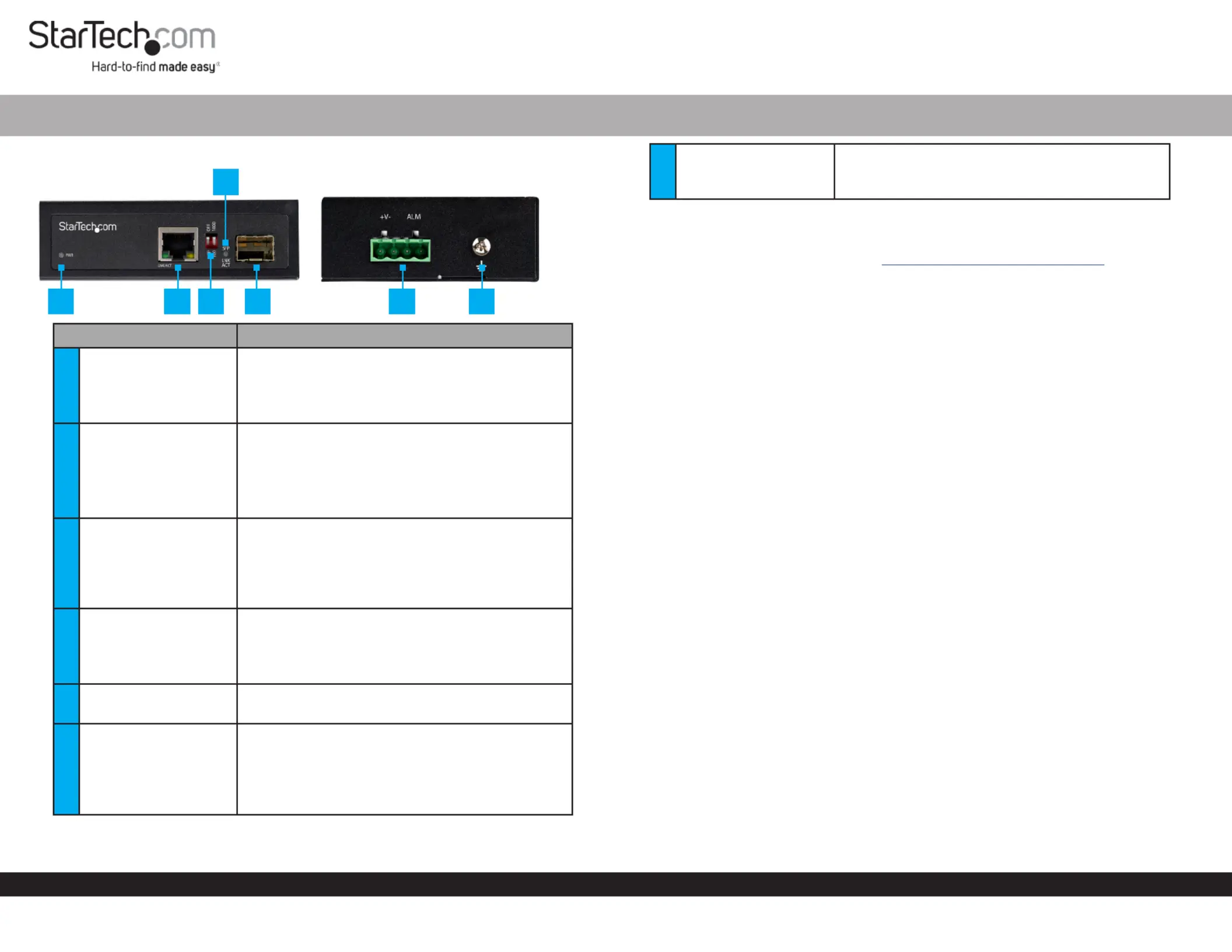
Product Diagram (IMC1GSFP60W)
Component Function
1PWR LED
• An external is Green: DC Power Source
detected.
• An external is not O: DC Power Source
detected.
2RJ45 Port
• Connect a to the Network Device Media
Converter.
• A (PD) is detected.ON: PoE Powered Device
• The is Flashing: Media Converter
transmitting/receiving data.
3DIP Switch
DIP1: This switch is currently not in use.
DIP 2:
• Sets SFP speeds to 1000Mbps (default) O:
• Sets SFP speeds to 100Mbps.On:
4SFP LED
• Indicates that a link is detected on the Green:
SFP.
• Indicates that data is being Flashing:
transmitted or received.
5SFP Slot
• Connect an (100/1000BASE-X) to the SFP
Media Converter.
64-Pin Terminal Block
• Connect an external (48-56V DC Power Source
DC Input) to the .Media Converter
• Connect an alarm or warning circuit to the
relay (ALM) connection. The relay is triggered if
the loses power.Media Converter
Industrial RJ45 to Open SFP Mini PoE Media Converter | 1000 Mbps (1G) | 60W
7Ground Screw
• Connect a ground connection to the Ground
Screw DC Power Source when connecting a to
the .Media Converter
Requirements
For the latest requirements, please visit www.startech.com/IMC1GSFP60W
• Network Equipment (e.g. Router, Network Switch) x 1
• MSA-Compliant 100/1000BASE-X SFP Transceiver Module x 1
• RJ45 Terminated UTP/STP CAT5e (or better) Network Cable x 1
• Terminated Fiber Optic Cable (dependent on SFP Module) x 1
• DC Power Source x 1
• Small Flat Head Screwdriver x 1
• Phillips Head Screwdriver x 1
• Alarm or Warning Circuit x 1
Powering the Media Converter
Connecting and installing the must be completed by a 4-Wire Terminal Connector
licensed Electrician.
Notes: Make sure that you turn o the power source before connecting the power wire
to the .Media Converter
Do not exceed the recommend power source voltage as it may result in personal or
product damage.
1. Using a , loosen the two screws (+V-) on the Small Flat Head Screwdriver 4-Wire
Terminal Connector (included).
2. Connect the from a (48 - 56V DC), or the provided Power Wires DC Power Source
Barrel Power Connector Adapter Terminal Block Connectors to the proper on
the . The terminals are marked on the Media Converter Media Converter’s Casing
(connect the positive wire to V+ and the negative wire to V-).
3. (Optional) Using a , loosen the two screws (ALM) on Small Flat Head Screwdriver
the .4-Wire Terminal Connector
4. (Optional) Connect the from an or to the Relay Wires Alarm Warning Circuit 2
ALM Relay Pins Terminal Block Connector on the .
5. Tighten the four screws on the .4-Wire Terminal Connector
6. Insert the in the on the 4-Wire Terminal Connector 4-Wire Terminal Block Media
Converter.
1 2
3 5 6
7
4
Produkspesifikasjoner
| Merke: | StarTech.com |
| Kategori: | Ikke kategorisert |
| Modell: | IMC1GSFP60W |
Trenger du hjelp?
Hvis du trenger hjelp med StarTech.com IMC1GSFP60W still et spørsmål nedenfor, og andre brukere vil svare deg
Ikke kategorisert StarTech.com Manualer
14 Oktober 2025
13 September 2025

18 Mars 2025

18 Mars 2025

22 Januar 2025

22 Januar 2025

22 Januar 2025

22 Januar 2025

22 Januar 2025

22 Januar 2025
Ikke kategorisert Manualer
- Goodway
- Ricoh
- Paradigm
- Smith-Victor
- Stamina
- Lantronix
- Speed-Link
- Micro Matic
- Kress
- Proscan
- NordicTrack
- Horizon Fitness
- GoPro
- Netgear
- Yaesu
Nyeste Ikke kategorisert Manualer

23 Oktober 2025

23 Oktober 2025

23 Oktober 2025

23 Oktober 2025

23 Oktober 2025

23 Oktober 2025

23 Oktober 2025

23 Oktober 2025

23 Oktober 2025

23 Oktober 2025