StarTech.com M2E1BMU31C Bruksanvisning
StarTech.com
Ikke kategorisert
M2E1BMU31C
Les nedenfor 📖 manual på norsk for StarTech.com M2E1BMU31C (2 sider) i kategorien Ikke kategorisert. Denne guiden var nyttig for 23 personer og ble vurdert med 4.5 stjerner i gjennomsnitt av 12 brukere
Side 1/2
Quick-Start Guide
To view manuals, FAQs, videos, drivers, downloads, technical drawings, and more, visit www.startech.com/support.
Manual Revision: February 27, 2019 9:51 AM
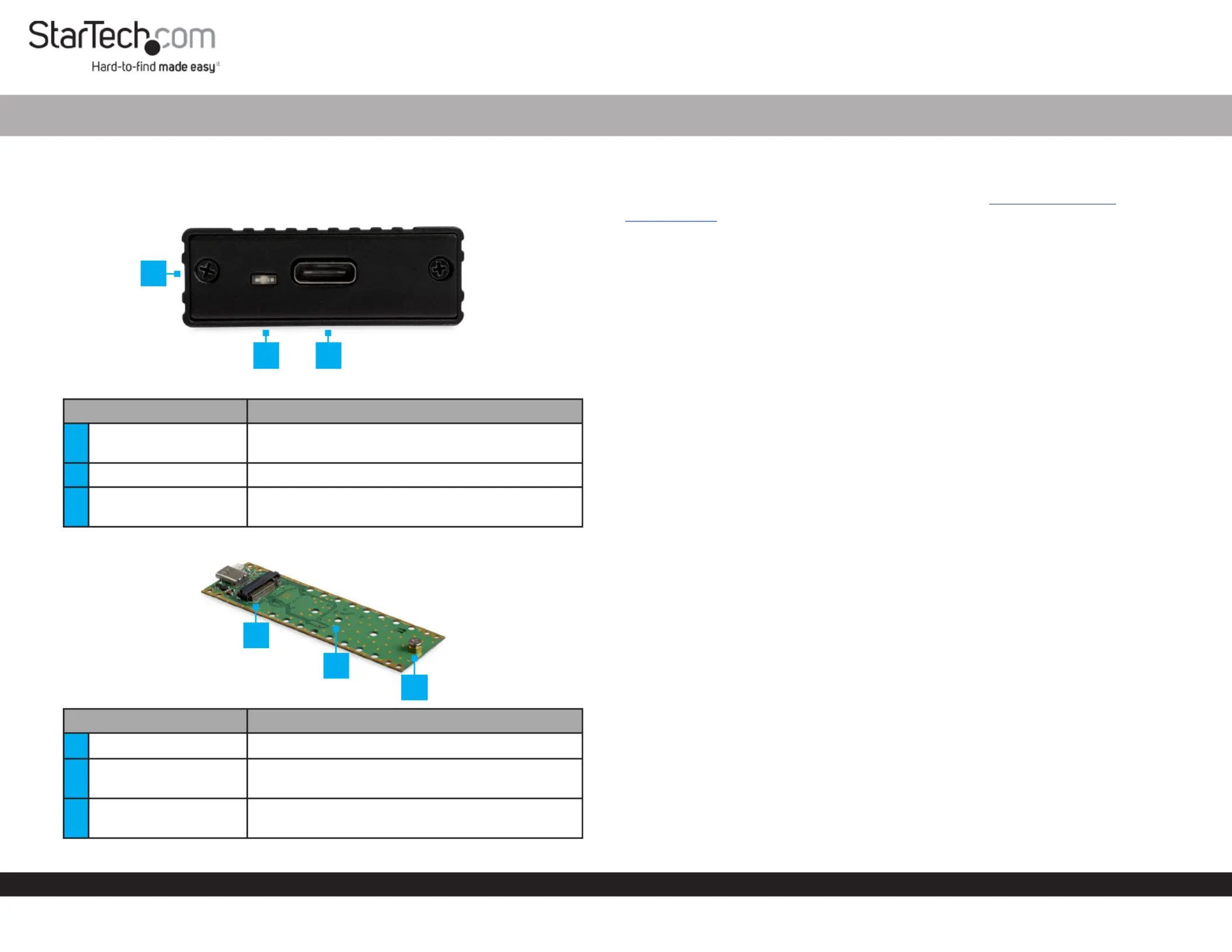
Product Diagram (M2E1BMU31C)
Exterior
Component Function
1Drive-Tray Screws x 2
• Used to secure the in the Drive Tray
Enclosure.
2Power LED • Indicates that the Enclosure is receiving power.
3USB-C Port
• Used to connect the to the Enclosure Host
Computer.
Interior
Component Function
4Drive Connector • Used to connect the to the .Drive Enclosure
5
Adjustable Drive
Length Holes
• Used to accommodate dierent drive lengths.
6
Drive-Mount Screw/
Nut
• Used to secure the to the .Drive Enclosure
M.2 NVMe Enclosure | USB 3.1 (10Gbps) | USB-C
1
Requirements
For the latest requirements and full manual, please visit www.startech.com/
M2E1BMU31C
Installation
Installing a Drive
Warning! Drives should be handled carefully, especially when they’re transported. If
you’re not careful with your drives, you may lose data as a result.
1. Using a remove the (x 2) from the Phillips Head Screwdriver, Drive-Tray Screws
Enclosure Cover Plate and remove the .
2. Carefully pull the out of the . Drive Tray Enclosure
3. Place the next to the and align the screw groove on the with Drive Drive Tray Drive
the on the .Adjustable Drive Length Holes Drive Tray
Note: If the drive-mount hardware is already installed in the correct position, proceed
to step 6.
4. Use a (included) and a set of to remove the Phillips Head Screwdriver Pliers Drive-
Mount Screw, Stando, Nut and .
5. Insert the and into the correct (80, 60, Stando Nut Adjustable Drive Length Hole
42, or 30) according to the length of the .Drive
6. Using a set of tighten the and .Pliers Stando Nut
7. Gently slide the connector on the (on a 30-degree angle) into the Drive
corresponding connector on the .Enclosure
Note: The connector on your drive is keyed so that it only ts one way.
8. Lightly push the down into position on the circuit board.Drive
9. Insert the through the screw groove on the and into the Drive-Mount Screw Drive
Stando.
10. Using a tighten the , being careful Phillips Head Screwdriver Drive-Mount Screw
not to over-tighten.
11. Slide the into the center grooves in the enclosure so that the Drive Tray USB-C Port
is facing outward.
12. Place the over the and circuit board.Cover Plate USB-C Port
2
4
3
6
5
Produkspesifikasjoner
| Merke: | StarTech.com |
| Kategori: | Ikke kategorisert |
| Modell: | M2E1BMU31C |
Trenger du hjelp?
Hvis du trenger hjelp med StarTech.com M2E1BMU31C still et spørsmål nedenfor, og andre brukere vil svare deg
Ikke kategorisert StarTech.com Manualer
14 Oktober 2025
13 September 2025

18 Mars 2025

18 Mars 2025

22 Januar 2025

22 Januar 2025

22 Januar 2025

22 Januar 2025

22 Januar 2025

22 Januar 2025
Ikke kategorisert Manualer
- Mitsubishi
- DiversiTech
- Joie
- Metro
- ASI
- Wire Technologies
- GBC
- Vocopro
- Noxon
- Inkbird
- Martin
- Broadcom
- Lamax
- Generac
- Nibe
Nyeste Ikke kategorisert Manualer

23 Oktober 2025

23 Oktober 2025

23 Oktober 2025

23 Oktober 2025

23 Oktober 2025

23 Oktober 2025

23 Oktober 2025

23 Oktober 2025

23 Oktober 2025

23 Oktober 2025