StarTech.com MCM110ST2P Bruksanvisning
StarTech.com
Ikke kategorisert
MCM110ST2P
Les nedenfor 📖 manual på norsk for StarTech.com MCM110ST2P (2 sider) i kategorien Ikke kategorisert. Denne guiden var nyttig for 18 personer og ble vurdert med 4.6 stjerner i gjennomsnitt av 9.5 brukere
Side 1/2
Instruction Manual
DE: Bedienungsanleitung - de.startech.com
FR: Guide de l'utilisateur - fr.startech.com
ES: Guía del usuario - es.startech.com
IT: Guida per l'uso - it.startech.com
NL: Gebruiksaanwijzing - nl.startech.com
PT: Guia do usuário - pt.startech.com
Manual Revision: 02/02/2021
For the most up-to-date information, please visit: www.startech.com
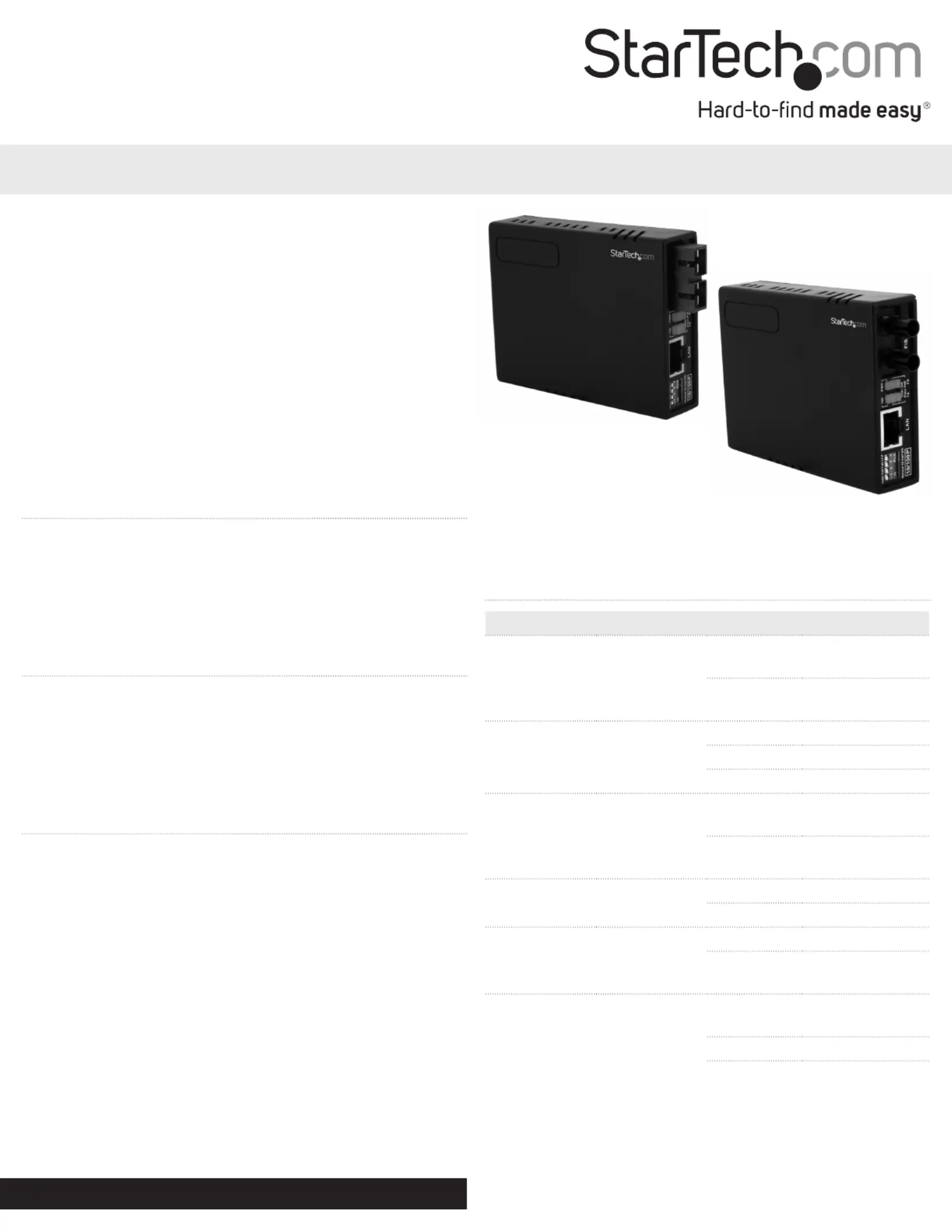
MCM110SC2P / MCM110SC2PGB
MCM110ST2P / MCM110ST2PGB
10/100 MM Fiber to Ethernet Media Converter SC/ST with PoE
Packaging Contents
• 1 x Fiber to Ethernet Media Converter
• 1 x Power Adapter ( MCM110ST2P only)MCM110SC2P and
• 1 x Instruction Manual
System Requirements
• 10/100Base compatible network
• For PoE operation: 802.3af compliant PSE (Power
Sourcing Equipment)
Installation
1. Connect the Ethernet cable to the Fiber Media Converter
“LAN” port.
2. Connect the other end of the Ethernet cable to the router/
switch/computer NIC. If connecting the media converter to
a 802.3af compliant PSE, skip Step 3.
3. Optional (Non-PoE operation): Plug a power adapter into
the media converter, and into an available AC power outlet.
4. Connect the ber cable into the ber receptacle on the
media converter.
5. Connect the other end of the ber cable into the router/
switch/computer NIC/another media converter. Remember
to reverse the TX and RX leads between the two devices.
*actual product may vary from photos
LED Indicators
LED Function StatusState
PWR
Power
Indicator
ON
Converter has
Power
OFF
Converter has no
Power
FX Link/Act
Fiber Link/
Activity
ON Fiber Link on
OFF No Link Detected
Flashing Receiving Data
POE
Power over
Ethernet
ON
PoE mode
enabled
OFF
PoE mode not
enabled
100 Mode
ON 100Mbps
OFF 10Mbps
Full Duplex Mode
ON Full Duplex Mode
OFF
Half Duplex
Mode
TX Link/Act
Ethernet Link/
Activity
ON
Ethernet link
Detected
OFF No Link Detected
Flashing Receiving Data
Produkspesifikasjoner
| Merke: | StarTech.com |
| Kategori: | Ikke kategorisert |
| Modell: | MCM110ST2P |
Trenger du hjelp?
Hvis du trenger hjelp med StarTech.com MCM110ST2P still et spørsmål nedenfor, og andre brukere vil svare deg
Ikke kategorisert StarTech.com Manualer
14 Oktober 2025
13 September 2025

18 Mars 2025

18 Mars 2025

22 Januar 2025

22 Januar 2025

22 Januar 2025

22 Januar 2025

22 Januar 2025

22 Januar 2025
Ikke kategorisert Manualer
- Cleanmaxx
- KoolScapes
- Golden Age Project
- Proclip
- Harley Benton
- Trijicon
- Titanwolf
- Fluke
- Mackie
- Petkit
- Integral LED
- Ingenuity
- PAG
- Victrola
- Taiji
Nyeste Ikke kategorisert Manualer

23 Oktober 2025

23 Oktober 2025

23 Oktober 2025

23 Oktober 2025

23 Oktober 2025

23 Oktober 2025

23 Oktober 2025

23 Oktober 2025

23 Oktober 2025

23 Oktober 2025