StarTech.com PEX2MPEX Bruksanvisning
StarTech.com
Ikke kategorisert
PEX2MPEX
Les nedenfor 📖 manual på norsk for StarTech.com PEX2MPEX (2 sider) i kategorien Ikke kategorisert. Denne guiden var nyttig for 19 personer og ble vurdert med 4.3 stjerner i gjennomsnitt av 10 brukere
Side 1/2
Instruction Manual
DE: Bedienungsanleitung - de.startech.com
FR: Guide de l'utilisateur - fr.startech.com
ES: Guía del usuario - es.startech.com
IT: Guida per l'uso - it.startech.com
NL: Gebruiksaanwijzing - nl.startech.com
PT: Guia do usuário - pt.startech.com
Manual Revision: 12/19/2011
For the most up-to-date information, please visit: www.startech.com
Packaging Contents
• 1xPCIetoMiniPCIeAdapter
• 1xLowProleBracket
• 2xMountingScrew
• 1xInstructionManual
System Requirements
• PCIExpress(PCIe)enabledcomputerwithavailablePCIeslot
• FulllengthminiPCIExpresscard
• OPTIONAL:USBheaderortypeBcable(forUSB-basedminiPCIe
cardsonly)
PEX2MPEX
PCI Express to Mini PCI Express Adapter Card
Installation
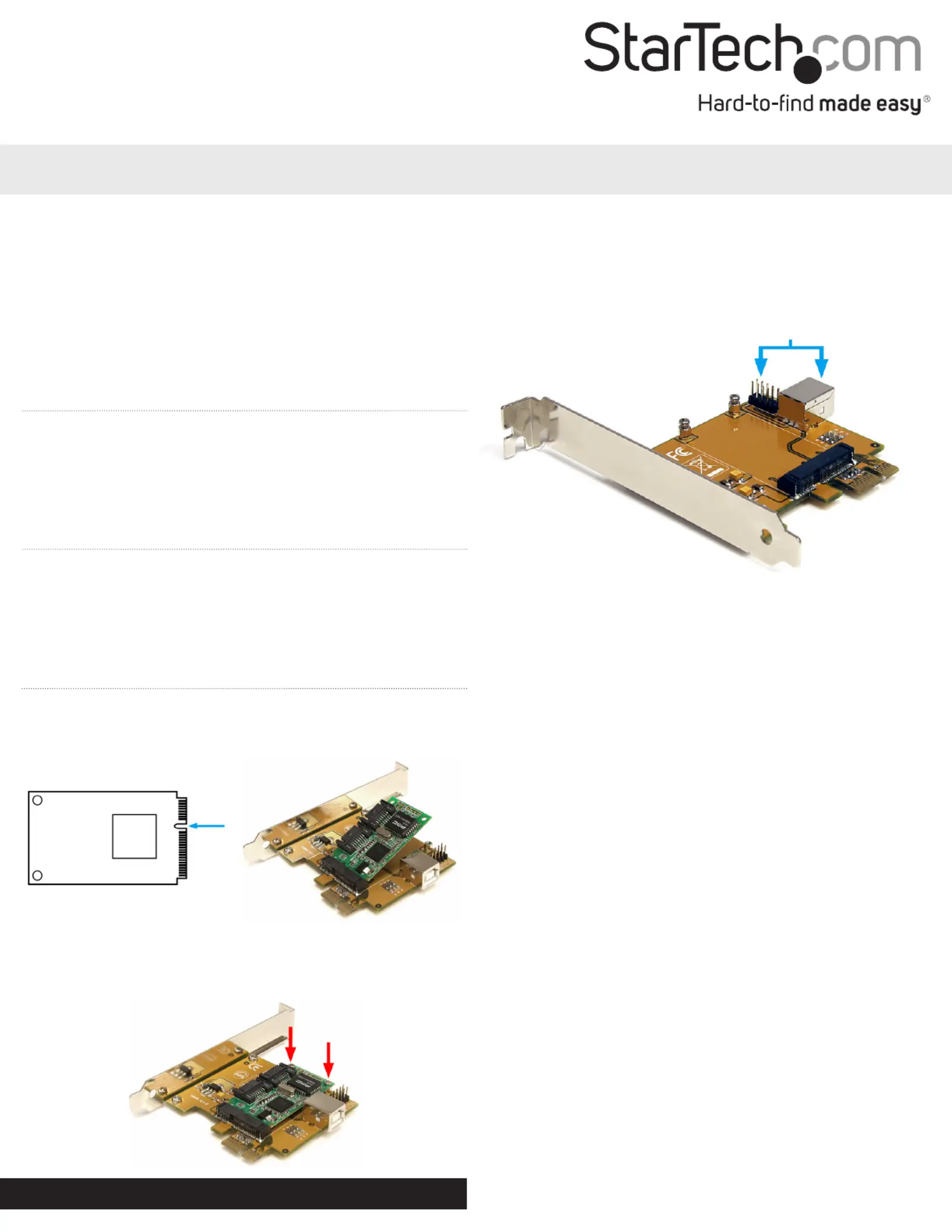
1.InserttheminiPCIExpresscardintotheslotconnectorat
anangle.Makesuretoproperlylineupthenotchintheslot
connectorwiththenotchontheminiPCIeconnector.
2.OncetheminiPCIecardisfullyinsertedintotheslot,pushthecard
backagainsttheadapterboard.FastentheminiPCIecardtothe
boardwiththesmallmountingscrewsprovided.Makesurenotto
over-tightenthescrews,oryoumaydamagetheminiPCIecard.
3. Turnyourcomputeroandanyperipheralsconnectedtothe
computer(i.e.Printers,externalharddrives,etc.).Unplugthe
powercablefromtherearofthepowersupplyonthebackofthe
computer.
4. Removethecoverfromthecomputercase.Seedocumentation
foryourcomputersystemfordetails.
5. LocateanopenPCIExpressslotandremovethemetalcoverplate
ontherearofthecomputercase(Refertodocumentationforyour
computersystemfordetails.).NotethatthiscardwillworkinPCI
Expressslotsofadditionallanes(i.e.x4,x8orx16slots).
OPTIONAL:Ifinstallingthecardintoalowprolesystem,remove
thefullheightbracketonthecardandreplacewiththeincludedlow
prolebracket.
6. InsertthecardintotheopenPCIExpressslotandfastenthe
brackettotherearofthecase.
OPTIONAL:IftheminiPCIecardisUSB-based,thenconnectaUSB
cablefromthecard(headerorBconnector)toaUSBconnectoron/
insidethecomputersystem.
7. Placethecoverbackontothecomputercase.
8. Insertthepowercableintothesocketonthepowersupplyand
reconnectallotherconnectorsremovedinStep1.
USB header/B connector
(optional)
*actual product may vary from photos
Produkspesifikasjoner
| Merke: | StarTech.com |
| Kategori: | Ikke kategorisert |
| Modell: | PEX2MPEX |
Trenger du hjelp?
Hvis du trenger hjelp med StarTech.com PEX2MPEX still et spørsmål nedenfor, og andre brukere vil svare deg
Ikke kategorisert StarTech.com Manualer
14 Oktober 2025
13 September 2025

18 Mars 2025

18 Mars 2025

22 Januar 2025

22 Januar 2025

22 Januar 2025

22 Januar 2025

22 Januar 2025

22 Januar 2025
Ikke kategorisert Manualer
- AS - Schwabe
- Stabo
- Hypnos
- Expobar
- Goodis
- ARC
- Consul
- Eero
- Needit
- GALAXY
- Frilec
- OKAY
- Ventev
- Carpigiani
- Cardiac Science
Nyeste Ikke kategorisert Manualer

23 Oktober 2025

23 Oktober 2025

23 Oktober 2025

23 Oktober 2025

23 Oktober 2025

23 Oktober 2025

23 Oktober 2025

23 Oktober 2025

23 Oktober 2025

23 Oktober 2025