StarTech.com PEX8S1050LP Bruksanvisning
StarTech.com
Ikke kategorisert
PEX8S1050LP
Les nedenfor 📖 manual på norsk for StarTech.com PEX8S1050LP (2 sider) i kategorien Ikke kategorisert. Denne guiden var nyttig for 20 personer og ble vurdert med 5.0 stjerner i gjennomsnitt av 10.5 brukere
Side 1/2
Quick-Start Guide
To view manuals, FAQs, videos, drivers, downloads, technical drawings, and more, visit www.startech.com/support.
Manual Revision: December 17, 2019 12:04 PM
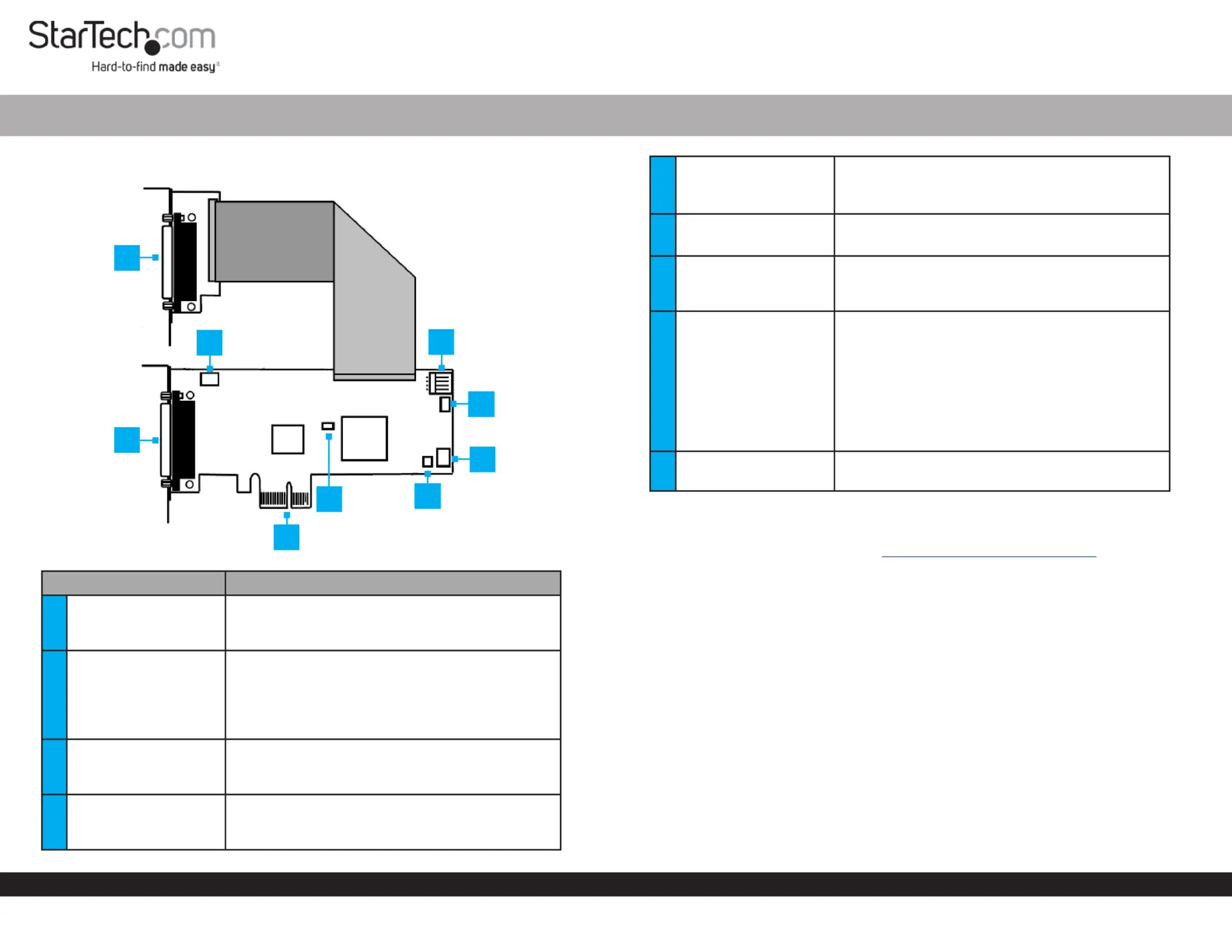
Product Diagram (PEX8S1050LP)
Component Function
1
S5 - S8: DB44 Pin
Connector to 4-Port
Breakout Cable
• Used to connect the DB44 to 4-Port DB9
Breakout Cable.
2
JP 5 - Power Over
Serial Connector
• Used to set pin 9 on the DB9 connector (S1 -
S4) to RI (no power) or to DC power. The JP2
Aux Power Source Selector determines the
voltage 12 or 5.
• Default position is RI.
3
S1 - S4: DB44 Pin
Connector to 4-Port
Breakout Cable
• Used to connect the DB44 to 4-Port DB9
Breakout Cable.
4PCI Express Connector
• Used to connect the to PCI Express Card
the PCI Express expansion slot on the Host
Computer.
8-Port PCI Express Low Prole RS232 Serial Card | 16C1050 UART
5JP1: PME
• Used to enable or disable the wake from sleep
setting.
• Default position is disable.
6JP4: Mode
• Used for factory testing.
• For normal use the jumper must be set to CEN.
7
JP6: S5 - S8
Power Over Serial
Connectors
• Used to enable or disable power over serial for
S5 - S8 connectors.
8
JP2: AUX Power
Source Selector
• Used to select the DC power source for Pin 9 on
the DB9 connector.
• Power supplied by Internal 12V:
motherboard’s PCI Express Slot.
• Power supplied by J3 Power External 12V:
Connector.
• Power supplied by J3 Power External 5V:
Connector.
9
J3 Aux. Power
Connector
• Used to connect an external power source to
the .Serial Card
Requirements
For the latest requirements, please visit www.startech.com/PEX8S1050LP
Installation
WARNING! PCI Express cards can be severely damaged by static electricity. Be sure
that you are properly grounded before touching the .Serial Card
1. Turn O the Host Computer.
2. Remove the chassis cover from the .Host Computer
3. Locate a , using a (sold separately) remove the PCI Express Slot Screwdriver Screw
used to secure the and set the aside. PCI Express Slot Cover Screw
4. Align the on the with a . While PCI Express Connector Serial Card PCI Express Slot
applying pressure evenly across the top edge of the , insert the Serial Card Serial
Card PCI Express Slot Serial Cardinto the , ensuring that the is properly aligned
with the rear panel slot.
5. Using a and the removed in step 3, secure the to Screwdriver Screw Serial Card
the motherboard and rear chassis. Secure the additional serial port provided by the
daughter board (smaller circuit board) to an adjacent rear bracket.
6
2
5
1
3
7
8
9
4
Produkspesifikasjoner
| Merke: | StarTech.com |
| Kategori: | Ikke kategorisert |
| Modell: | PEX8S1050LP |
Trenger du hjelp?
Hvis du trenger hjelp med StarTech.com PEX8S1050LP still et spørsmål nedenfor, og andre brukere vil svare deg
Ikke kategorisert StarTech.com Manualer
14 Oktober 2025
13 September 2025

18 Mars 2025

18 Mars 2025

22 Januar 2025

22 Januar 2025

22 Januar 2025

22 Januar 2025

22 Januar 2025

22 Januar 2025
Ikke kategorisert Manualer
- Ibanez
- DPM
- Bretford
- OLLO
- FeiyuTech
- AirTurn
- Propellerhead
- HomeCraft
- Phoenix Contact
- Martin Audio
- Blood Cells Audio
- Zylight
- Catit
- BenQ
- INOGENI
Nyeste Ikke kategorisert Manualer

23 Oktober 2025

23 Oktober 2025

23 Oktober 2025

23 Oktober 2025

23 Oktober 2025

23 Oktober 2025

23 Oktober 2025

23 Oktober 2025

23 Oktober 2025

23 Oktober 2025