Tripp Lite TVU-200C Bruksanvisning
Tripp Lite
Fjernkontroll
TVU-200C
Les nedenfor 📖 manual på norsk for Tripp Lite TVU-200C (3 sider) i kategorien Fjernkontroll. Denne guiden var nyttig for 3 personer og ble vurdert med 4.5 stjerner i gjennomsnitt av 2 brukere
Side 1/3

Removing iTunes from Windows XP
1. Quit iTunes.
2. On the menu, click .Start Control Panel
3. In Control Panel, open Add or Remove Programs.
4. Select from the list of currently installed programs, then click .iTunes Remove
5. When asked if you would like to remove iTunes, select
Y
es.
6. After the uninstallation is complete, do not restart if you are prompted to.
7. If other entries were present for iTunes remove those as well.
8. In Add or Remove Programs, remove any iPod Updater applications that are listed in the same
fashion as iTunes was removed.
9. Restart your computer.
10. After the computer restarts, open Local Disk (C:) in Computer or whichever disk programs are installed
on.
11. Open the Program Files folder.
12. Right-click the iTunes folder and select Delete and choose Yes when asked to conrm the deletion.
Note: This folder may have already been deleted.
13. Right-click the iPod folder and select Delete and choose Yes when asked to conrm the deletion. Click
Continue if Windows needs permission to continue.
14. Right-click on the Recycle Bin and on the shortcut menu, click Empty Recycle Bin.
15. Restart your computer.
16. Install the compatible version of iTunes listed at:
http://www.tripplite.com/EN/products/model.cfm?txtModelID=3906 and
http://www.tripplite.com/EN/products/model.cfm?txtModelID=4035
Removing iTunes from a Mac
1. Quit iTunes.
2. In the Finder, choose Go > Applications.
3. Locate iTunes and then drag it to the Trash.
4. Choose . If Utilities is not available under Go, then choose Go > Utilities Go > Go to Folder, type in
/Applications/Utilities/, and then click Go.
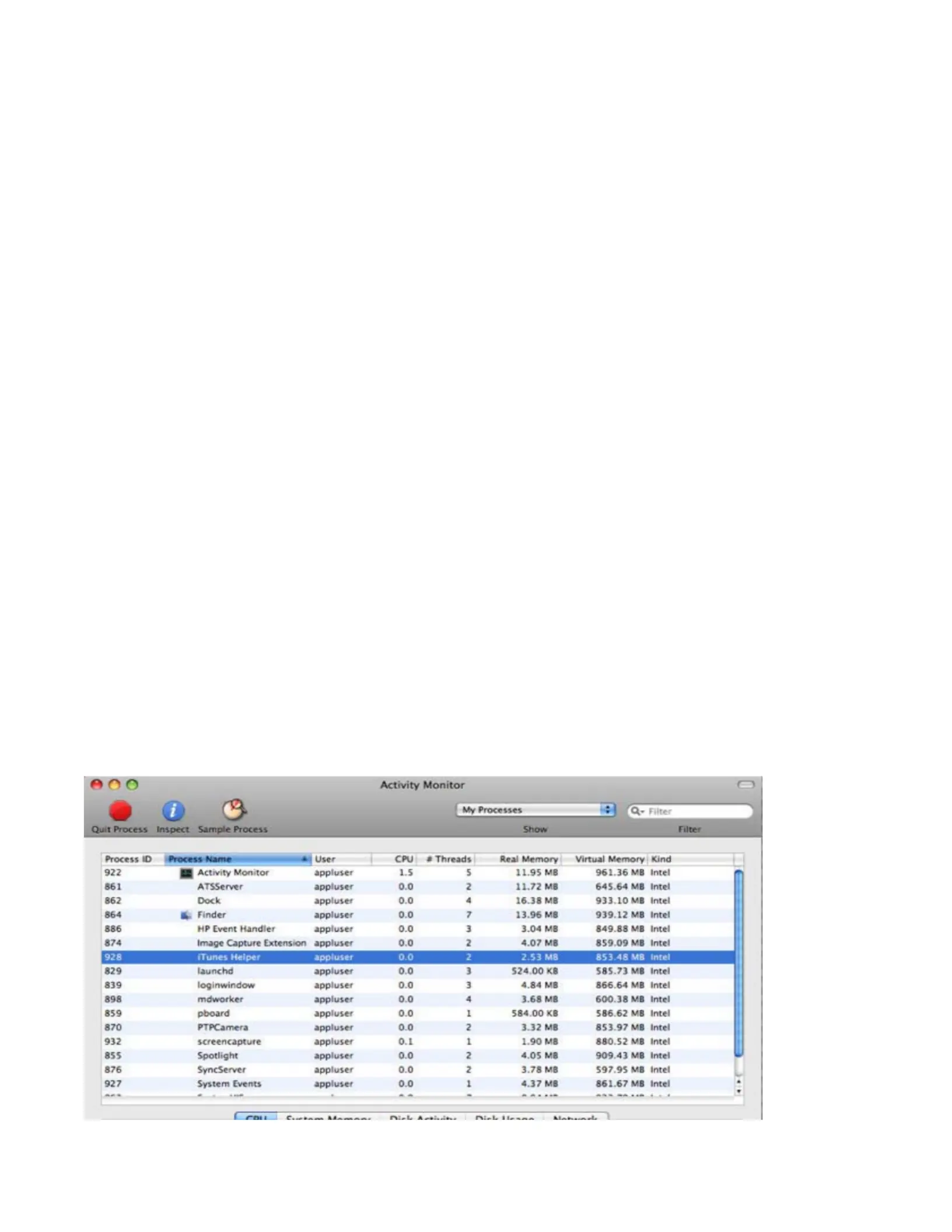
5. Open Activity Monitor.
6. In the process list locate and select iTunes Helper. Click Quit Process. When asked if you really want to
quit the process, click Quit.

7. Quit Activity Monitor.
8. Open System Preferences (choose Apple > System Preferences).
9. Choose View > Accounts and then click Login Items.
10. Look for the iTunesHelper entry and select it, then click the "-" button to remove it from the list.
11. Quit System Preferences.
12. Restart your Mac.
13. Empty the Trash. This should fully remove iTunes.
A
dditionally, you may need to remove les and folders associated with iTunes. Use the following steps to
remove these les and folders.
1. In the Finder, choose and type in Go > Go to Folder ~/Library
/
and click Go.
2. Locate the iTunes folder and then drag it to the Trash.
3. Choose and type in Go > Go to Folder ~/Library/Preferences/ and click Go.

4. Locate the preference les that have names beginning with com.apple.iTunes and move them to the
Trash.
File Names should be:
com.apple.iTunes.eq.plist
com.apple.iTunes.plist
com.apple.iTunesHelper.plist
5. Choose and type in Go > Go to Folder /Library and click Go.
6. Locate the iTunes folder, and then move it to the Trash.
7. Choose and type in Go > Go to Folder ~/Library/Preferences/ByHost/ and click Go.
8. Locate the preference les that have names beginning with com.apple.iTunes and move them to the
Trash.
9. Empty the Trash. This should fully remove the les and folders associated with iTunes.
Removing iTunes from Vista
1. Quit iTunes.
2. From the menu, click Control Panel.Start
3. In Control Panel, click Uninstall a program. The Programs and Features control panel opens.
A
lternately, in Classic Panel of Control Panel, click Programs and Features.
4. Select iTunes from the list of currently installed programs, then click Uninstall.
5. When asked if you would like to remove iTunes, select Yes.
6. After the uninstallation is complete, do not restart if you are prompted to.
7. If other entries were present for iTunes remove those as well.
8. In Programs and Features, remove any iPod Updater applications that are listed in the same fashion as
iTunes was removed.
9. Restart your computer.
10. After the computer restarts, open Local Disk (C:) in Computer or whichever disk programs are installed
on.
11. Open the Program Files folder.
12. Right-click the iTunes folder and select Delete and choose Yes when asked to conrm the deletion.
Note: This folder may have already been deleted.
13. Right-click the iPod folder and select Delete and choose Yes when asked to conrm the deletion. Click
Continue if Windows needs permission to continue.
14. Right-click on the Recycle Bin and on the shortcut menu, click Empty Recycle Bin.
15. Restart your computer.
16. Install the compatible version of iTunes listed at:
http://www.tripplite.com/EN/products/model.cfm?txtModelID=3906 and
http://www.tripplite.com/EN/products/model.cfm?txtModelID=4035
Produkspesifikasjoner
| Merke: | Tripp Lite |
| Kategori: | Fjernkontroll |
| Modell: | TVU-200C |
| Maksimal rekkevidde: | 45.72 m |
| Kompatible operativsystemer: | Windows XP & Windows Vista\nMac OS X 10.4.x+ |
| Batteritype: | AA |
| Produktfarge: | Sort |
| Antall støttede batterier: | 2 |
| Batterier medfølger: | Ja |
| Kompatibel med Mac: | Ja |
| Utskrevet brukerguide/brukermanual: | Ja |
Trenger du hjelp?
Hvis du trenger hjelp med Tripp Lite TVU-200C still et spørsmål nedenfor, og andre brukere vil svare deg
Fjernkontroll Tripp Lite Manualer
17 August 2025
17 August 2025
Fjernkontroll Manualer
- Fjernkontroll ORNO
- Fjernkontroll Insignia
- Fjernkontroll Hama
- Fjernkontroll Neewer
- Fjernkontroll Philips
- Fjernkontroll Schwaiger
- Fjernkontroll IKEA
- Fjernkontroll Samsung
- Fjernkontroll DJI
- Fjernkontroll One For All
- Fjernkontroll Sony
- Fjernkontroll Morel
- Fjernkontroll Vello
- Fjernkontroll Amewi
- Fjernkontroll Extron
- Fjernkontroll Danfoss
- Fjernkontroll Pioneer
- Fjernkontroll Somfy
- Fjernkontroll Panasonic
- Fjernkontroll Audio-Technica
- Fjernkontroll PeakTech
- Fjernkontroll Technisat
- Fjernkontroll Velleman
- Fjernkontroll Nanlite
- Fjernkontroll Nexa
- Fjernkontroll Aplic
- Fjernkontroll CSL
- Fjernkontroll Zalman
- Fjernkontroll Canon
- Fjernkontroll Blaupunkt
- Fjernkontroll Conceptronic
- Fjernkontroll Intermatic
- Fjernkontroll Mosconi
- Fjernkontroll Logilink
- Fjernkontroll Majestic
- Fjernkontroll Ridem
- Fjernkontroll Nikon
- Fjernkontroll Antelope Audio
- Fjernkontroll Abus
- Fjernkontroll Vizio
- Fjernkontroll Russound
- Fjernkontroll CGV
- Fjernkontroll Libec
- Fjernkontroll Profoto
- Fjernkontroll Impact
- Fjernkontroll PDP
- Fjernkontroll Uni-T
- Fjernkontroll Rademacher
- Fjernkontroll Vimar
- Fjernkontroll Genaray
- Fjernkontroll Harman Kardon
- Fjernkontroll Ferguson
- Fjernkontroll Compustar
- Fjernkontroll Savio
- Fjernkontroll Conrad
- Fjernkontroll Ruwido
- Fjernkontroll Antec
- Fjernkontroll Magnus
- Fjernkontroll Multibrackets
- Fjernkontroll MIOPS
- Fjernkontroll EQ-3
- Fjernkontroll Kathrein
- Fjernkontroll Autel
- Fjernkontroll Interphone
- Fjernkontroll Geemarc
- Fjernkontroll Futaba
- Fjernkontroll Metronic
- Fjernkontroll SMK-Link
- Fjernkontroll Pentatech
- Fjernkontroll Hannspree
- Fjernkontroll Lutron
- Fjernkontroll TELE System
- Fjernkontroll Pixel
- Fjernkontroll Bang Olufsen
- Fjernkontroll Control4
- Fjernkontroll Hegel
- Fjernkontroll URC
- Fjernkontroll Canal Digitaal
- Fjernkontroll AXIL
- Fjernkontroll Funai
Nyeste Fjernkontroll Manualer
19 August 2025
18 August 2025
18 August 2025
16 August 2025
16 August 2025
16 August 2025
16 August 2025
16 August 2025
15 August 2025
11 August 2025