Turtle Beach Ear Force X1 Bruksanvisning
Turtle Beach
hodetelefon
Ear Force X1
Les nedenfor 📖 manual på norsk for Turtle Beach Ear Force X1 (2 sider) i kategorien hodetelefon. Denne guiden var nyttig for 6 personer og ble vurdert med 4.4 stjerner i gjennomsnitt av 3.5 brukere
Side 1/2
For more products, accessories, and our support
knowledge base, visit www.turtlebeach.com
Operating Instructions
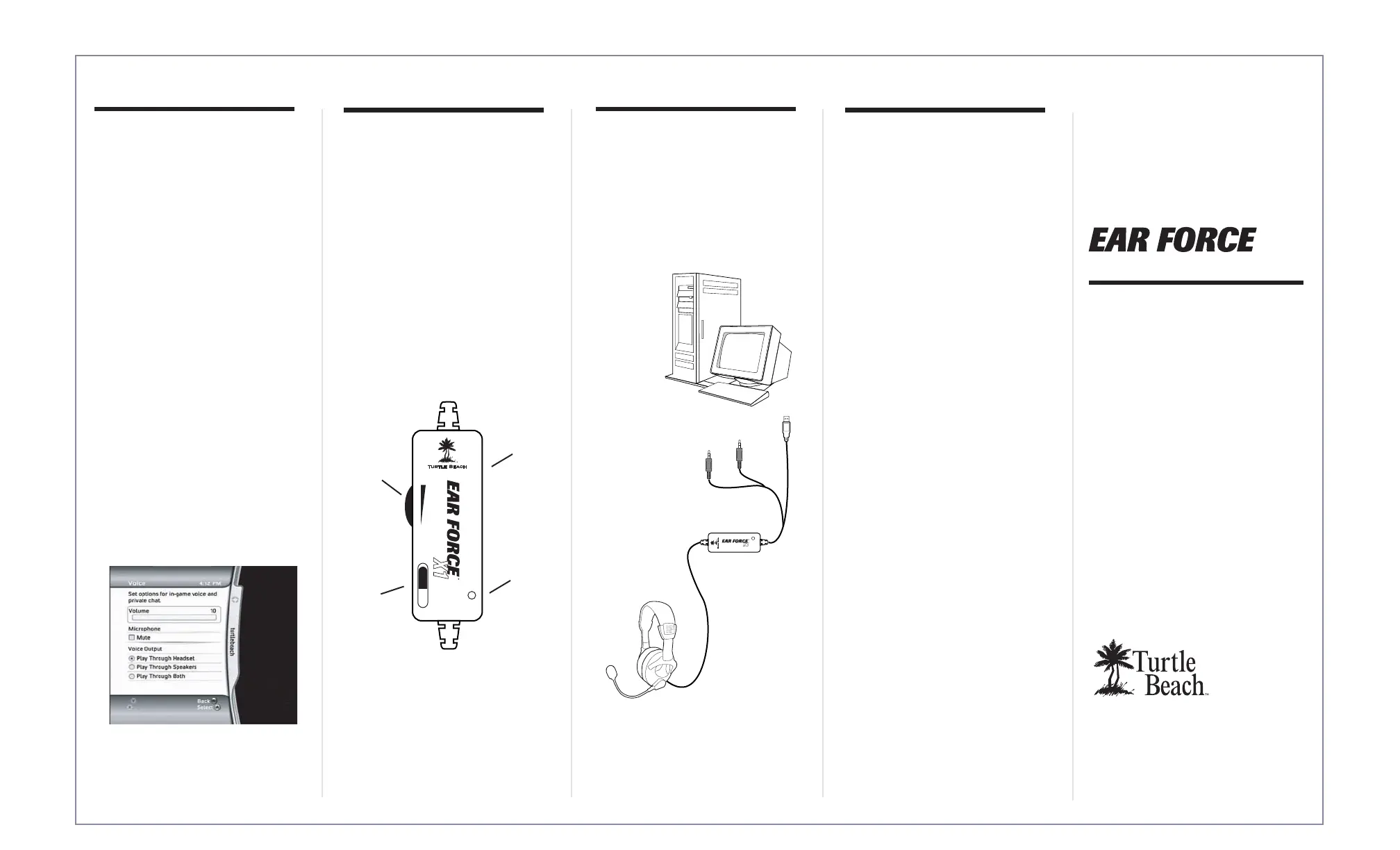
Connecting to PC
X1
Voice Chat plus Game Audio
®
Configuring Xbox Settings
The X1 headphones can also be used as
a powered headset and microphone for
PC gaming or VoIP.
Step 1:
Connect the X1's green 1/8"
jack to the speaker output of
your PC's sound card.
Step 2:
Connect the X1's
pink 1/8" jack to
the microphone
input of your PC's
sound card.
Step 3:
Connect the X1's USB/Power
jack to an open USB port on
your PC to power the X1.
IMPORTANT: In order to hear
other players you must make sure that
the following is set from the Xbox 360
dashboard.
1. From the Xbox 360 Dashboard,
press the Xbox Guide button
(the X button in the center of your
controller) to access your Xbox
Live Settings.
2. Navigate to the "Personal
Settings" selection, and press the
"A" button on your controller.
3. Select "Voice" from the following
menu, and press "A".
4. On the Voice screen, make sure
that "Play Through Headset" is
selected for Voice Output selection
and that volume is set to 10
(see below).
5. You can fine tune game audio and
chat volumes using the X1 amplifier
and chat volume controls.
green
1/8" jack
pink 1/8" jack
Optional Power AdapterUsing the Amplifier
The X1 headphones are powered by
USB. If you'd like to use the X1s and
don't have access to a USB port you can
use an optional AC to USB converter.
For more information visit
TurtleBeach.com.
Game Audio Volume:
This dial allows you to control the
amount of amplification that the X1 will
apply to your game audio.
Mic Mute Switch:
This switch will mute your microphone.
Amplifier LED:
When your X1's have power, this LED
will light green. When the Mic Mute
Switch is engaged, your microphone will
be muted and this LED will glow red.
Game Audio
Volume
Xbox Controller
Cable Connection
(on side)
Mic Mute
Switch
Amplifier
LED
Produkspesifikasjoner
| Merke: | Turtle Beach |
| Kategori: | hodetelefon |
| Modell: | Ear Force X1 |
| Produkttype: | Hodesett |
| Vekt: | 233 g |
| Tilkobling: | USB |
| Tilkoblingsteknologi: | Koblet med ledninger (ikke trådløs) |
| Volumkontroll: | Rotasjon |
| Impedans: | - Ω |
| 3,5 mm-kontakt: | Ja |
| Mikrofontilkobling: | 3,5 mm |
| Mikrofonfrekvens: | 50 - 15000 Hz |
| Kabellengde: | 4.87 m |
| Hodetelefonsfrekvens: | 30 - 20000 Hz |
| Hodetelefonssensitivitet/hodetelefonsfølsomhet: | 120 dB |
| Driverenhet: | 40 mm |
| Mikrofondemping: | Ja |
| Øresammenkobling: | Supraaural |
| Magnettype: | Neodym |
Trenger du hjelp?
Hvis du trenger hjelp med Turtle Beach Ear Force X1 still et spørsmål nedenfor, og andre brukere vil svare deg
hodetelefon Turtle Beach Manualer
22 September 2025
22 September 2025
21 September 2025
21 September 2025
21 September 2025
21 September 2025
21 September 2025

21 September 2025
20 September 2025
20 September 2025
hodetelefon Manualer
- Hecate
- Fresh N Rebel
- Savio
- Lamax
- InLine
- Auna
- AOC
- Mackie
- Suunto
- Krüger&Matz
- Harman Kardon
- Anchor Audio
- Celly
- Teufel
- 4smarts
Nyeste hodetelefon Manualer
21 Oktober 2025
18 Oktober 2025
17 Oktober 2025

17 Oktober 2025
16 Oktober 2025
16 Oktober 2025

13 Oktober 2025

13 Oktober 2025
13 Oktober 2025
13 Oktober 2025