Turtle Beach Ear Force X11 Bruksanvisning
Turtle Beach
hodetelefon
Ear Force X11
Les nedenfor 📖 manual på norsk for Turtle Beach Ear Force X11 (2 sider) i kategorien hodetelefon. Denne guiden var nyttig for 10 personer og ble vurdert med 5.0 stjerner i gjennomsnitt av 5.5 brukere
Side 1/2
User’s Guide
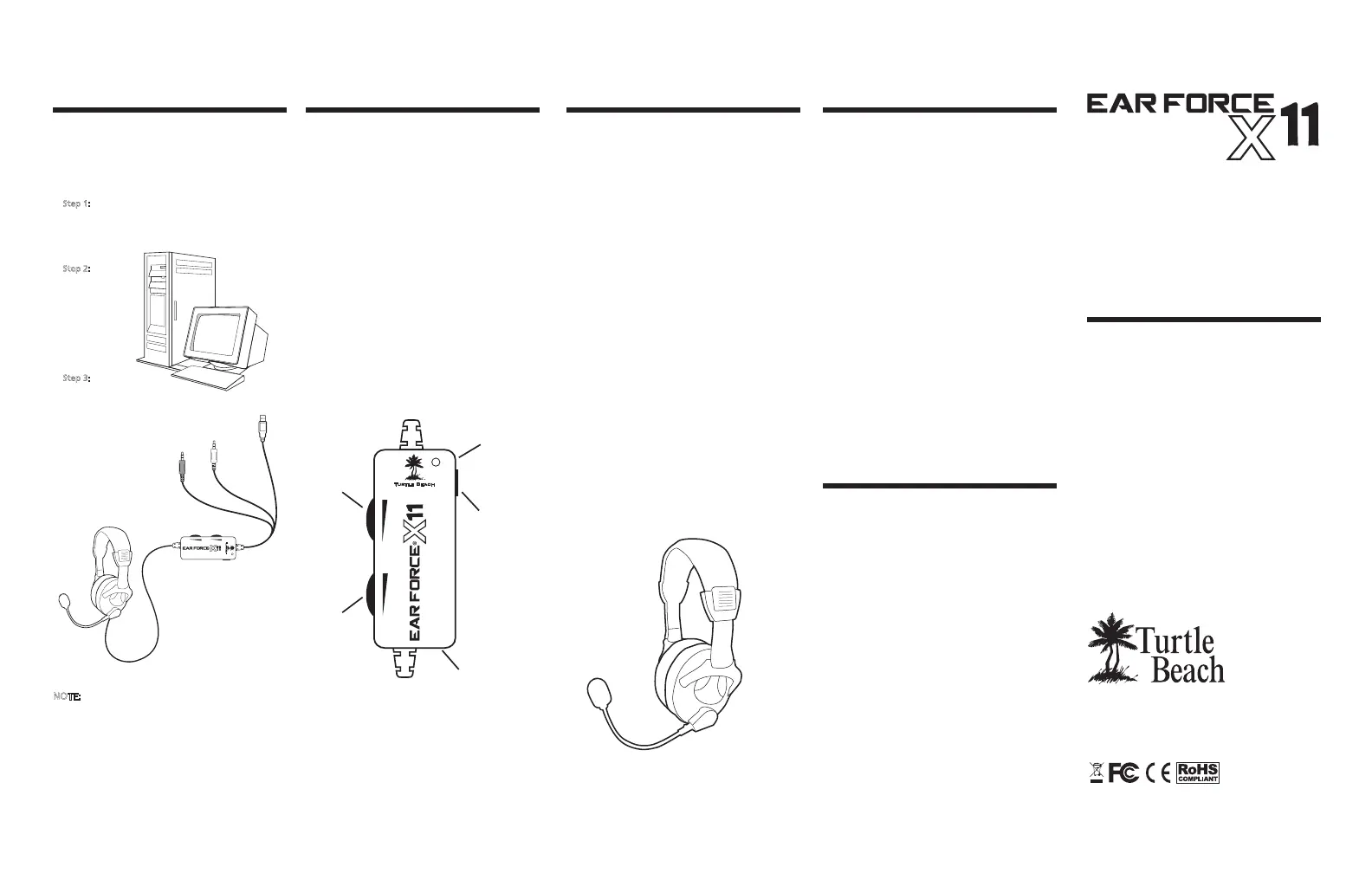
Using the Amplifier
Game Audio Volume:
This volume control sets the level of
the game audio.
Chat Volume:
This volume control sets the level of
XBOX LIVE chat voices from other
players.
Mic Mute Switch:
This switch mutes the microphone.
Amplifier LED:
This LED will light Green when the
mic is active and Red when the mic
is muted.
Game Audio
Volume
XBOX Jack
(Mic output to
XBOX controller)
Mic Mute
Switch
Amplifier
LED
Chat
Volume
®
Package Contents
headset
®
controller talkback cable
Avoid Hearing Damage
Important Information
Over time, your ears adapt to loud
volume levels, so a level that may not
cause initial discomfort may still
damage your hearing.
If you experience ringing in your ears
after using the headset, it means the
volume is set too loud. The louder
the volume is set, the less time it
takes to affect your hearing. So, please
take care to listen at moderate levels.
Turn down the volume if you can’t
hear people speaking near you.
Avoid turning up the volume to block
out noisy surroundings.
information and our support
knowledge base, visit TurtleBeach.com
Connecting the X�� to a PC
These instructions show how to set
up the X as a headset for PC
gaming or VoIP.
NOTE:
In this configuration, the amplifier game volume
may be used to adjust the game sound level and
the mic mute switch may be used to silence the
microphone. The chat volume serves no function
in this setup.
Step :
Connect the X.mm
audio plug to the speaker output
Step :
Connect the
X
.mm plug to
the microphone
input of your
Step :
Insert the X
PC to power the X.
Green .mm
audio plug
Pink .
mm
mic plug
. Be careful when turning up the
master volume control on the
amplifier. Before placing the
headphones over your ears, set the
volume control to minimum, then
slowly increase until you reach a
comfortable level.
. Like any speakers, overdriving a
headset may cause damage to both
the headset and your ears. Please
listen at moderate levels.
. WARNING: Long term exposure to
loud music or other sounds in a
headset may cause hearing damage.
It is best to avoid extreme volume
levels when using a headset,
especially for extended periods.
About the X Headset
amplified
headset gives serious gamers the
ultimate competitive edge by
combining XBOX LIVE chat and
stereo game audio into an
immersive sound experience.
The X’s integrated design
overcomes the limitation of
communicator headsets that block
game sound from one ear and
eliminates voice chat interference
caused by the headset microphone
picking up sound from external
speakers.
Pump up the volume without
disturbing friends, family or
neighbors. Hear every nuance of the
game - from an opponent sneaking
voice right next to you. Trash talk
everything you need for an amazing
gaming experience.
XBOX LIVE
®
Chat +
Stereo Game Audio
®
Produkspesifikasjoner
| Merke: | Turtle Beach |
| Kategori: | hodetelefon |
| Modell: | Ear Force X11 |
| Produkttype: | Hodesett |
| Vekt: | 233 g |
| Tilkoblingsteknologi: | Koblet med ledninger (ikke trådløs) |
| Pakkevekt: | 531 g |
| Impedans: | - Ω |
| Mikrofontilkobling: | 3,5 mm |
| Mikrofonfrekvens: | 50 - 15000 Hz |
| Oppladbart batteri: | Ja |
| Kabellengde: | 4.877 m |
| Pakkedybde: | 100 mm |
| Pakkehøyde: | 272 mm |
| Pakkebredde: | 240 mm |
| Hodetelefonsfrekvens: | 30 - 20000 Hz |
| Hodetelefonssensitivitet/hodetelefonsfølsomhet: | 120 dB |
| Driverenhet: | 40 mm |
| Antall: | 1 |
| Øresammenkobling: | Supraaural |
| Magnettype: | Neodym |
Trenger du hjelp?
Hvis du trenger hjelp med Turtle Beach Ear Force X11 still et spørsmål nedenfor, og andre brukere vil svare deg
hodetelefon Turtle Beach Manualer
22 September 2025
22 September 2025
21 September 2025
21 September 2025
21 September 2025
21 September 2025
21 September 2025

21 September 2025
20 September 2025
20 September 2025
hodetelefon Manualer
- KeepOut
- Denon
- Biltema
- Benchmark
- Antec
- Aluratek
- Essentiel B
- Phoenix Technologies
- RME
- Nacon
- Tascam
- Topping
- Fresh N Rebel
- Uniden
- Microsoft
Nyeste hodetelefon Manualer
21 Oktober 2025

18 Oktober 2025
17 Oktober 2025
17 Oktober 2025
16 Oktober 2025
16 Oktober 2025

13 Oktober 2025

13 Oktober 2025
13 Oktober 2025
13 Oktober 2025