Xiaomi MiJia Smart Temperature Control Kettle Bruksanvisning
Xiaomi
Ikke kategorisert
MiJia Smart Temperature Control Kettle
Les nedenfor 📖 manual på norsk for Xiaomi MiJia Smart Temperature Control Kettle (4 sider) i kategorien Ikke kategorisert. Denne guiden var nyttig for 6 personer og ble vurdert med 4.9 stjerner i gjennomsnitt av 3.5 brukere
Side 1/4
MiJia Smart Kettle
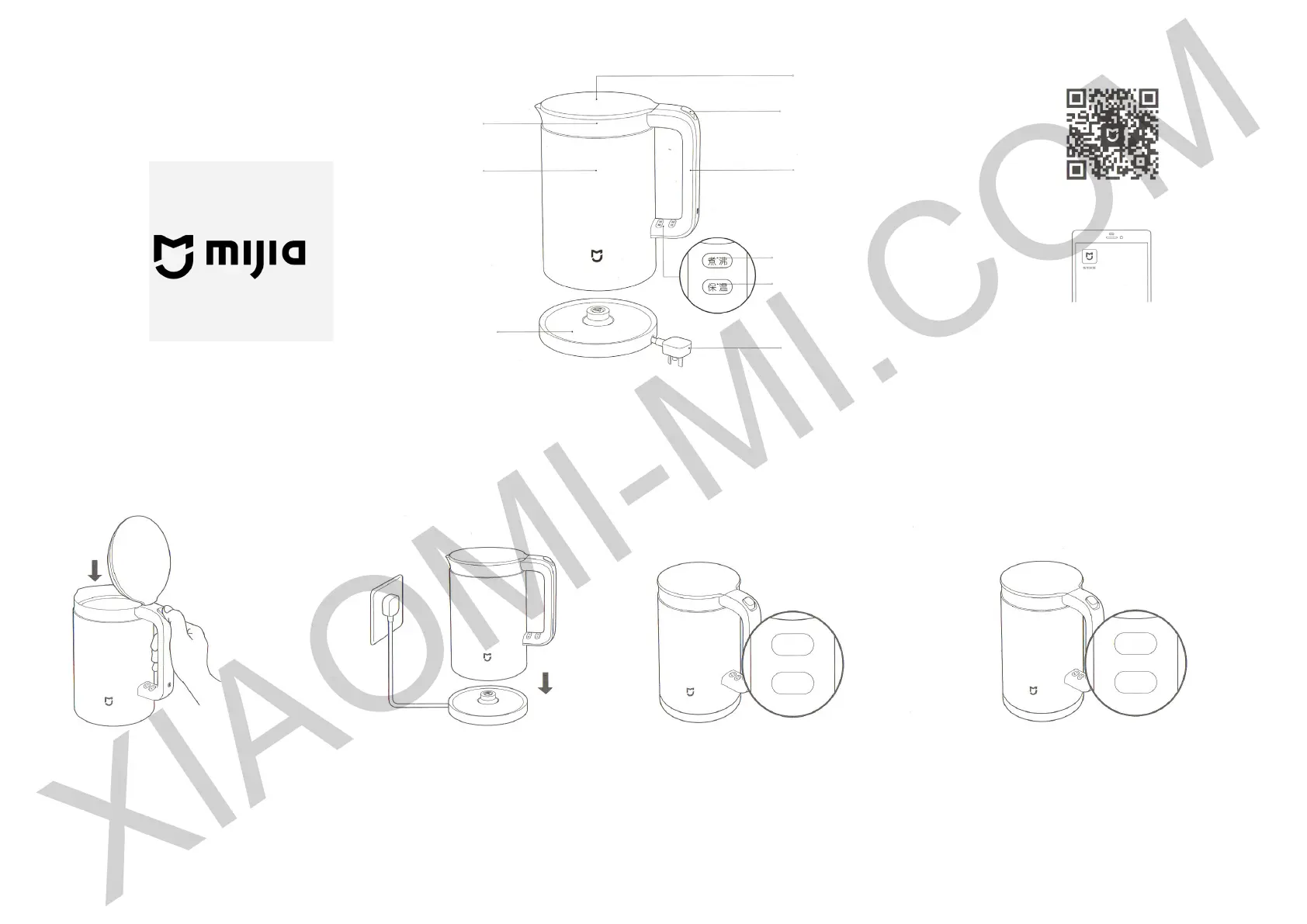
Overview
XIAOMI-MI.COM
Smart connection
Lid
Inner part
Body
Base
Open lid
button
Handle
Boiling indicator
Boil/Hold a
temperature
button
Power plug
The inside of the pot and lid are made from 304
stainless steel, allowed for contact with food: austenitic
stainless steel, 06Cr19Ni10
1. Turn on Bluetooth on your phone;
2. In Mi Store get «Mi Smart Home» app or scan the QR-
code to download a client application;
3. Make sure that electric Mi Smart Kettle is on. Open the
app and connect the devices to each other, guided by the
instructions of the client interface.
Using
1. Click on button to open a lid of
the kettle, add water.
The water level must not
exceed the maximum mark,
and should not be below the
minimum.
2. Close a lid, put the kettle on a base.
If there is a normal contact between the
kettle and base, the LED blinks once,
and then turn o.
3. Click on the «Boil» or «Keep
temperature» button, select the
heating mode.
Keep temperature mode setup
instructions, see on the next
page.
4. When water boils, «Boil» indicator turns o,
then water heating will stop and sound a specic
signal; when «Keep temperature» mode is on, water
temperature reaches the level, you set before, and
the kettle sounds a specic signal. Orange indicator of
«Keep temperature» mode lights up and turns on.
XIAOMI-MI.COM
Produkspesifikasjoner
| Merke: | Xiaomi |
| Kategori: | Ikke kategorisert |
| Modell: | MiJia Smart Temperature Control Kettle |
Trenger du hjelp?
Hvis du trenger hjelp med Xiaomi MiJia Smart Temperature Control Kettle still et spørsmål nedenfor, og andre brukere vil svare deg
Ikke kategorisert Xiaomi Manualer
15 September 2025
15 September 2025
15 September 2025

15 September 2025

15 September 2025

15 September 2025

15 September 2025

15 September 2025

15 September 2025
14 September 2025
Ikke kategorisert Manualer
- Mennekes
- Lawn Star
- Geneva
- ZKTeco
- Franke
- Adler
- Elektrobock
- Avtec
- Fellowes
- Lezyne
- Vincent
- Infasecure
- Esatto
- Tascam
- Technaxx
Nyeste Ikke kategorisert Manualer

23 Oktober 2025

23 Oktober 2025

23 Oktober 2025

23 Oktober 2025

23 Oktober 2025

23 Oktober 2025

23 Oktober 2025

23 Oktober 2025

23 Oktober 2025

23 Oktober 2025