Xiaomi RunMi 90 Points Ultra Smart Running Shoes Bruksanvisning
Xiaomi
Ikke kategorisert
RunMi 90 Points Ultra Smart Running Shoes
Les nedenfor 📖 manual på norsk for Xiaomi RunMi 90 Points Ultra Smart Running Shoes (5 sider) i kategorien Ikke kategorisert. Denne guiden var nyttig for 11 personer og ble vurdert med 4.4 stjerner i gjennomsnitt av 6 brukere
Side 1/5
Fold forward
90FUN XingChip Manual
Compatible with MiJia intelligent platform, the product supports MIUI system and can be
controlled via MiJia APP
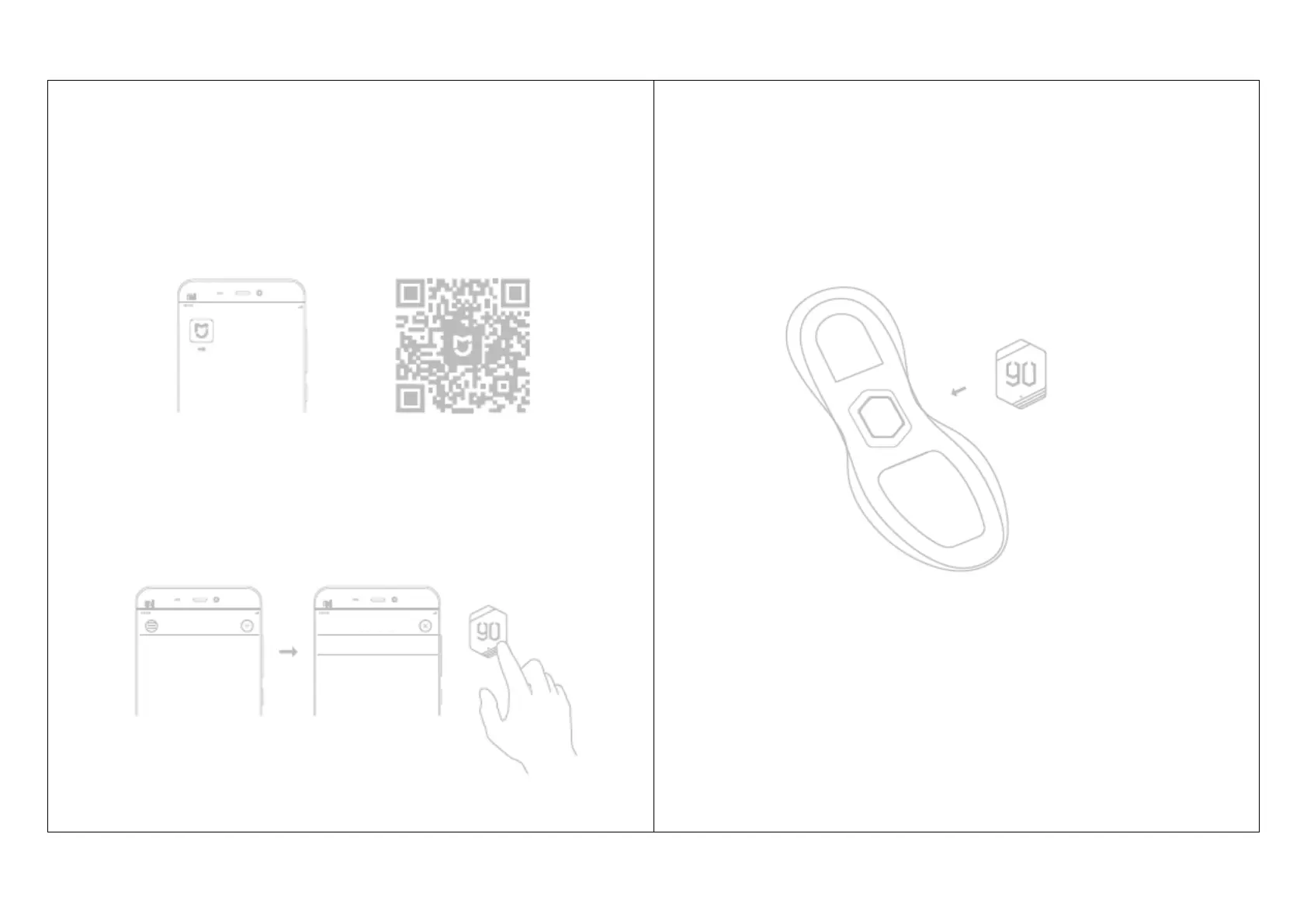
1. Download APP
Download MiJia APP by searching "MiJia" in APP store or scanning the following QR
code and install it
2. Add device
Open "My device" in MiJia APP and add the device by touching "+" on the upper right
corner, and it will be connected by tapping twice during the connection. After that, you
will find 90FUN Ultra Smart Running Shoes in "My Device" list
3. Put the 90FUN XingChip in the slot correctly
a. Take out the right insole and the fillings in the chip slot;
b. Put the 90FUN XingChip in the slot with "90FUN" towards toe, and gently press it
until placed correctly
4. Start use
You can enjoy it after putting the right insole back
Side a
Side b
Complete
Add device
Add scene
90FUN XingChip
Shoe sole
Produkspesifikasjoner
| Merke: | Xiaomi |
| Kategori: | Ikke kategorisert |
| Modell: | RunMi 90 Points Ultra Smart Running Shoes |
Trenger du hjelp?
Hvis du trenger hjelp med Xiaomi RunMi 90 Points Ultra Smart Running Shoes still et spørsmål nedenfor, og andre brukere vil svare deg
Ikke kategorisert Xiaomi Manualer
15 September 2025
15 September 2025
15 September 2025

15 September 2025

15 September 2025

15 September 2025

15 September 2025

15 September 2025

15 September 2025
14 September 2025
Ikke kategorisert Manualer
- Globo
- AVM
- Advantech
- Goobay
- Steelseries
- Infiniton
- IFM
- Hama
- NGS
- Code
- Vitammy
- Musicmate
- AOpen
- Vermeiren
- Smith-Victor
Nyeste Ikke kategorisert Manualer

23 Oktober 2025

23 Oktober 2025

23 Oktober 2025

23 Oktober 2025

23 Oktober 2025

23 Oktober 2025

23 Oktober 2025

23 Oktober 2025

23 Oktober 2025

23 Oktober 2025