Canon LM-V1 Bruksanvisning
Canon
Ikke kategorisert
LM-V1
Les nedenfor 📖 manual på norsk for Canon LM-V1 (4 sider) i kategorien Ikke kategorisert. Denne guiden var nyttig for 30 personer og ble vurdert med 4.9 stjerner i gjennomsnitt av 15.5 brukere
Side 1/4
MONITORING
10
EN
Monitoring
LM-V1 / LM-V2 LCD Monitor
Connect the LCD monitor to the camera to add a large monitoring screen with touch screen operations
(touch to focus), menu operation buttons and joystick and two assignable buttons.
For details on how to attach and use the LCD monitor, see the instruction manual of the camera being
used.
An optional attachment unit is also required to attach the monitor to the camera.
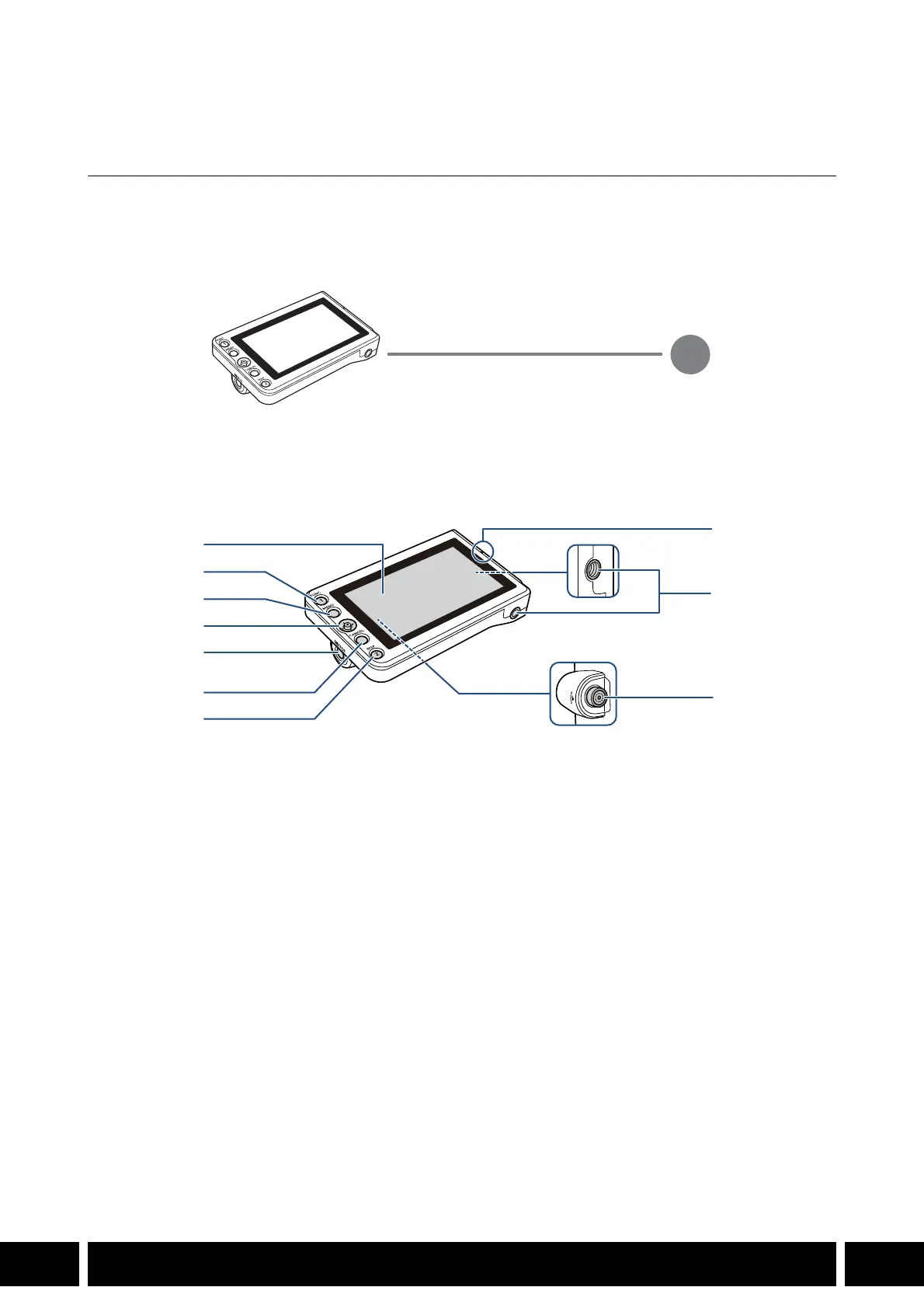
Names of Parts
1 LCD panel with touch screen
2 FUNC (main functions) button / Assignable
button LCD LM-V1/V2 1
3MENU button
4Joystick
5 MIRROR (invert the displayed image) button
6CANCEL button
7 DISP (display) button / Assignable button LCD
LM-V1/V2 2
8 LCD monitor’s position alignment mark Í
9 Screw holes for 1/4"-20 screws (11.2 mm
(0.44 in.) deep, x2)
10 VIDEO terminal
VIDEO terminal
UN-5 / UN-10 Unit Cable (optional)
1
2
3
4
5
6
7
8
9
10
Produkspesifikasjoner
| Merke: | Canon |
| Kategori: | Ikke kategorisert |
| Modell: | LM-V1 |
Trenger du hjelp?
Hvis du trenger hjelp med Canon LM-V1 still et spørsmål nedenfor, og andre brukere vil svare deg
Ikke kategorisert Canon Manualer
29 August 2025

24 Januar 2025

24 Januar 2025

7 Januar 2025

7 Januar 2025
Ikke kategorisert Manualer
- Samsung
- Metronic
- CAME-TV
- Ciarra
- Lumens
- Totolink
- Chacon
- Artrom
- ISi
- Shark
- Grothe
- Lionelo
- Garden Feelings
- Rapoo
- Grizzly
Nyeste Ikke kategorisert Manualer

23 Oktober 2025

23 Oktober 2025

23 Oktober 2025

23 Oktober 2025

23 Oktober 2025

23 Oktober 2025

23 Oktober 2025

23 Oktober 2025

23 Oktober 2025

23 Oktober 2025