Cudy P4 Bruksanvisning
Les nedenfor 📖 manual på norsk for Cudy P4 (2 sider) i kategorien Ruter. Denne guiden var nyttig for 17 personer og ble vurdert med 4.7 stjerner i gjennomsnitt av 9 brukere
Side 1/2
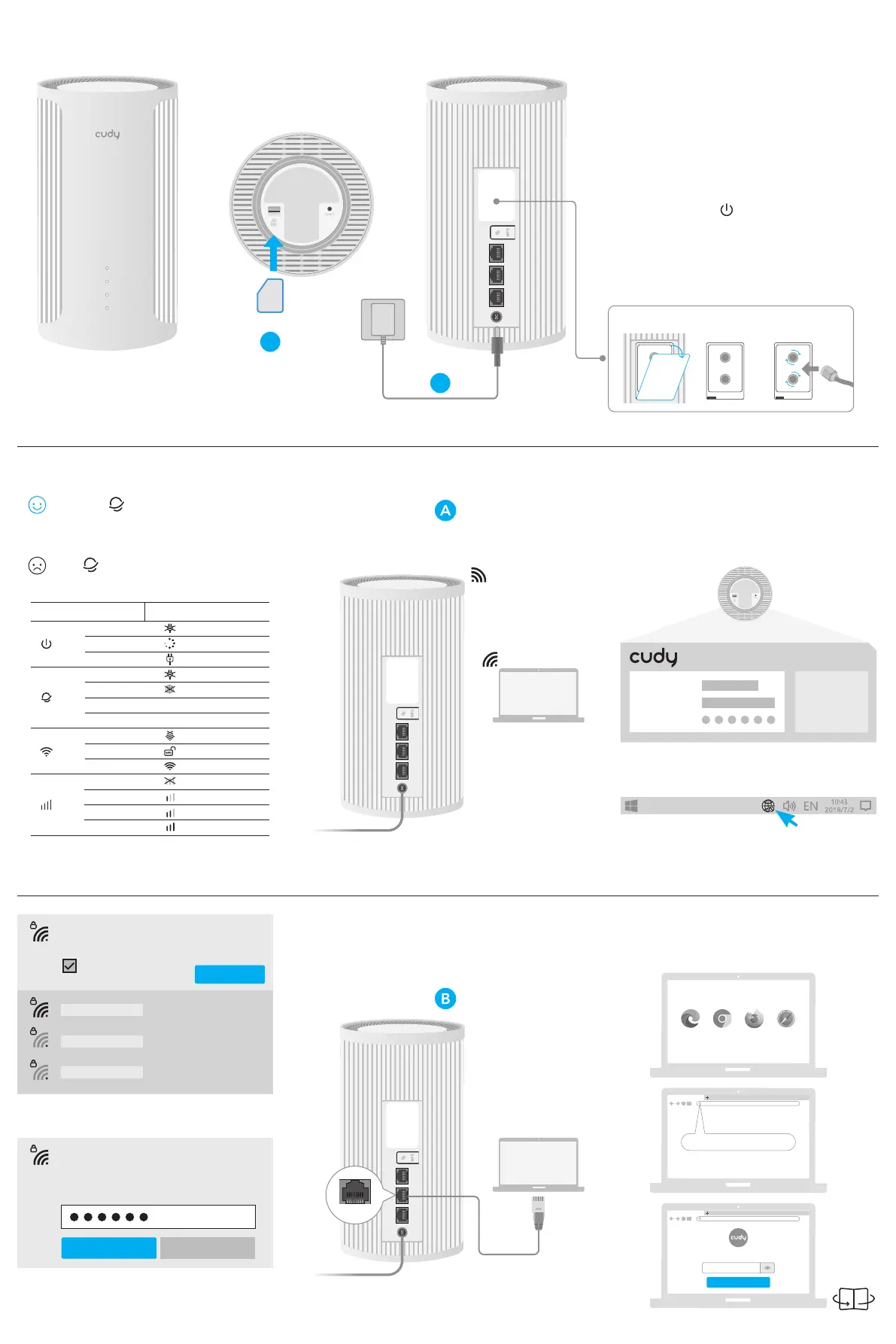
1 According to the engraved SIM
direction, insert your Nano SlM card
into the slot until you hear a clicking
sound.
5 Open a browser and follow
below pictures to log in the router.
A Wi-Fi: Connect your device to the
router’s Wi-Fi using the SSID (network
name) and Password printed on the
bottom of the router.
5G SSID:
2.4G SSID:
Password:
Cudy-
****
-5G
Connect
Auto Connect
Cudy-
****
-5G
Password
Next Cancel
B Wired: Turn off the Wi-Fi on your
computer and connect it to the router’s
LAN port via an Ethernet cable.
SafariFirefoxChromeEdge
http://cudy.net/
http://cudy.net/
When the LED is in yellow or white,
the router is connected to the cellular
network.
If the LED is in red, please continue
to configure the router.
3 Check the LED.
Flash
Solid
Off
Status 5G Model
Off
Yellow
Red
White
Red
Off
Yellow
White
Flash
Solid
Off
Name
5G/WAN
4G/3G/2G
http://cudy.net/
Confirm
Create an administrator password
Create a password
LAN
4 Connect to the router via A or B
method.
2 Connect the power adapter to the
router, and wait for 2~5 minutes until
the system LED turns solid on.
1 0
Note: If the signal is still too weak indoors, try installing your
extension antennas (not included in the box) to the SMA
connector and placing the antennas outdoors.
1 0
1 0
1
2
Go to Step 5 and continue.
Note: No hot-swapping. Please insert or remove the SIM
card while the system is powered off.
Here to install antennas when necessary.
Nano SIM
SIM
Produkspesifikasjoner
| Merke: | Cudy |
| Kategori: | Ruter |
| Modell: | P4 |
Trenger du hjelp?
Hvis du trenger hjelp med Cudy P4 still et spørsmål nedenfor, og andre brukere vil svare deg
Ruter Cudy Manualer
3 Oktober 2025

9 April 2025

31 Januar 2025

31 Januar 2025

6 Januar 2025

5 Desember 2024

5 Desember 2024

15 Oktober 2024

15 Oktober 2024

15 Oktober 2024
Ruter Manualer
- Toolcraft
- Arris
- Genexis
- Marshall Electronics
- Strong
- Zebra
- Kiloview
- IP-COM
- Huawei
- Zoom
- Vimar
- Trust
- SPL
- Lantronix
- Draytek
Nyeste Ruter Manualer
20 Oktober 2025

12 Oktober 2025

7 Oktober 2025
7 Oktober 2025
7 Oktober 2025
6 Oktober 2025
6 Oktober 2025

6 Oktober 2025

6 Oktober 2025

6 Oktober 2025