TP Link Deco M8550 Bruksanvisning
Les nedenfor 📖 manual på norsk for TP Link Deco M8550 (2 sider) i kategorien Ruter. Denne guiden var nyttig for 14 personer og ble vurdert med 4.3 stjerner i gjennomsnitt av 7.5 brukere
Side 1/2
©2025 TP-Link 7100000696 REV1.0.1
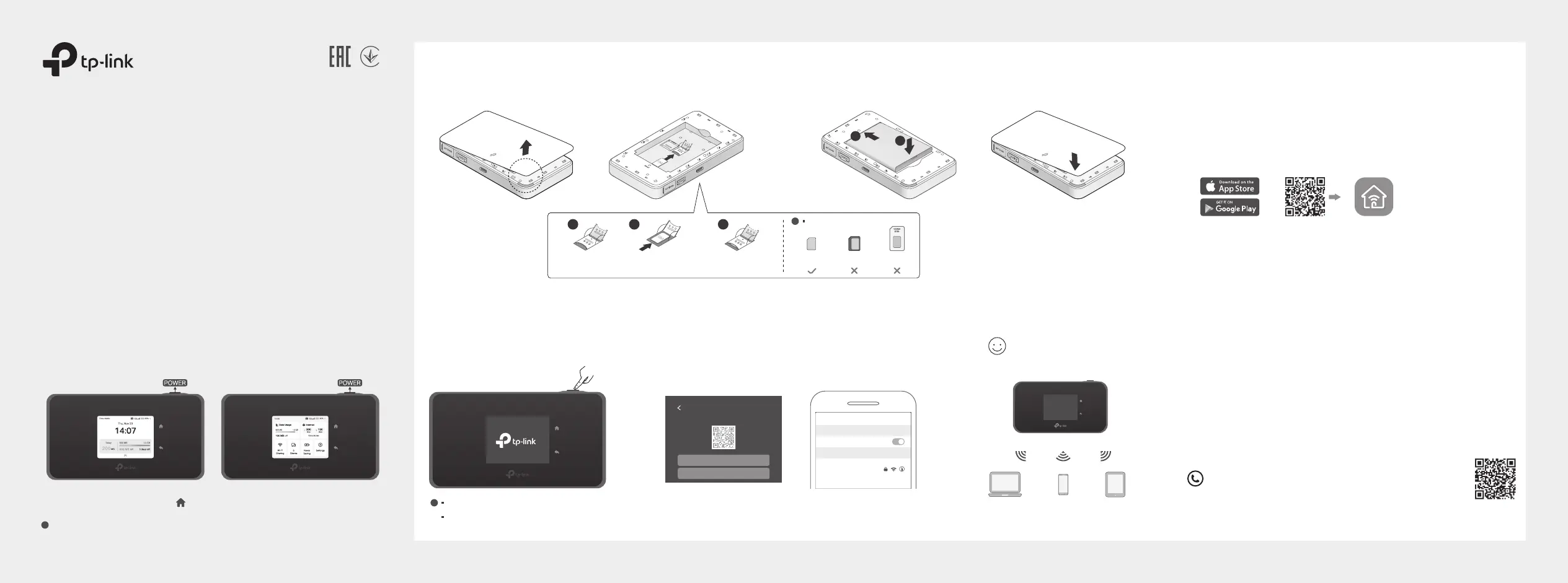
Managing Your Mobile Wi-Fi
Tether App
1. Get the Tether app from App Store or Google Play, or by
scanning the QR code.
2. Connect your wireless device to the Mobile Wi-Fi.
3. Create a password to log in.
Web Management Page
1. Connect your wireless device to the Mobile Wi-Fi. If it is a
computer, make sure it is set to obtain an IP address
automatically.
2. Launch a web browser and visit http://tplinkmi.net or
http://192.168.1.1. Create a password to log in.
For technical support, user manuals and more information,
please visit https://www.tp-link.com/support, or simply
scan the QR code.
Manage your Mobile Wi-Fi using any of the methods below. You
can customize Wi-Fi settings, block Wi-Fi devices and more.
* Images are for demonstration only.
Quick Installation Guide
Mobile Wi-Fi
or
d. Replace the cover.
a. Remove the back cover. b. Install your SIM card. c. Install the provided battery.
1. Install the SIM Card and Battery
Slide and lift up
the cover.
Install your SIM
card.
Put down and slide
back the cover.
1 2 3
· SIM card requirement:
!
Nano
SIM card
Standard
SIM card
Micro
SIM card
1
2
1
2
1
2
· If you cannot access the internet, refer to FAQ > Q1.
·
By default, Power Saving is disabled and the Mobile Wi-Fi will turn o Wi-Fi when no wireless devices are connected to it for 10 minutes.
To resume the Wi-Fi connection, press the POWER button .
!
2. Connect to the Internet
b. Connect your smart device to the Mobile Wi-Fi.
Press the Wi-Fi Sharing icon to view the wireless infomation. Use the SSID
/Password or QR code shown on the screen to connect to your Mobile Wi-Fi.
a. Press and hold the Power button
to power on the Mobile Wi-Fi.
Wi-Fi
Wi-Fi
TP-Link_XXXX_5G
CHOOSE A NETWORK...
Other...
< Settings
Press to turn on or o the screen display.
Screen Display
Home Screen
The screen display will automatically turn o after being idle for a while.
To turn it on again, press the POWER button.
!
Swipe up or tap to enter the menu screen.
Menu Screen
Press to select an icon.
Enjoy the internet!
Wi-Fi Sharing
5GHz
SSID TP-Link_XXXX_5G
Password XXXXXXXX
QR
CODE
Produkspesifikasjoner
| Merke: | TP Link |
| Kategori: | Ruter |
| Modell: | Deco M8550 |
Trenger du hjelp?
Hvis du trenger hjelp med TP Link Deco M8550 still et spørsmål nedenfor, og andre brukere vil svare deg
Ruter TP Link Manualer
20 Oktober 2025
17 September 2025
9 September 2025
31 August 2025
3 August 2025
3 August 2025
3 August 2025
3 August 2025
3 August 2025
3 August 2025
Ruter Manualer
- BZBGear
- Zebra
- Key Digital
- Blackmagic Design
- Allnet
- Keezel
- Alfatron
- Huawei
- Ryobi
- Sitecom
- Arris
- Mikrotik
- Keenetic
- Intellinet
- Amped Wireless
Nyeste Ruter Manualer
12 Oktober 2025
7 Oktober 2025
7 Oktober 2025
7 Oktober 2025
6 Oktober 2025
6 Oktober 2025
6 Oktober 2025
6 Oktober 2025
6 Oktober 2025
5 Oktober 2025