Dual BUCAM350 Bruksanvisning
Dual
Ikke kategorisert
BUCAM350
Les nedenfor 📖 manual på norsk for Dual BUCAM350 (1 sider) i kategorien Ikke kategorisert. Denne guiden var nyttig for 24 personer og ble vurdert med 4.4 stjerner i gjennomsnitt av 12.5 brukere
Side 1/1
Mounting the camera
Posion on the license plate top screws for the best viewing angle. This should not be
directly next to or under a reverse/backup/license lamp as it may blind the camera at night.
Before drilling, determine the best way to run the power wires to the reverse lights
and the extension cable through the car. Insure that the route will not interfere with
any safety equipment, trunk release or other items in the vehicle. Look for wires,
sensors, double metal, anything that could cause a problem or damage.
The camera should lay flat against the mounng surface for proper installaon.
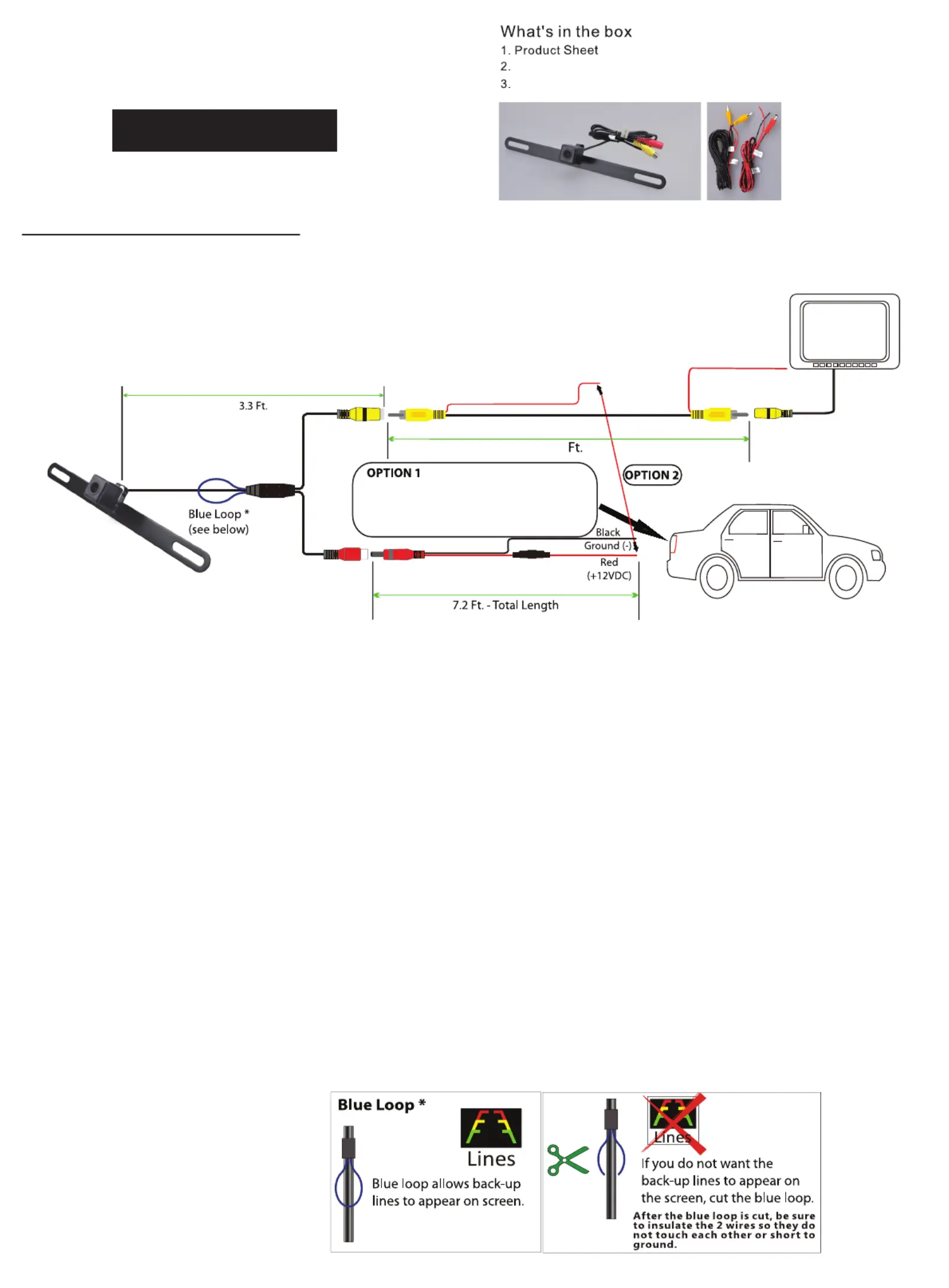
1.Fix the camera to the appropriate posion on the license plate and adjust the angle .
2.Follow ONE of the following wiring opons.
OPTION 1: Connect camera power wire to the vehicle's reverse lamp:
a)Locate the reverse lamp in the tail light assembly.
b)Aach the red wire to the posive 12 volt wire from the reverse lamp.Use a crimp connector or soldering tool to ensure connecon
is secure. Once this connecon is complete,note that the red power wire that is located on either end of the video RCA cable will not
be needed. The bare wire at the end of each wire lead should be capped or taped off to prevent potenal power interrupon.
c)Aach the black wire to ground(-).
d)Run video cable to the locaon of the receiver or monor(not included).Connect one yellow RCA end of the video cable to the
camera and connect the other end of the yellow RCA cable to the video source(receiver/monitor).
OPTION 2: Connect camera power wire to receiver/monitor power:
a)From camera locaon,connect red power wire from power cable to red power wire from one end of the video cable.Use a crimp
connector or soldering tool to ensure connecon is secure.
b)Aach the black wire to ground.
c)Run video cable to the locaon of the receiver or monitor(not included).Connect not yellow RCA end of the video cable to the
camera and connect the other end of the yellow RCA cable to the video source(receiver/monitor).
d)From video source(receiver/monitor) locaon,connect red power wire from end of the video cable to the reverse wire lead located
on the video source(receiver/monitor).
Camera Specifications
Image Sensor: CMOS,OV 7955
Powe 12V DC,Negave Groundr:
Power Consump 1 Waon: <
Effecve Pixels: 672H × 492V
Video Format: NTSC
Lux: 0.5<
White Balance: Auto
Viewing Angle: 170 Degr
ees
IP Rang: IP67
Operating Temperature: -30 ~ +70℃ ℃
P late material: Stainless Steel SUS304
Camera Body: Plastic
Camera input
of receiver
BUCAM350
BUCAM License plate style camera350
Power Cable w/ Fuse, Video Cable
Universal License Plate
Style Camera
Power/Ground Cables
Red (12V+) and Black (GND-)
(Recommended connection for 12V+ to
reverse light power wire.)
24
Produkspesifikasjoner
| Merke: | Dual |
| Kategori: | Ikke kategorisert |
| Modell: | BUCAM350 |
Trenger du hjelp?
Hvis du trenger hjelp med Dual BUCAM350 still et spørsmål nedenfor, og andre brukere vil svare deg
Ikke kategorisert Dual Manualer

9 Februar 2025

31 Januar 2025

31 Januar 2025

31 Januar 2025

31 Januar 2025

29 Januar 2025

4 Januar 2025

4 Januar 2025

4 Januar 2025

4 Januar 2025
Ikke kategorisert Manualer
- Manhattan
- Murideo
- Hoshizaki
- CTOUCH
- Audioengine
- Digital Forecast
- UDG Gear
- Alcon
- ORCA
- Russound
- Dreamland
- Nostalgia
- Thermador
- Logilink
- NANO Modules
Nyeste Ikke kategorisert Manualer

23 Oktober 2025

23 Oktober 2025

23 Oktober 2025

23 Oktober 2025

23 Oktober 2025

23 Oktober 2025

23 Oktober 2025

23 Oktober 2025

23 Oktober 2025

23 Oktober 2025