Icy Box IB-AC538a Bruksanvisning
Icy Box
kabler for datamaskiner og annet
IB-AC538a
Les nedenfor 📖 manual på norsk for Icy Box IB-AC538a (2 sider) i kategorien kabler for datamaskiner og annet. Denne guiden var nyttig for 9 personer og ble vurdert med 4.9 stjerner i gjennomsnitt av 5 brukere
Side 1/2
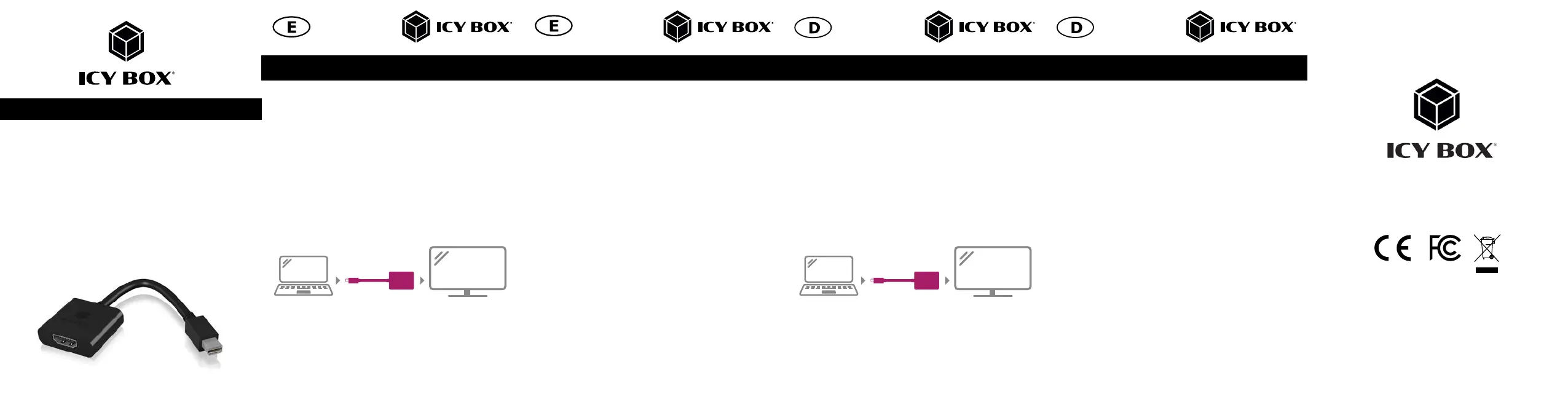
Quick installation guide IB-AC538a
© Copyright 2021 by RaidSonic Technology GmbH.
All Rights Reserved.
The information contained in this manual is believed to be accurate and reliable.
RaidSonic Technology GmbH assumes no responsibility for any errors contained in
this manual. RaidSonic Technology GmbH reserves the right to make changes in the
specifications and/or design of the above-mentioned product without prior notice.
The diagrams contained in this manual may also not fully represent the product that
you are using and are there for illustration purposes only. RaidSonic Technology
GmbH assumes no responsibility for any differences between the product mentioned
in this manual and the product you may have. DisplayLink
®
is the registered
trademark of DisplayLink Corp. in the EU, the US, and other countries Display-
Port™ and the DisplayPort™ logo are trademarks owned by the Video Electronics
Standards Association (VESA
®
) in the United States and other countries. The terms
HDMI
®
and HDMI
®
High-Definition Multimedia Interface, and the HDMI
®
logo are
trademarks or registered trademarks of HDMI
®
LA, Inc. in the United States and
other countries. Apple and macOS are registered trademarks of Apple Computer
.
Quick installation guide IB-AC538a Quick installation guide IB-AC538a Schnellinstallationsanleitung IB-AC538a Schnellinstallationsanleitung AC538a
Mini DP
™
to HDMI
®
adapter
Schnellinstallationsanleitung
IB-AC538a
Mini DP
™
zu HDMI
®
Adapter
Package content
1x IB-AC538a, 1x quick installation guide
Key features
• Mini DisplayPort™ (male) to HDMI® (female)
• Compliant with DisplayPort™ specification V1.1
• Resolution of up to 1920x1200@60 Hz
• Compact case
• Plug & Play
• Compatible to iMac/MacBook series
Installation
The adapter connects a Notebook/Tablet/PC to a monitor/beamer/TV with up to
1920x1200@60 Hz. (The maximum resolution depends on the monitor used.)
Verpackungsinhalt
1x IB-AC538a, 1x Handbuch
Haupteigenschaften
• Mini DisplayPort™ (Stecker) auf HDMI® (Buchse)
• Entspricht DisplayPort™ Spezifikation V1.1
• Auflösung von bis zu 1920x1200@60 Hz
• Kompaktes Gehäuse
• Plug & Play
• Kompatibel mit iMac/MacBook-Serie
Installation
Der Adapter verbindet ein Notebook/Tablet/PC zu einem Monitor/Beamer/TV
mit bis zu 1920x1200@60 Hz. (Die max. Auflösung ist abhängig vom verwendeten
Monitor)
1. Connection
Notebook/Tablet/PC to a monitor/beamer/TV
2. Display configuration under Windows
2.1 Please klick the right mouse button on your desktop and you will get a
drop-down menu
2.1 Choose „Screen resolution“ and a new menu will be shown on the display.
Now you can select the monitor, resolution and further functions which you wish
to use.
3. Function setting under Windows
3.1 Display: switch between screens
3.2 Resolution: choose your resolution
3.3 Orientation: choose between:
a. Landscape -> usual setting
b. Portrait -> 90 degrees left rotated
c. Landscape (Flipped) -> Upside down
d. Portrait (Flipped) -> 90 degrees right rotated
3.4 Multiple displays:
a. Dublicate this display
b. Extend this display -> Extends your desktop to multiple displays
c. Show desktop only on 1
d. Show desktop only on 2
1. Verbindung
Notebook/Tablet/PC zu einem Monitor/Beamer/TV
2. Bildschirm Einstellung unter Windows
2.1 Klicken Sie mit der rechten Maustaste auf den Desktop Ihres Bildschirms und es
öffnet sich ein Untermenü
2.2 Klicken Sie auf „Bildschirmauflösung“ – es erscheint ein Menü zur Auswahl
des Monitors und der Bildschirmauflösung.
3. Darstellungsänderung unter Windows
3.1 Anzeige: wechseln zwischen den Bildschirmen
3.2 Auflösung: wählen Sie die Auflösung
3.3 Ausrichtung: wählen Sie zwischen:
a. Querformat -> übliche Einstellung
b. Hochformat -> 90 Grad links gedreht
c. Querformat (gedreht) -> kopfüber
d. Hochformat (gedreht) -> 90 Grad rechts gedreht
3.4 Mehrere Anzeigen: wählen Sie zwischen:
a. Diese Anzeige duplizieren
b.
Diese Anzeige erweitern -> Erweitert Ihren Desktop auf mehrere Bildschirme
c. Desktop nur auf 1 zeigen
d. Desktop nur auf 2 zeigen
Mini
DP
HDMI
Mini
DP
HDMI
Produkspesifikasjoner
| Merke: | Icy Box |
| Kategori: | kabler for datamaskiner og annet |
| Modell: | IB-AC538a |
| Vekt: | 26 g |
| Bredde: | 146 mm |
| Dybde: | 43 mm |
| Høyde: | 12 mm |
| Bruksanvisning: | Ja |
| Maksimal oppløsning: | 1920 x 1200 piksler |
| Pakkevekt: | 98 g |
| Maksimal oppdateringshastighet: | 60 Hz |
| Antall per pakke: | 1 stykker |
| DisplayPort-versjon: | 1.1 |
| Tilkobling 1: | Mini DisplayPort |
| Tilkobling 2: | HDMI |
| Kabellengde: | 0.15 m |
| Produktfarge: | Sort |
| Pakkedybde: | 102 mm |
| Pakkehøyde: | 200 mm |
| Pakkebredde: | 27 mm |
| Støttede Windows operativsystemer: | Ja |
| Plugg inn og spill: | Ja |
| Støttede Mac operativsystemer: | Ja |
| Masterkassens (ytterkassens) bruttovekt: | 5800 g |
| Masterkassens (ytterkassens) lengde: | 400 mm |
| Produkter per masterkasse (ytterkasse): | 50 stykker |
| Masterkassens (ytterkassens) bredde: | 420 mm |
| Masterkassens (ytterkassens) høyde: | 235 mm |
| Connector 1 kjønn: | Hankjønn |
| Connector 2 kjønn: | Hunkjønn |
| Tilkobling 1 formfaktor: | Rett |
| Tilkobling 2 formfaktor: | Rett |
Trenger du hjelp?
Hvis du trenger hjelp med Icy Box IB-AC538a still et spørsmål nedenfor, og andre brukere vil svare deg
kabler for datamaskiner og annet Icy Box Manualer
5 Oktober 2025
5 Oktober 2025
4 Oktober 2025
4 Oktober 2025
4 Oktober 2025
4 Oktober 2025
4 Oktober 2025
4 Oktober 2025
4 Oktober 2025
4 Oktober 2025
kabler for datamaskiner og annet Manualer
- Tributaries
- Fusion
- Elecom
- Schneider
- Vivotek
- JL Audio
- Fiio
- Opticis
- Cisco
- Belkin
- Tripp Lite
- On-Q
- EXSYS
- Insignia
- Duronic
Nyeste kabler for datamaskiner og annet Manualer
19 Oktober 2025
9 Oktober 2025

9 Oktober 2025
9 Oktober 2025
9 Oktober 2025
8 Oktober 2025
8 Oktober 2025
8 Oktober 2025
7 Oktober 2025
7 Oktober 2025