On-Q EZ-RJ45 Bruksanvisning
On-Q
kabler for datamaskiner og annet
EZ-RJ45
Les nedenfor 📖 manual på norsk for On-Q EZ-RJ45 (3 sider) i kategorien kabler for datamaskiner og annet. Denne guiden var nyttig for 10 personer og ble vurdert med 4.6 stjerner i gjennomsnitt av 5.5 brukere
Side 1/3
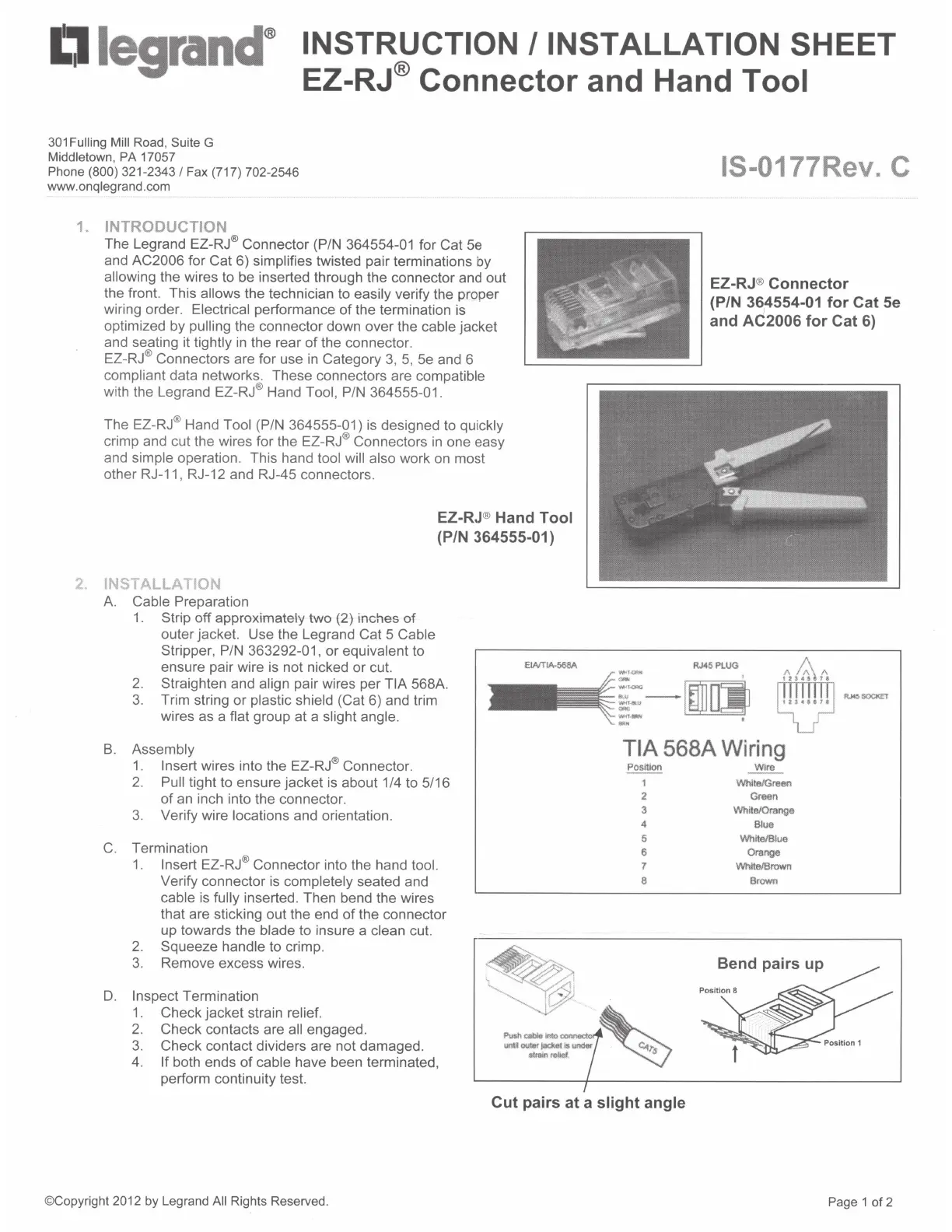
D
legrancr
INSTRUCTION /INSTALLATION SHEET
EZ-RJ® Connector and Hand
Tool
301
Fulling Mill Road, Suite G
Middletown,
PA
17057
Phone
(800)
321-2343
I
Fax (717) 702-2546
www.onqlegrand.com
1.
INTRODUCTION
The Legrand EZ-RJ® Connector (P/N 364554-01 for Cat
5e
and
AC2006
for Cat 6)
simplifies
twisted pair terminations by
allowing
the wires to be inserted through the connector and out
the front. This
allows the technician to
easily
verify the proper
wiring order.
Electrical
performance
of
the termination
is
optimized by
pulling
the connector down over the cable
jacket
and seating it
tightly
in
the rear
of
the connector.
EZ-
RJ
® Connectors are for use
in
Category
3,
5,
5e and 6
compliant
data networks. These connectors are
compatible
with the Legrand EZ-RJ® Hand
Tool,
P/N 364555-01 .
The EZ-RJ® Hand
Tool
(P/N 364555-01)
is
designed to
quickly
crimp and cut the wires for the EZ-RJ® Connectors
in
one easy
and
simple
operation. This hand
tool will also
work
on
most
other RJ-11 , RJ-12 and RJ-45 connectors.
2.
INSTALLATION
A.
Cable
Preparation
1.
Strip
off approximately two (2) inches
of
outer jacket. Use the Legrand Cat 5
Cable
Stripper, P/N 363292-01, or
equivalent
to
ensure pair wire is not nicked or cut.
EZ-RJ® Hand Tool
(PIN 364555-01)
2.
Straighten and
align pair wires per
TIA
568A.
3.
Trim string or
plastic shield
(Cat 6) and trim
wires as a flat
group at a
slight angle.
B.
Assembly
1.
Insert wires into the EZ-RJ® Connector.
2.
Pull tight to ensure jacket
is
about 1/4 to 5/16
of
an
inch into the connector.
3. Verify wire
locations
and orientation.
C.
Termination
1.
Insert
EZ-RJ® Connector into the hand
tool.
Verify connector
is
completely
seated and
cable
is
fully
inserted. Then bend the wires
that are sticking out the end
of
the connector
up towards the
blade to insure a clean cut.
2.
Squeeze
handle
to crimp.
3.
Remove excess wires.
D.
Inspect
Termination
1 . Check jacket strain
relief.
2.
Check contacts are all
engaged.
3.
Check contact dividers are not damaged.
4.
If
both ends
of
cable
have been terminated,
perform continuity test.
IS-0177Rev. C
EZ-RJ® Connector
(P/N
36
1
4554-01
for Cat 5e
and
AC2006 for Cat 6)
RJ45PLUG
==
o
·····
o
....
·
..
···
. j
,._.,
_
~T
..a.t1
-
::
- I
TIA
568A
Wiring
~
Wire
1
White/Green
2
Green
3
White/Orange
4
Blue
5
White/Blue
6
orange
7
White/Brown
8
Brown
Bend pairs up
Cut pairs at a
slight angle
©Copyright
2012
by Legrand
All
Rights Reserved.
Page 1 of 2
Produkspesifikasjoner
| Merke: | On-Q |
| Kategori: | kabler for datamaskiner og annet |
| Modell: | EZ-RJ45 |
Trenger du hjelp?
Hvis du trenger hjelp med On-Q EZ-RJ45 still et spørsmål nedenfor, og andre brukere vil svare deg
kabler for datamaskiner og annet On-Q Manualer
5 September 2025
kabler for datamaskiner og annet Manualer
- Insignia
- Metra
- Schneider
- Vimar
- Duronic
- Gembird
- Vivotek
- Akasa
- IOGEAR
- Tripp Lite
- StarTech.com
- Icy Box
- Biltema
- DataVideo
- Worx
Nyeste kabler for datamaskiner og annet Manualer
19 Oktober 2025
9 Oktober 2025

9 Oktober 2025
9 Oktober 2025
9 Oktober 2025
8 Oktober 2025
8 Oktober 2025
8 Oktober 2025
7 Oktober 2025

7 Oktober 2025