Panasonic CQ-DF602W Bruksanvisning
Panasonic
Ikke kategorisert
CQ-DF602W
Les nedenfor 📖 manual på norsk for Panasonic CQ-DF602W (10 sider) i kategorien Ikke kategorisert. Denne guiden var nyttig for 38 personer og ble vurdert med 4.8 stjerner i gjennomsnitt av 19.5 brukere
Side 1/10
E
N
G
L
I
S
H
2
CQ-DF602W
11
General
E
N
G
L
I
S
H
1
CQ-DF602W
10
Before Reading these Instructions
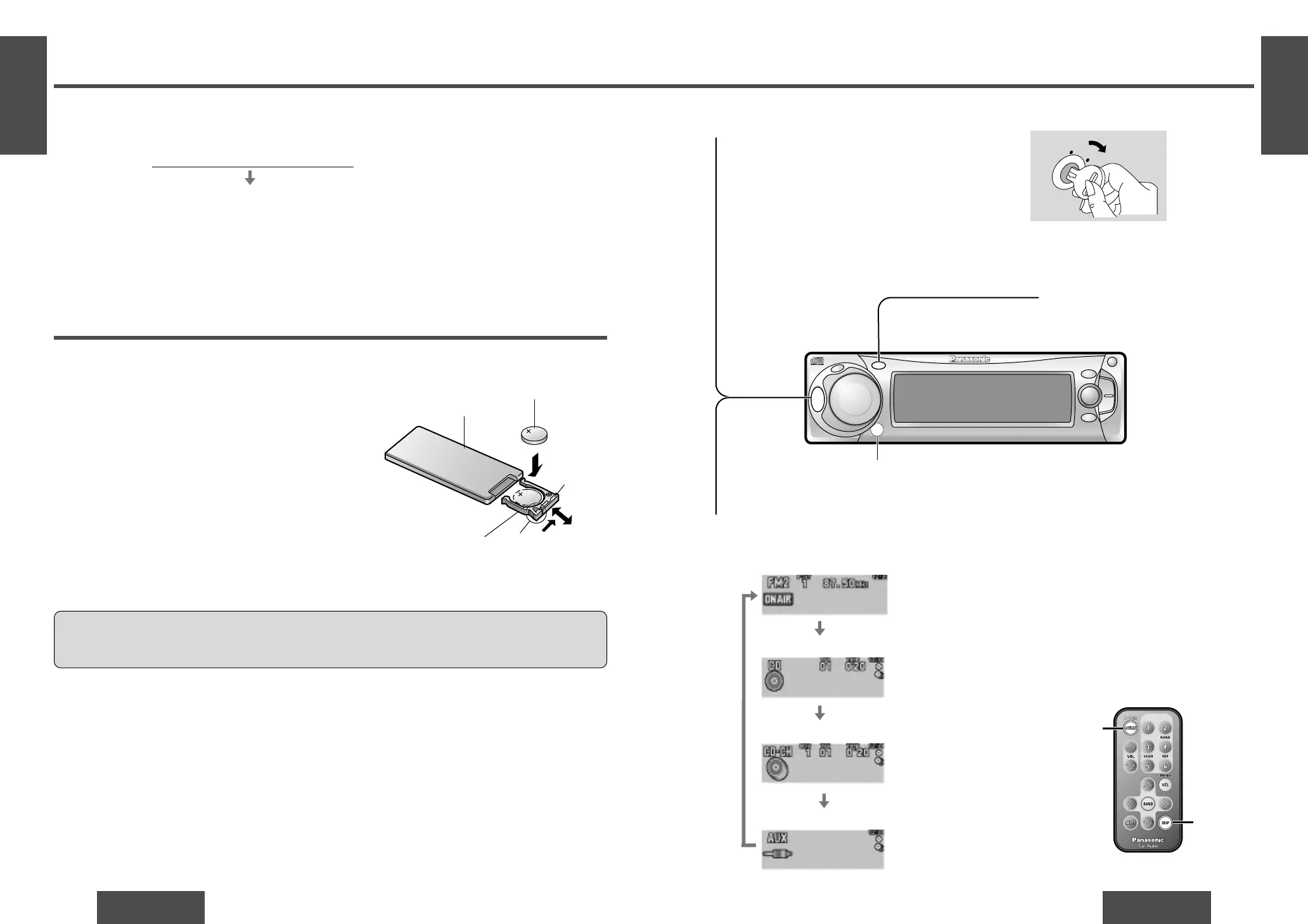
You can operate this unit by pressing buttons on the main unit and the remote control unit.
∫ These instructions describe buttons that are concerned with operations as follows.
Example: Press [P·SET "] or [P·SET #]/["] or [#].
∫ Some operations can be activated by pressing buttons only on main unit or remote control unit.
Those cases are described in the instructions.
Example: Press [OPEN] on the main unit.
Battery Installation
1 Remove the battery holder.
Pull the battery holder by the position B while pushing
position A in the direction indicated by the arrow.
2 Install the battery on the battery holder.
Set a new battery properly with its “i” side facing up
as shown in the figure.
3 Insert the battery holder.
Push the battery holder back into its original position.
Battery Notes
Remove and dispose of an old battery immediately.
Battery Information:
≥ Battery type: Panasonic lithium battery (CR2025) (included)
≥ Battery life: Approximately 6 months with normal use (at room temperature)
≥ Do not disassemble or short the battery. Do not throw a battery into a fire.
≥ Keep batteries away from children to avoid the risk of accidents.
≥ Be careful to observe proper local disposal rules when you dispose of batteries.
Caution:
≥ Improper use of batteries may cause overheating, an explosion or ignition, resulting in injury or a fire.
Battery leakage may damage the unit.
[buttons on the main unit]/[remote control unit]
Point the remote control unit at the main unit’s sensor.
Remote Control Unit Preparation
Lithium battery
(included)
Back side
Position B
Position ABattery holder
Note:
≥ When the power is switched on for the
first time, a demonstration message ap-
pears on the display.
To cancel this display, press [DISP] (dis-
play).
AC
C
O
N
[SOURCE]
(POWER)
[DISP]
(Display)
Power
Turn the key in the ignition until the accessory in-
dicator lights.
ON: Press [SRC] (PWR)/[SOURCE] (POWER).
OFF:Press and hold [SRC] (PWR)/[SOURCE]
(POWER) again for more than 1 second.
≥ After turning off the ignition key, a security
message is displayed, and the panel removable
alarm that reminds you to take the panel is acti-
vated.
(When security function is set to on ➡ page 28)
1
Source
Press [SRC] (SOURCE)/[SOURCE] to change the source.
2
Radio
CD player
CD changer control
AUX-IN setting
(When a CD is in the player.)
(When a CD changer is con-
nected and magazine is in the
changer.) (➡ page 20)
SRC
DISP
P
.
SET
CQ-DF602W
N
5
O
6
W
X
;
/ 1
OPEN
BAND
TUNE
TRACK
PW
R
M
U
T
E
P
U
S
H
CD RECEIVER WITH FULL DOT MATRIX DISPLAY
DISC
SET/APM
M
E
N
U
VOLUME
S
O
U
R
C
E
MOSFET
50W
X
4
Remote control signal sensor
Produkspesifikasjoner
| Merke: | Panasonic |
| Kategori: | Ikke kategorisert |
| Modell: | CQ-DF602W |
Trenger du hjelp?
Hvis du trenger hjelp med Panasonic CQ-DF602W still et spørsmål nedenfor, og andre brukere vil svare deg
Ikke kategorisert Panasonic Manualer
4 Oktober 2025
31 August 2025

28 August 2025
15 August 2025
15 August 2025
6 August 2025
6 August 2025

10 April 2025

4 April 2025

4 April 2025
Ikke kategorisert Manualer
- ACOPower
- Murideo
- Coors Light
- Furman
- Hughes & Kettner
- Vantec
- Nanoleaf
- Megasat
- BeSafe
- Nimbus
- Nintendo
- Lazer
- Wire Technologies
- SecureSafe
- Philco
Nyeste Ikke kategorisert Manualer

23 Oktober 2025

23 Oktober 2025

23 Oktober 2025

23 Oktober 2025

23 Oktober 2025

23 Oktober 2025

23 Oktober 2025

23 Oktober 2025

23 Oktober 2025

23 Oktober 2025