StarTech.com 155UE-USB4-DOCK Bruksanvisning
StarTech.com
Annet datatilbehør
155UE-USB4-DOCK
Les nedenfor 📖 manual på norsk for StarTech.com 155UE-USB4-DOCK (2 sider) i kategorien Annet datatilbehør. Denne guiden var nyttig for 24 personer og ble vurdert med 4.6 stjerner i gjennomsnitt av 12.5 brukere
Side 1/2
Quick-Start Guide
To view manuals, FAQs, videos, drivers, downloads, technical drawings, and more, visit www.startech.com/support.
Manual Revision: June 1, 2023 1:18 PM
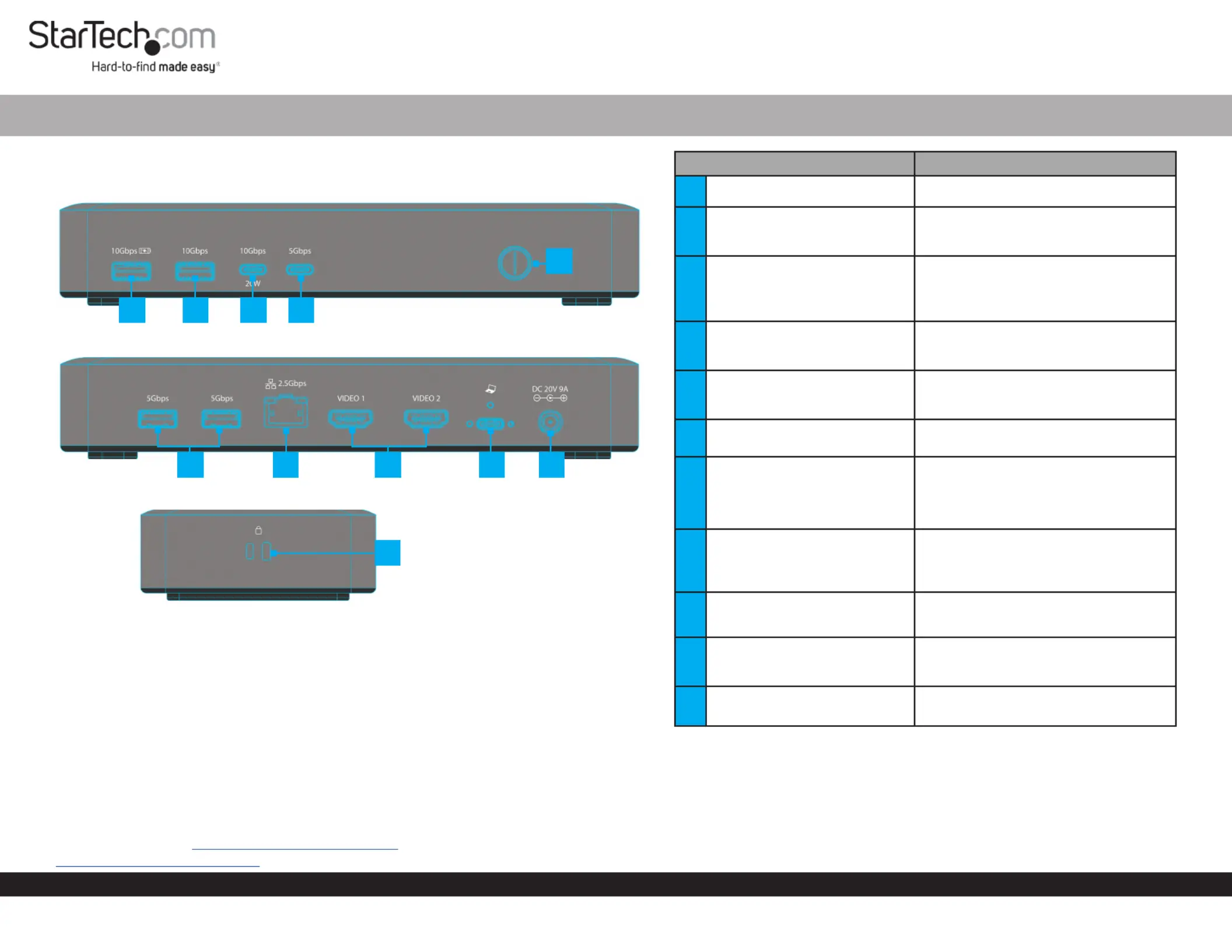
Product Diagram (Side A)
USB4 Docking Station - Dual 4K 60Hz HDMI, 6-Port USB Hub, 2.5GbE, 100W PD
1
67
9
2
(Side B)
Product ID
155NA-USB4-DOCK / 155UE-USB4-DOCK
(Side C)
Component Function
1Power Button
• Press and Release to Toggle Power for the
Dock
2USB-C Data Port
• Connect a USB-C Peripheral
• USB 3.2 Gen 1 (5Gbps)
• Supports up to 7.5W(5V/1.5A) of Power
3USB-C Data/Power Port
• Connect a USB-C Peripheral
• USB 3.2 Gen 2 (10 Gbps)
• Power Delivery 3.0
4USB-A Data Port
• Connect a USB-A Peripheral
• USB 3.2 Gen 2 (10 Gbps)
• Supports up to 4.5W (5V/0.5A) of Power
5USB-A Data/Charge Port
• Connect and/or Charge a USB-A Peripheral
• USB 3.2 Gen 2 (10 Gbps)
• Supports 7.5W BC 1.2 Charging (5V/1.5A)
6DC 20V Port
• Connect the Dock to a Power Source, using
the Universal Power Adapter
7
USB4 Host Port
(Screw-Locking, USB Type-C)
• Connect to a USB-C Port on a Host Computer
• USB4 (40 Gbps)
• Power Delivery 3.0 Specication
• Capability of charging the Host Computer
up to 100W
82x HDMI Video Ports
• Connect HDMI Displays
• HDMI 2.1
• Up to 8K (7680x4320) 60Hz
• Via DisplayPort 1.4 Alt Mode
92.5 Gigabit Ethernet Port
• Connect the Dock to a Network Device,
using a Network Cable
• 2.5GBASE-T
10 2x USB-A Data Ports
• Connect USB-A Peripherals
• USB 3.2 Gen 1 (5 Gbps)
• Supports up to 4.5W (5V/0.9A) of Power
11
2x Lock Slots
(Standard & Nano)
• Connect a K-Slot Style Locking Device to
deter the theft of the Docking Station
Requirements
• Computer
• USB4 Port
• USB-C Port with DP Alt Mode
• This Dock can function with either a USB4 or USB-C host port. For
maximum performance a USB4 port is recommended. Video support
and performance, such as resolution, and refresh rate depend on the
host computer’s video controller. Please verify the specications of the
host computer.
For the latest drivers, manuals, product information, technical specications, and declarations of
conformance, please visit: www.StarTech.com/155NA-USB4-DOCK or
www.StarTech.com/155UE-USB4-DOCK
810
11
345
Package Contents
• USB-C Docking Station x 1
• 3 ft (1 m) USB4 Host Cable x 1
• Universal Power Adapter x 1
• Quick-Start Guide x 1
Produkspesifikasjoner
| Merke: | StarTech.com |
| Kategori: | Annet datatilbehør |
| Modell: | 155UE-USB4-DOCK |
Trenger du hjelp?
Hvis du trenger hjelp med StarTech.com 155UE-USB4-DOCK still et spørsmål nedenfor, og andre brukere vil svare deg
Annet datatilbehør StarTech.com Manualer

16 Januar 2025

29 Desember 2024

29 Desember 2024

29 Desember 2024

8 Desember 2024

8 Desember 2024

24 Oktober 2024

16 Oktober 2024

16 Oktober 2024

16 Oktober 2024
Annet datatilbehør Manualer
- Gamber-Johnson
- Goobay
- IFM
- Kensington
- Iiyama
- IOGEAR
- Gembird
- Sharkoon
- Dell
- Middle Atlantic
- Rocstor
- Lenovo
- Lindy
- Uncaged Ergonomics
- Techly
Nyeste Annet datatilbehør Manualer

3 April 2025

3 April 2025

2 April 2025

13 Mars 2025

21 Februar 2025

21 Februar 2025

21 Februar 2025

21 Februar 2025

21 Februar 2025

13 Februar 2025