StarTech.com DK30CHHPD Bruksanvisning
StarTech.com
Annet datatilbehør
DK30CHHPD
Les nedenfor 📖 manual på norsk for StarTech.com DK30CHHPD (2 sider) i kategorien Annet datatilbehør. Denne guiden var nyttig for 61 personer og ble vurdert med 4.9 stjerner i gjennomsnitt av 31 brukere
Side 1/2
Quick-Start Guide
To view manuals, FAQs, videos, drivers, downloads, technical drawings, and more, visit www.startech.com/support.
Manual Revision: August 28, 2019 8:48 AM
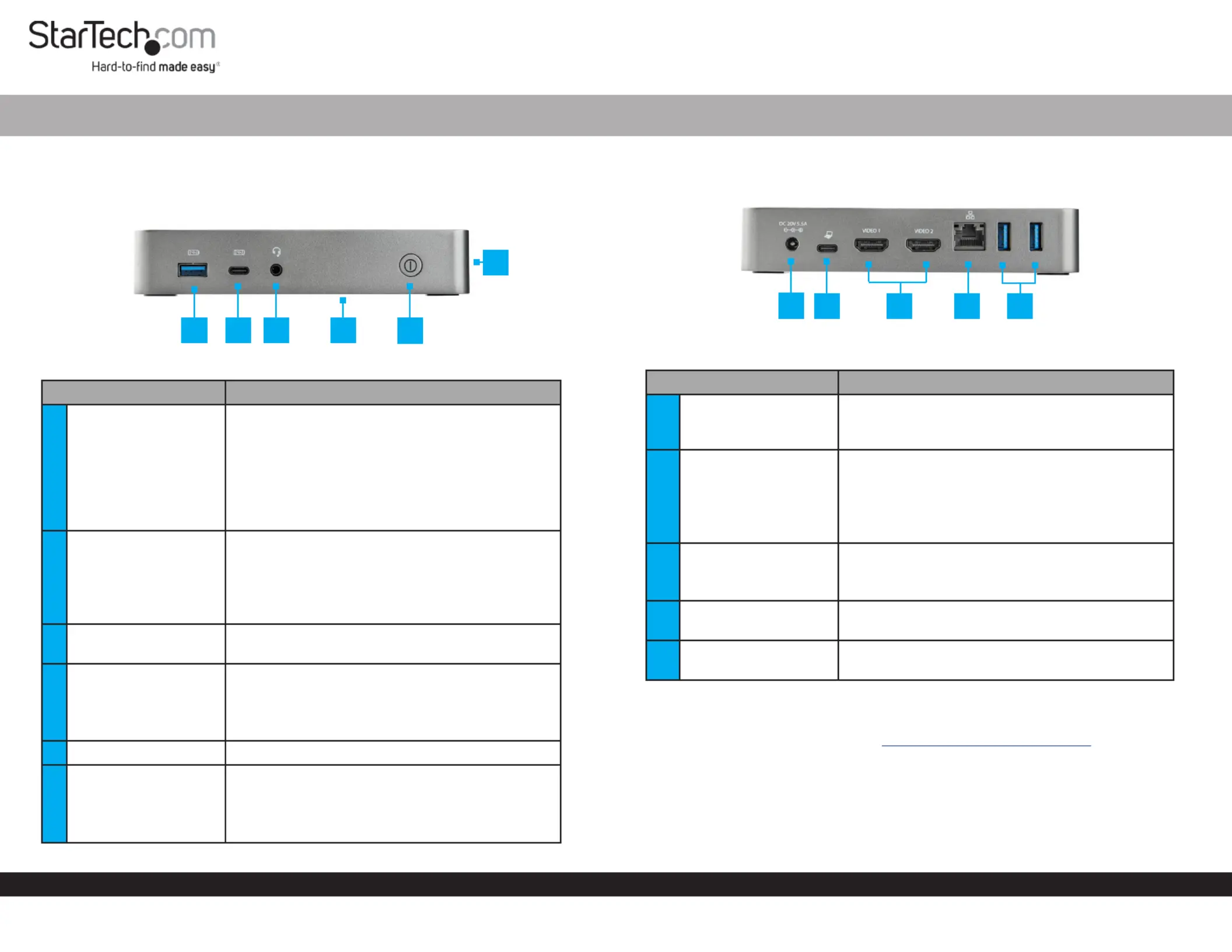
Product Diagram (DK30CHHPD/DK30CHHPDUK/
DK30CHHPDEU/DK30CHHPDAU)
Front
Component Function
1USB-A Port
• Used to charge a connected .USB Device
• Used to connect to the USB Devices Docking
Station (ash drive, etc.).
• BC 1.2 Compliant.
• 7.5W of power output.
• Charges with or without a connection to the
Host Computer.
2USB-C Port
• Used to charge a connected .USB Device
• B.C. 1.2 compliant.
• 7.5 W of power output.
• Charges with or without a connection to the
Host Computer.
33.5 mm Audio Port
• Used to connect an to the Audio Device
Docking Station (headset, microphone, etc.).
4Mounting Holes (x 4)
• Used to mount the to a desk Docking Station
or wall.
Note: Located on the bottom of the Docking
Station.
5Power Button • Used to turn the On/O.Docking Station
6 Lock Slot
• Used to secure the to a Docking Station
secure stationary object.
Note: Located on the side of the Docking
Station.
USB-C Dual Video 1080p Monitor, USB 3.1 Gen 1 Dock
Rear
Component Function
7Power Connector
• Used to power the by Docking Station
connecting the to Universal Power Adapter
the .Docking Station
8USB-C Host Port
• Used to connect the to the Host Computer
Docking Station.
• Used to charge the connected .Host Computer
• Power Delivery 3.0.
• 60W of power output.
9
HDMI Video 1 and 2
Ports (x 2)
• Used to connect two to HDMI Display Devices
the .Docking Station
• 1920x1200 @ 60 Hz.Maximum Resolution:
10 RJ-45 Port
• Used to connect a to the Network Device
Docking Station.
11 USB-A Ports (x 2)
• Used to connect to the USB Devices Docking
Station (mouse, keyboard, etc.).
Requirements
For the latest requirements, please visit www.startech.com/DK30CHHPD
Powering the Docking Station
1. Connect the to the on the Universal Power Adapter Power Connector Docking
Station.
2. Connect the to the and to an Power Cord Universal Power Adapter AC Electrical
Outlet.
1
2
3
4
5
6
7
8 9 10 11
Produkspesifikasjoner
| Merke: | StarTech.com |
| Kategori: | Annet datatilbehør |
| Modell: | DK30CHHPD |
Trenger du hjelp?
Hvis du trenger hjelp med StarTech.com DK30CHHPD still et spørsmål nedenfor, og andre brukere vil svare deg
Annet datatilbehør StarTech.com Manualer

16 Januar 2025

29 Desember 2024

29 Desember 2024

29 Desember 2024

8 Desember 2024

8 Desember 2024

24 Oktober 2024

16 Oktober 2024

16 Oktober 2024

16 Oktober 2024
Annet datatilbehør Manualer
- Xcellon
- Act
- IOGEAR
- Vantec
- Lindy
- VisionTek
- Urban Factory
- Apricorn
- Iiyama
- Rocstor
- Enhance
- Kensington
- Biltema
- Gamber-Johnson
- Gabor
Nyeste Annet datatilbehør Manualer

3 April 2025

3 April 2025

2 April 2025

13 Mars 2025

21 Februar 2025

21 Februar 2025

21 Februar 2025

21 Februar 2025

21 Februar 2025

13 Februar 2025