StarTech.com CDP2HVGUASPD Bruksanvisning
StarTech.com
Annet datatilbehør
CDP2HVGUASPD
Les nedenfor 📖 manual på norsk for StarTech.com CDP2HVGUASPD (2 sider) i kategorien Annet datatilbehør. Denne guiden var nyttig for 50 personer og ble vurdert med 4.1 stjerner i gjennomsnitt av 25.5 brukere
Side 1/2
Quick-Start Guide
To view manuals, FAQs, videos, drivers, downloads, technical drawings, and more, visit www.startech.com/support.
Manual Revision: March 20, 2020 2:13 PM
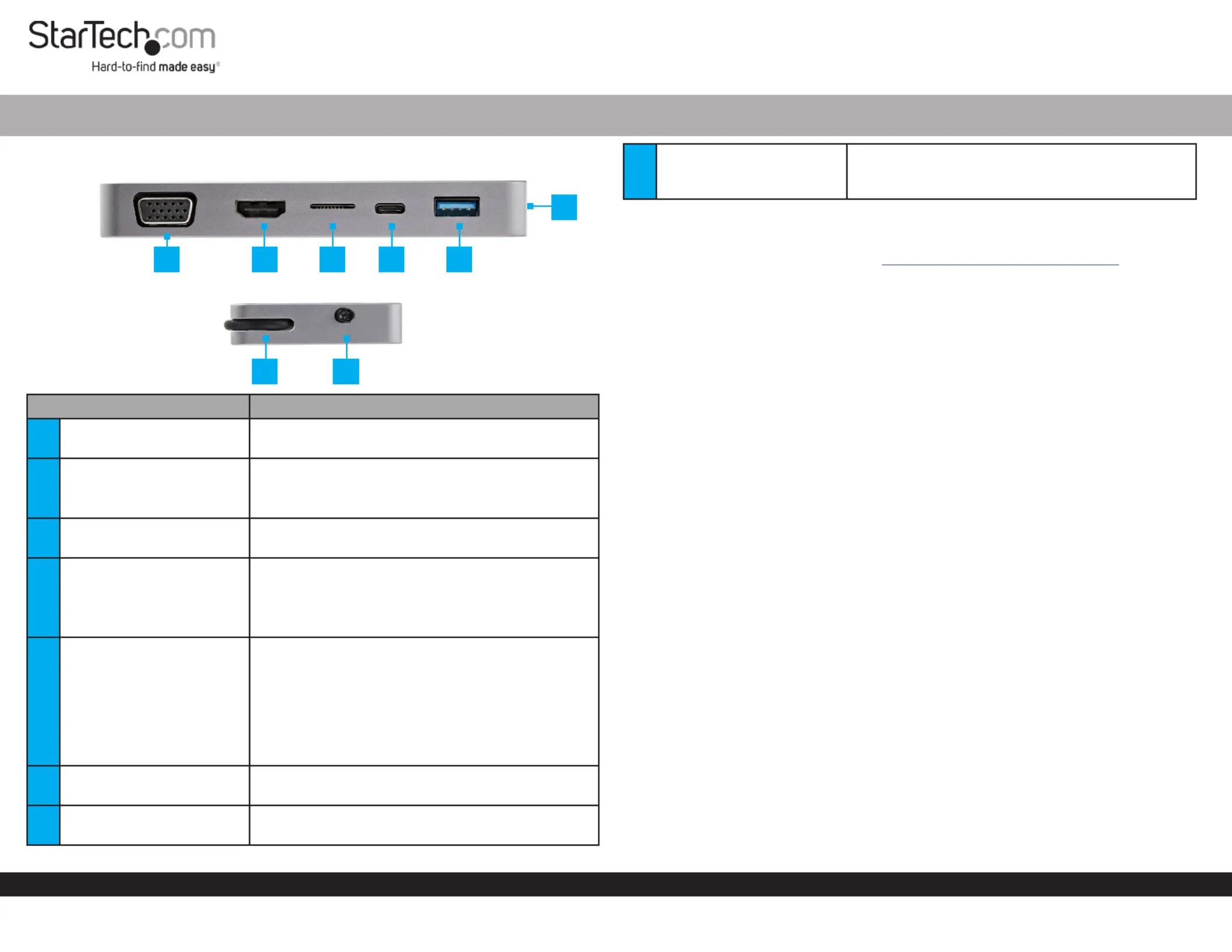
Product Diagram (CDP2HVGUASPD)
Component Function
1VGA Port
• Used to connect a to the Display Device
Docking Station.
2HDMI Port
• Used to connect a to the Display Device
Docking Station.
• Maximum Resolution = 4K30.
3MicroSD Card Slot
• Used to connect an to theMicroSD Card
Docking Station.
4USB-C Port
• Used to connect a to the USB Device Docking
Station.
• Power Delivery (PD) 3.0 Specication.
• Charge with up to 85W.Host Computer
5USB-A Port
• Used to connect a to the USB Device Docking
Station.
• Supports BC1.2 5V/1.5A (7.5W) charging.
Note: When using Bus Powered mode to power
the , the needs Docking Station Docking Station
to be connected to a 15W USB-C port on the Host
Laptop, in order to use the fast charge function.
6RJ45 Port
• Used to connect a to the Network Device
Docking Station.
7Integrated USB-C Cable
• Used to connect the to the Docking Station
Host Computer.
USB-C to HDMI/VGA + GbE + USB-A + PD 3.0 and Presentation Mode
8Presentation Mode Switch
• Used to prevent the connected Host Computer
from going into sleep mode or placing a
connected into standby mode.Display Device
Requirements
For the latest requirements, please visit www.startech.com/CDP2HVGUASPD
Powering the Docking Station
Bus Powered
• Connect the on the to a on Integrated USB-C Cable Docking Station USB-C Port
the .Host Computer
PD Passthough
1. Connect a (sold separately) to the on the USB-C Power Adapter USB-C Port
Docking Station.
Note: The USB-C port on the must support USB Power Delivery to Host Computer
power and charge the Host Computer.
2. Connect the on the to a USB-C port on Integrated USB-C Cable Docking Station
the .Host Computer
3. Connect the to an .USB-C Power Adapter AC Electric Outlet
Connecting the Docking Station
1. Connect a to the on the USB-A Device USB-A Port Docking Station.
2. If using the method to power the , you can connect a Bus Powered Docking Station
USB-C Device USB-C Port Docking Station to the on the .
3. For information regarding the see the MicroSD Card Slot, Inserting/Removing
MicroSD Card section.
4. Connect an to the on the and the other HDMI Cable HDMI Port Docking Station
end to and HDMI port on the .Display Device
5. Connect an to the on the and the other end VGA Cable VGA Port Docking Station
to and VGA port on the .Display Device
Note: If two are connected to both the and at the same Displays HDMI VGA Ports
time, the connected to the will take priority.Display HDMI Port
6. Connect a (or better) to the on the and the CAT5 Cable RJ45 Port Docking Station
other end to an RJ45 port on a .Network Device
1 2 3 4 5
7 8
6
Produkspesifikasjoner
| Merke: | StarTech.com |
| Kategori: | Annet datatilbehør |
| Modell: | CDP2HVGUASPD |
Trenger du hjelp?
Hvis du trenger hjelp med StarTech.com CDP2HVGUASPD still et spørsmål nedenfor, og andre brukere vil svare deg
Annet datatilbehør StarTech.com Manualer

16 Januar 2025

29 Desember 2024

29 Desember 2024

29 Desember 2024

8 Desember 2024

8 Desember 2024

24 Oktober 2024

16 Oktober 2024

16 Oktober 2024

16 Oktober 2024
Annet datatilbehør Manualer
- Lenovo
- SMK-Link
- Gabor
- Apricorn
- IFM
- Dell
- Iiyama
- Urban Factory
- Icy Box
- Enhance
- Sharkoon
- Goobay
- Middle Atlantic
- Alogic
- VisionTek
Nyeste Annet datatilbehør Manualer

3 April 2025

3 April 2025

2 April 2025

13 Mars 2025

21 Februar 2025

21 Februar 2025

21 Februar 2025

21 Februar 2025

21 Februar 2025

13 Februar 2025