StarTech.com PR12GIP-NETWORK-CARD Bruksanvisning
StarTech.com
Nettverkskort/adapter
PR12GIP-NETWORK-CARD
Les nedenfor 📖 manual på norsk for StarTech.com PR12GIP-NETWORK-CARD (2 sider) i kategorien Nettverkskort/adapter. Denne guiden var nyttig for 39 personer og ble vurdert med 5.0 stjerner i gjennomsnitt av 20 brukere
Side 1/2
Quick-Start Guide
To view manuals, FAQs, videos, drivers, downloads, technical drawings, and more, visit www.startech.com/support
Manual Revision: October 12, 2023
Product ID
PR12GIP-NETWORK-CARD
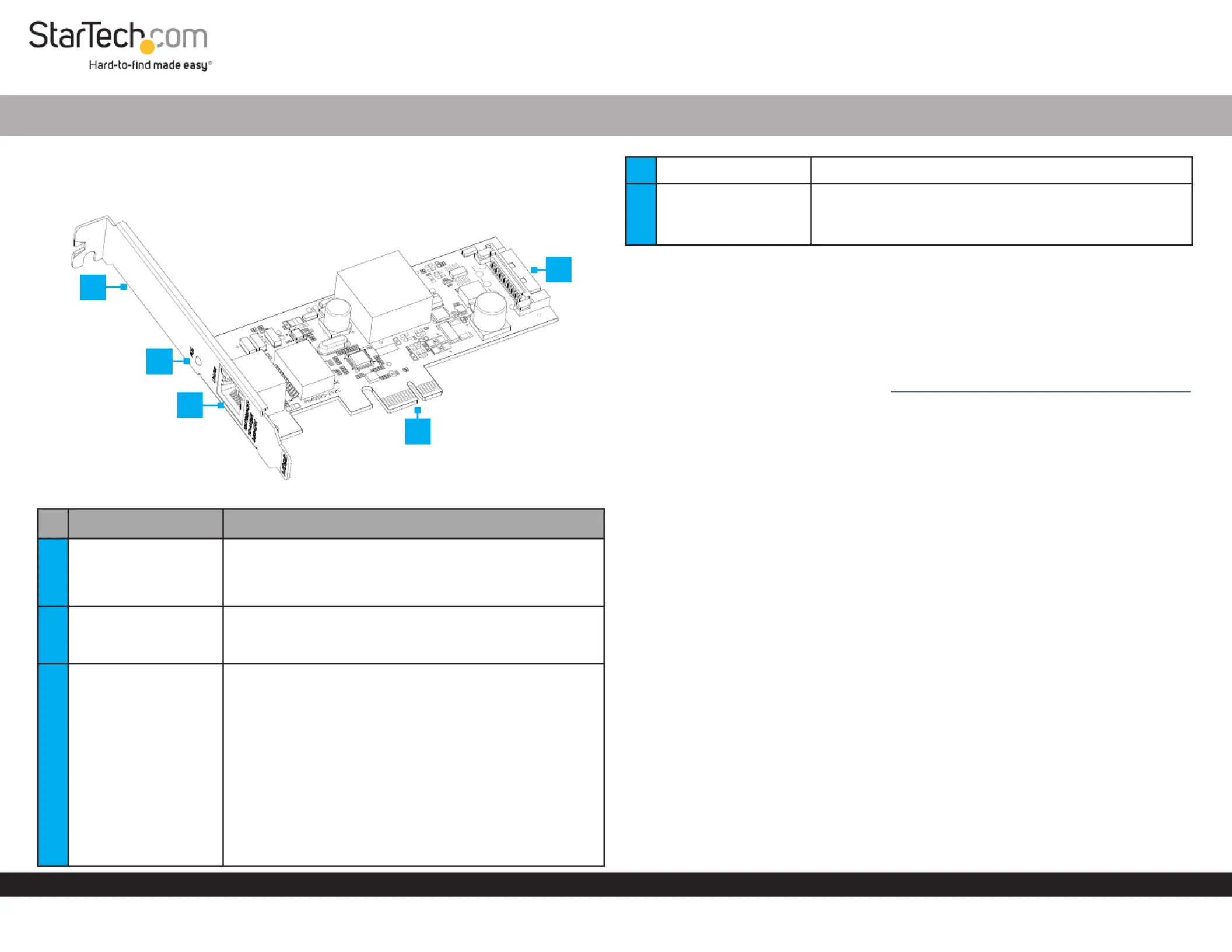
Port/LED/Connector Function
1Bracket
• Secures the card to the Host Computer Case
• The comes pre-installedFull Prole Bracket
• The is included Low Prole Bracket
2
Power Over Ethernet
(PoE) LED Indicator
• Solid Green: PoE has been negotiated and power is
being supplied to the Powered Device
• O: No power output has been negotiated
3Ethernet Port
• Connect an to the Ethernet Cable Network Card
• Supports 2.5Gbps, 1Gbps, 100Mbps, and 10Mbps
• Supports and IEEE 802.3at IEEE 802.3af
• Right LED Indicator Link Speed is
• Solid Green: 2.5Gbps
• Solid Amber: 1Gbps
• O: 10/100Mbps
• Left LED Indicator Link Status is
• Solid Green: Active link
• Flashing Green: Activity
1-Port PCIe 2.5GBase-T Ethernet PoE Network Adapter Card - Intel
4PCIe 2.0 p1-x1 Connector • Insert into a on the PCI Express Slot Host Computer
5
SATA Power
Connector
• Connect from the SATA Power Host Computer’s
Power Supply
• Required to enable Power over Ethernet (PoE)
Package Contents
• Network Card x 1
• Low Prole Bracket x 1
• Quick-Start Guide x 1
Requirements
For the latest requirements, please visit: www.StarTech.com/PR12GIP-NETWORK-CARD
• Host Computer with an available PCI Express 2.0 or greater slot (x1, x4, x8, or x16)
Installation
Install the PCI Express Card
WARNING! Static Electricity PCI Express Cardscan severely damage . Ensure that
you are adequately before you open your or touch Grounded Host Computer Case
the . You should wear an or use anPCI Express Card Anti-Static Strap Anti-Static
Mat Anti-Static Strap when installing any Host Computer component. If an isn’t
available, discharge any built-up static electricity by touching a large Grounded
Metal Surface PCI Express Card for several seconds. Only handle the by its edges and
don’t touch the gold connectors.
1. Turn o the and any that are connected to it Host Computer Peripheral Devices
(e.g. printers, external hard drives, etc.).
2. Unplug the from the back of the .Power Cable Host Computer
3. Disconnect any that are connected to the .Peripheral Devices Host Computer
4. Remove the from the . Cover Host Computer Case
Note: Consult the documentation that came with the for details Host Computer
about doing this safely.
5. Locate an open and remove the corresponding PCI Express Slot Slot Cover Plate
from the back of the . Host Computer Case
4
1
2
3
5
Produkspesifikasjoner
| Merke: | StarTech.com |
| Kategori: | Nettverkskort/adapter |
| Modell: | PR12GIP-NETWORK-CARD |
Trenger du hjelp?
Hvis du trenger hjelp med StarTech.com PR12GIP-NETWORK-CARD still et spørsmål nedenfor, og andre brukere vil svare deg
Nettverkskort/adapter StarTech.com Manualer

15 Januar 2025

15 Januar 2025

30 Desember 2025

30 Desember 2025

29 Desember 2024

29 Desember 2024

29 Desember 2024

17 Desember 2024

23 Oktober 2024

16 Oktober 2024
Nettverkskort/adapter Manualer
- Digitus
- Strong
- Vivolink
- Hama
- Russound
- Ubiquiti Networks
- GeoVision
- EVOLVEO
- Vigitron
- Logilink
- Atto
- Kathrein
- Cambium Networks
- Twelve South
- Louroe Electronics
Nyeste Nettverkskort/adapter Manualer

8 April 2025

3 April 2025

3 April 2025

2 April 2025

2 April 2025

2 April 2025

31 Mars 2025

29 Mars 2025

15 Mars 2025

15 Mars 2025