StarTech.com PWRSTRPCLMP Bruksanvisning
StarTech.com
Flatpanelstøtte
PWRSTRPCLMP
Les nedenfor 📖 manual på norsk for StarTech.com PWRSTRPCLMP (2 sider) i kategorien Flatpanelstøtte. Denne guiden var nyttig for 30 personer og ble vurdert med 4.8 stjerner i gjennomsnitt av 15.5 brukere
Side 1/2
Quick-Start Guide
To view manuals, FAQs, videos, drivers, downloads, technical drawings, and more, visit www.startech.com/support.
Manual Revision: August 6, 2019 8:15 AM
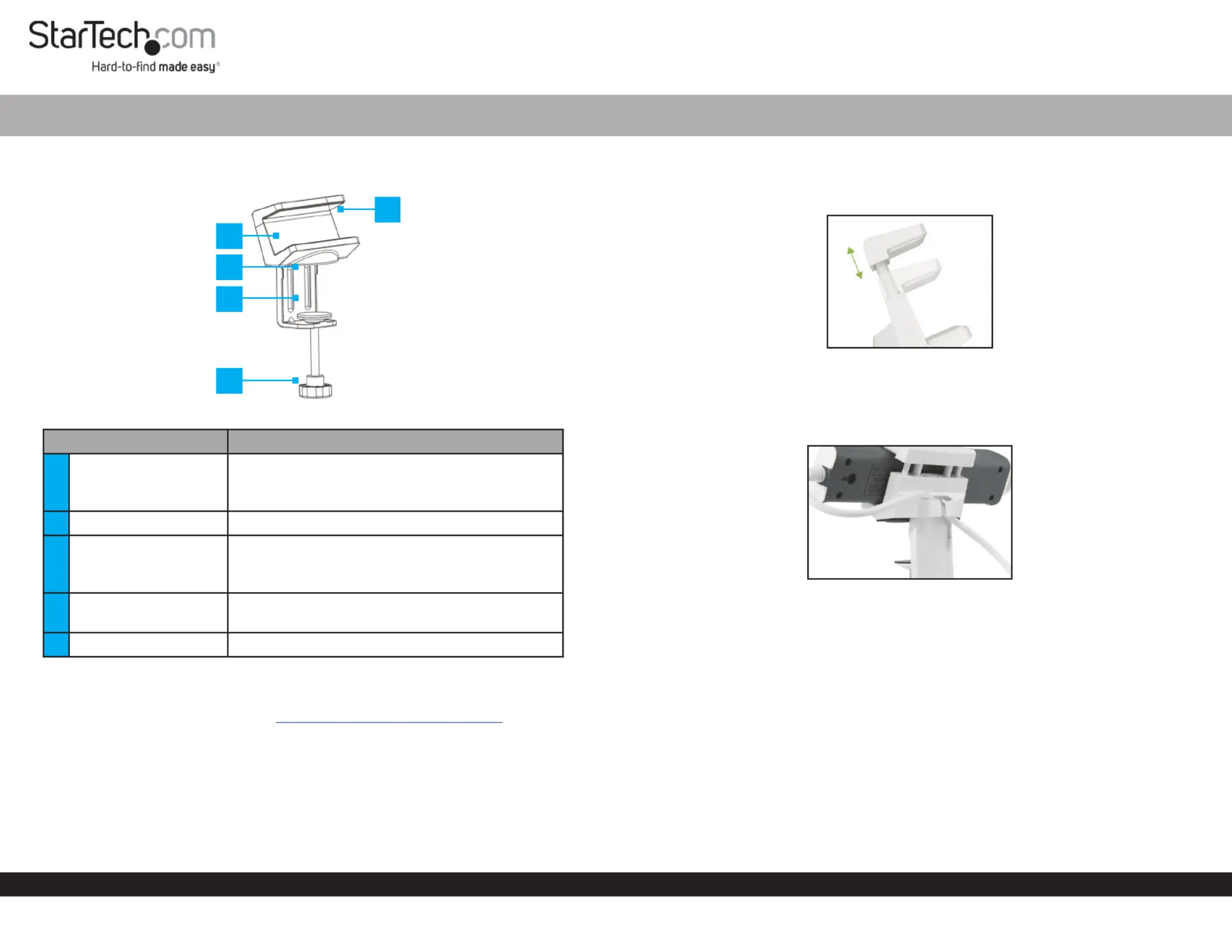
Product Diagram (PWRSTRPCLMP)
Component Function
1Adjustable Clamp
• Used to hold the in place.Power Strip
• The can support devices Adjustable Clamp
between 40 mm - 60 mm (1.6” - 2.4”) wide.
2EVA Form Pad (x 2) • Used to prevent surface scratches.
3C-Clamp
• Used to secure the to Power Strip Desk Clamp
the edge of a surface.
• Clamps to surfaces up to 50 mm (2”) thick.
4Thumb Screw
• Used to tighten the securing it to the C-Clamp
surface.
5Silicone Pad (x 2) • Used to securely grip the clamped .Device
Requirements
For the latest requirements, please visit www.startech.com/PWRSTRPCLMP
Installation
1. Align the with the edge of the surface and slide it over the edge of the C-Clamp
surface.
2. Using the tighten the until the is pressed tightly Thumb Screw C-Clamp C-Clamp
against the surface.
Power Strip Desk Clamp
3. Slide the (e.g. Power Strip) into the , securing the Device Adjustable Clamp Device
in place. The will adjust to the size of the , between Power Strip Desk Clamp Device
40 mm - 60 mm (1.6” - 2.4”) wide.
Adjusting the Power Stripe Desk Clamp
4. Route the down the back of the Power Cable Power Strip Desk Clamp and through
the .Cable Management Clip
Routing the Cable
1
2
3
4
5
Produkspesifikasjoner
| Merke: | StarTech.com |
| Kategori: | Flatpanelstøtte |
| Modell: | PWRSTRPCLMP |
Trenger du hjelp?
Hvis du trenger hjelp med StarTech.com PWRSTRPCLMP still et spørsmål nedenfor, og andre brukere vil svare deg
Flatpanelstøtte StarTech.com Manualer

20 Februar 2025

17 Januar 2025

17 Januar 2025

17 Januar 2025

17 Januar 2025

15 Januar 2025

15 Januar 2025

15 Januar 2025

15 Januar 2025

15 Januar 2025
Flatpanelstøtte Manualer
- Premier Mounts
- Ateca
- SereneLife
- Newstar
- My Wall
- Kogan
- Speaka
- KIMEX
- Heckler
- Peerless-AV
- Sven
- SunBriteTV
- Sanus
- Blaupunkt
- Premier
Nyeste Flatpanelstøtte Manualer

16 Oktober 2025
11 Oktober 2025
10 Oktober 2025
10 Oktober 2025
10 Oktober 2025
10 Oktober 2025
10 Oktober 2025
10 Oktober 2025
10 Oktober 2025
10 Oktober 2025