StarTech.com SSPMSUDWM Bruksanvisning
StarTech.com
Flatpanelstøtte
SSPMSUDWM
Les nedenfor 📖 manual på norsk for StarTech.com SSPMSUDWM (2 sider) i kategorien Flatpanelstøtte. Denne guiden var nyttig for 33 personer og ble vurdert med 4.8 stjerner i gjennomsnitt av 17 brukere
Side 1/2
Quick-Start Guide
To view manuals, FAQs, videos, drivers, downloads, technical drawings, and more, visit www.startech.com/support.
Manual Revision: July 18, 2019 12:19 PM
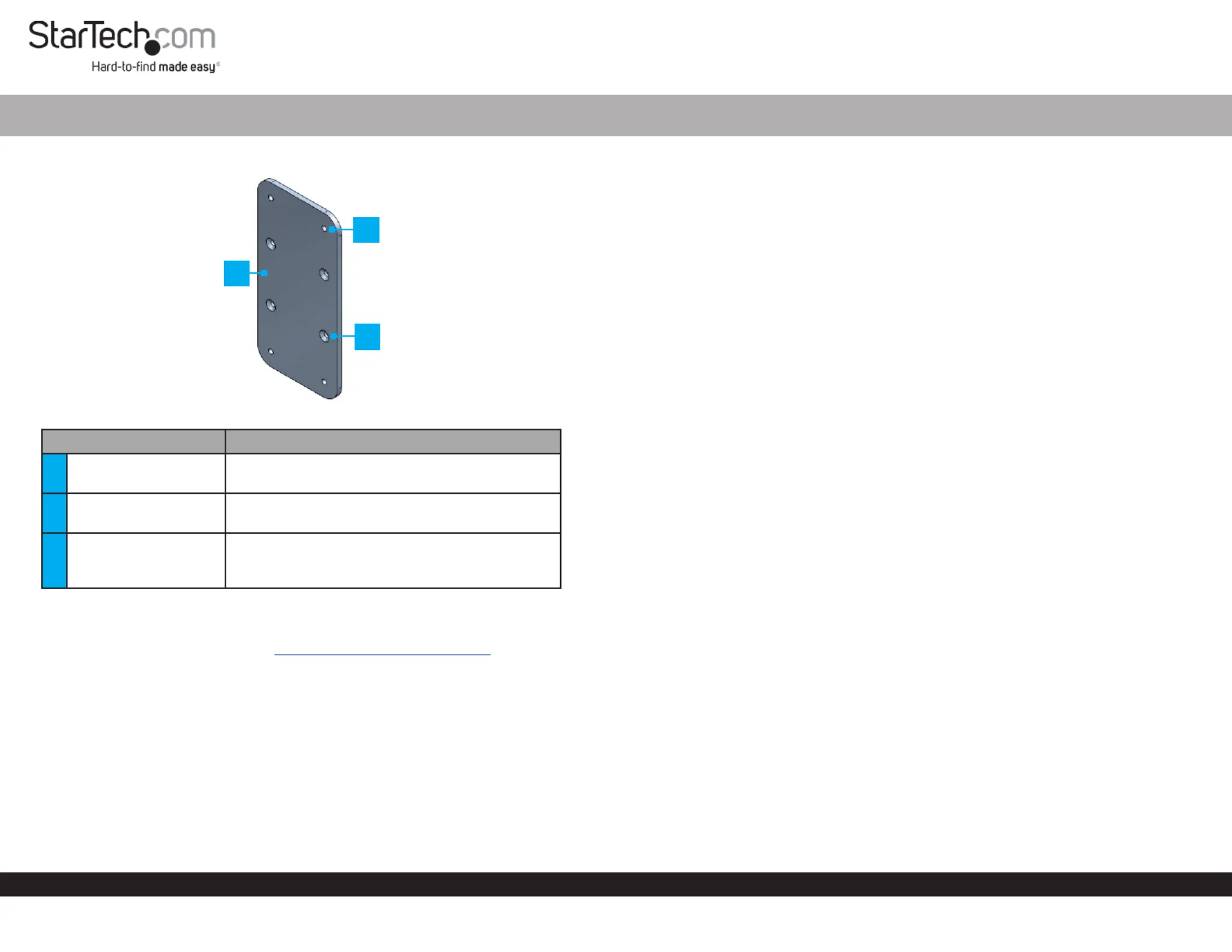
Product Diagram (SSPMSUDWM)
Component Function
1
Docking Station
Mount
• Used to mount a StarTech.com Docking
Station Hub or to a desk or wall.
2Mounting Holes
• Used to mount the to Docking Station Mount
a desk or wall.
3
Docking Station
Mounting Holes
• Used to mount a StarTech.com Docking
Station Hub Docking Station or to the
Mount.
Requirements
For the latest requirements, please visit www.startech.com/SSPMSUDWM
• Robertson Head Screwdriver x 1
Package Contents
• Docking Station Mount x 1
• M3 x 5 mm Screws x 4
• #5-20 x 5/8” Wood Screws x 4
• Quick-Start Guide x 1
Mount for StarTech.com Docking Stations and Hubs
Attaching a StarTech.com Docking Station or Hub
1. Align the on the with the on the Mounting Holes Adapter Mounting Holes
StarTech.com Docking Station Hub or . The recessed hole pattern should be facing
outward so the will t properly.M3 x 5 mm (Countersunk) Screws
2. Insert the four through the on the M3 x 5 mm Screws Mounting Holes Adapter
and into the on the or .Mounting Holes Startech.com Docking Station Hub
3. Using a (sold separately) tighten the , Phillips Head Screwdriver M3 x 5 mm Screws
being careful not to over-tighten the .M3 x 5 mm Screws
Mounting the Docking Station Mount on a Desk
Note: Make sure that the thickness of the Desk is greater than 12.5 mm (.5”) to ensure
that the screws do not penetrate the opposite side of the desk.
1. Align the on the desk.Docking Station Mount
2. Insert the # in the on the 5-20 x 5/8” Wood Screws Mounting Holes Docking
Station Mount.
3. Using a (sold separately), tighten the #Robertson Head Screwdriver 5-20 x 5/8”
Wood Screws.
Mounting the Docking Station Mount on a Wall
Notes: It is recommended to use wall studs when mounting the Docking Station
Mount onto a Wall.
You may need to drill pilot holes when mounting the into a Docking Station Mount
wall stud.
1. Align the on the .Docking Station Mount Wall
2. Insert the # in the on the 5-20 x 5/8” Wood Screws Mounting Holes Docking
Station Mount.
3. Using a , tighten the # .Robertson Head Screwdriver 5-20 x 5/8” Wood Screws
2
1
3
Produkspesifikasjoner
| Merke: | StarTech.com |
| Kategori: | Flatpanelstøtte |
| Modell: | SSPMSUDWM |
Trenger du hjelp?
Hvis du trenger hjelp med StarTech.com SSPMSUDWM still et spørsmål nedenfor, og andre brukere vil svare deg
Flatpanelstøtte StarTech.com Manualer

20 Februar 2025

17 Januar 2025

17 Januar 2025

17 Januar 2025

17 Januar 2025

15 Januar 2025

15 Januar 2025

15 Januar 2025

15 Januar 2025

15 Januar 2025
Flatpanelstøtte Manualer
- Konig & Meyer
- CTA Digital
- Tracer
- NeoMounts
- Helder
- Newstar
- LTN Technologies
- SereneLife
- Twelve South
- Fellowes
- My Wall
- V7
- Grunkel
- Ateca
- Sanus
Nyeste Flatpanelstøtte Manualer
16 Oktober 2025
11 Oktober 2025
10 Oktober 2025
10 Oktober 2025
10 Oktober 2025
10 Oktober 2025
10 Oktober 2025
10 Oktober 2025
10 Oktober 2025
10 Oktober 2025