Xiaomi Yuemi Bruksanvisning
Les nedenfor 📖 manual på norsk for Xiaomi Yuemi (2 sider) i kategorien Tastatur. Denne guiden var nyttig for 12 personer og ble vurdert med 4.3 stjerner i gjennomsnitt av 6.5 brukere
Side 1/2
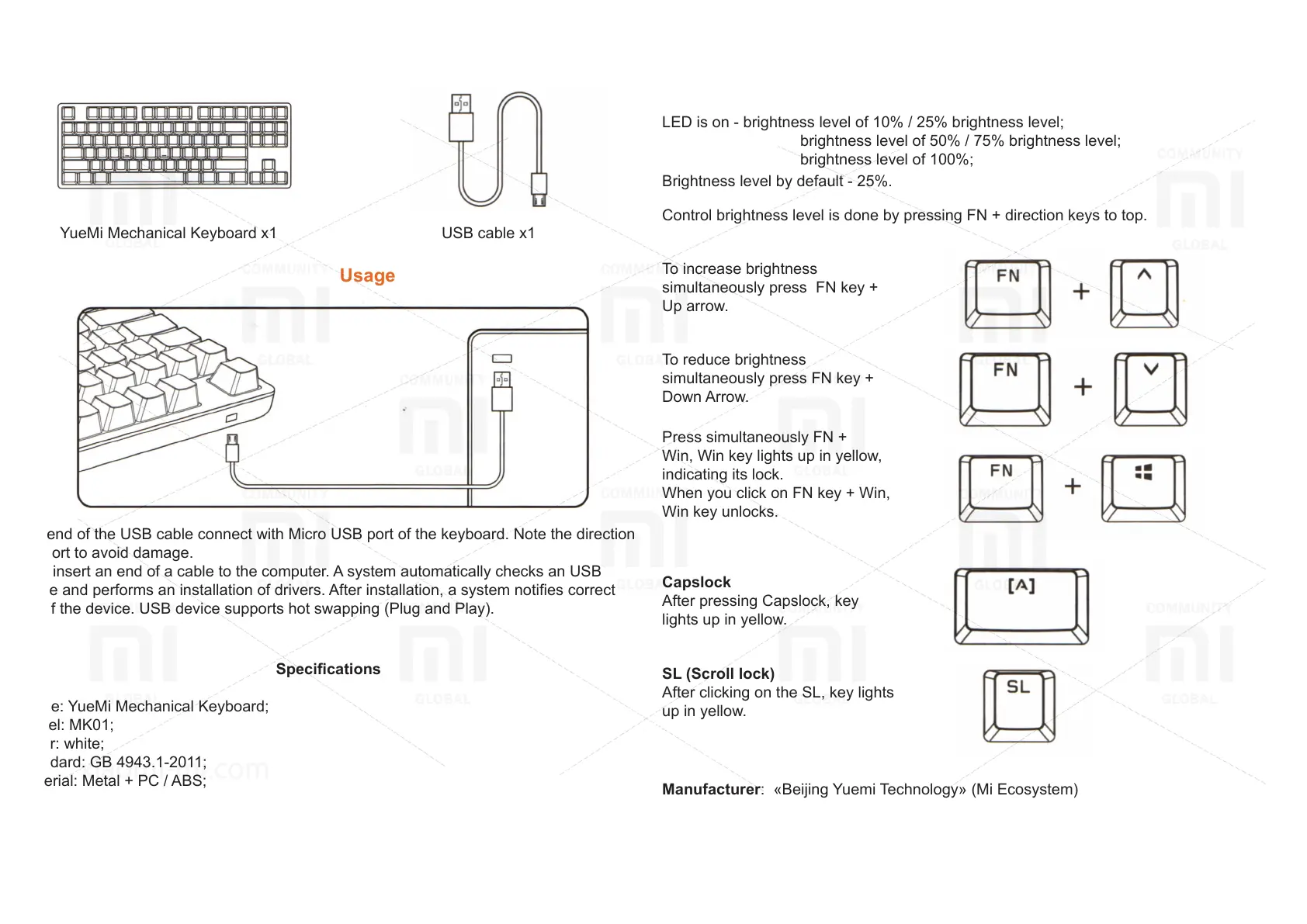
YueMi Mechanical Keyboard
Accessories
YueMi Mechanical Keyboard х1
USB cable х1
Usage
One end of the USB cable connect with Micro USB port of the keyboard. Note the direction
of a port to avoid damage.
Then insert an end of a cable to the computer. A system automatically checks an USB
device and performs an installation of drivers. After installation, a system noties correct
use of the device. USB device supports hot swapping (Plug and Play).
Keys and keyboard brightness
This unit has 6 modes of brightness:
LED is o - brightness level 0;
LED is on - brightness level of 10% / 25% brightness level;
brightness level of 50% / 75% brightness level;
brightness level of 100%;
Brightness level by default - 25%.
Control brightness level is done by pressing FN + direction keys to top.
To increase brightness
simultaneously press FN key +
Up arrow.
To reduce brightness
simultaneously press FN key +
Down Arrow.
Press simultaneously FN +
Win, Win key lights up in yellow,
indicating its lock.
When you click on FN key + Win,
Win key unlocks.
Capslock
After pressing Capslock, key
lights up in yellow.
SL (Scroll lock)
After clicking on the SL, key lights
up in yellow.
Specications
Name: YueMi Mechanical Keyboard;
Model: MK01;
Color: white;
Standard: GB 4943.1-2011;
Material: Metal + PC / ABS;
Weight: 940 g;
Size: 358 mm x 128 mm x 31.6 mm;
The method of transferring data: cable;
Keyboard: mechanical keyboard, 87 keys;
Port: Micro USB.
Manufacturer: «Beijing Yuemi Technology» (Мi Ecosystem)
Address: Beijing city, Haiding District, Cuiwei Road 2, Building 1, 2nd Floor, Oce 2057.
Produkspesifikasjoner
| Merke: | Xiaomi |
| Kategori: | Tastatur |
| Modell: | Yuemi |
Trenger du hjelp?
Hvis du trenger hjelp med Xiaomi Yuemi still et spørsmål nedenfor, og andre brukere vil svare deg
Tastatur Xiaomi Manualer
1 September 2025
Tastatur Manualer
- Boss
- Logilink
- Crestron
- Cherry
- Roccat
- Voxicon
- Nanoxia
- Xtech
- IK Multimedia
- Accuratus
- HyperX
- IOPLEE
- Behringer
- Conceptronic
- Techly
Nyeste Tastatur Manualer
20 Oktober 2025

19 Oktober 2025
19 Oktober 2025
18 Oktober 2025

18 Oktober 2025

15 Oktober 2025
13 Oktober 2025
11 Oktober 2025
11 Oktober 2025
11 Oktober 2025