Atdec SPC40B Bruksanvisning
Atdec
Ikke kategorisert
SPC40B
Les nedenfor 📖 manual på norsk for Atdec SPC40B (2 sider) i kategorien Ikke kategorisert. Denne guiden var nyttig for 7 personer og ble vurdert med 5.0 stjerner i gjennomsnitt av 4 brukere
Side 1/2
SPC40S
SPC40SW
SPC40SB
SPC40B
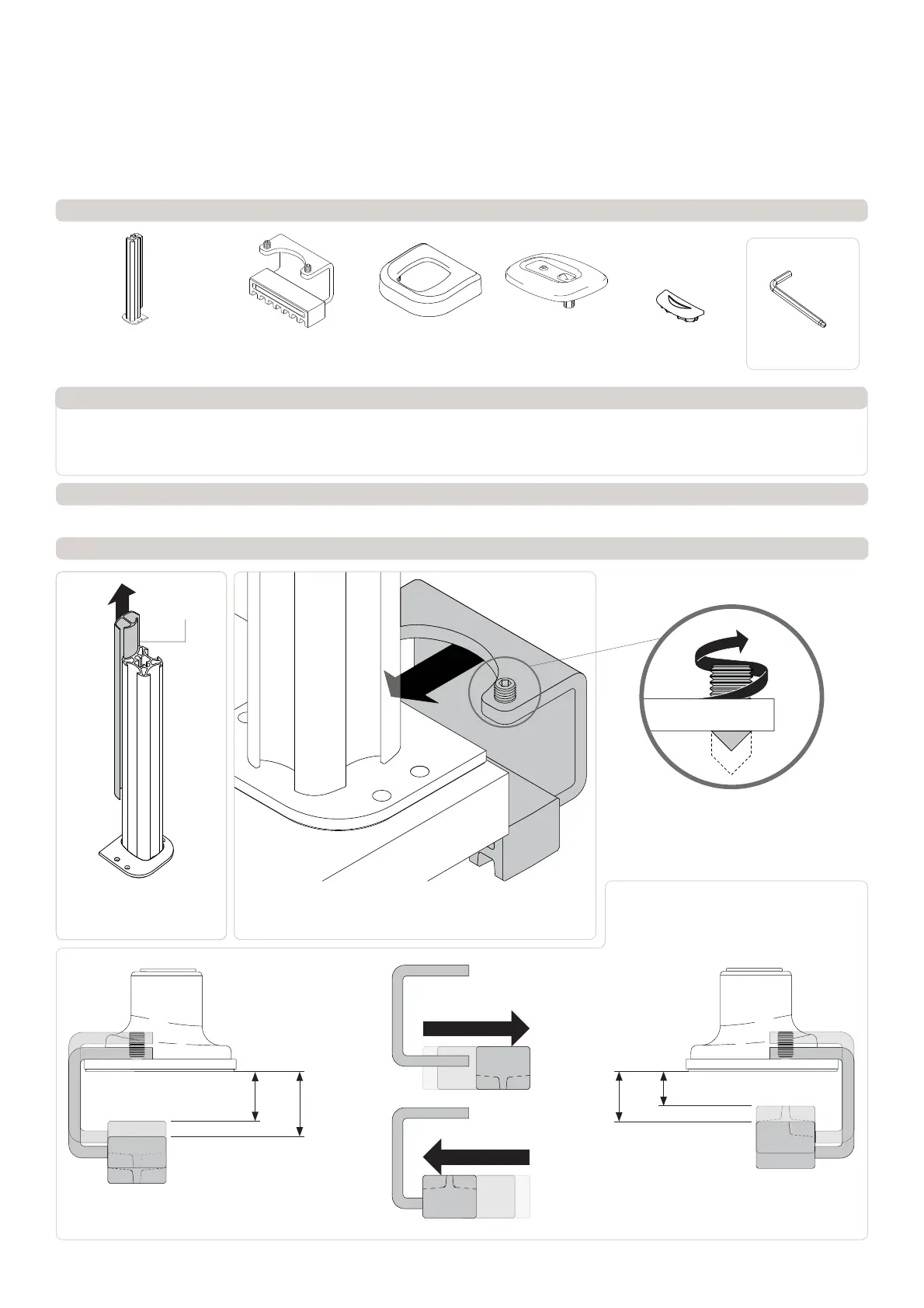
Component Checklist
Systema | 400mm Post C-Clamp
C-Clamp Base Plate with
Post and Cable Cover
! IMPORTANT - Install Systema 400mm Post as per installation instruction.
! Systema 400mm Post is compatible with Systema monitor arms SA13, SA46, SA71 & SS
! The manufacturer accepts no responsibility for incorrect installation.
IMPORTANT INFORMATION:
Step 1. Check Components
Check what you have received against the component checklist above.
Step 2. Mount C-Clamp
Cable Cover Cap
SYSTEMA
Installation Instructions
Cable Cover
A.1 Remove the Cable Cover,
pull it straight up and out of
the post.
Pole CapC-Clamp Bracket with
Spacer Block and Set
Screw M8x16 (2x)
C-Clamp
Cover
HARDWARE
4mm Ball-tip
Allen Key
A.2 Place C-Clamp Base onto the mounting surface. Slide the
Bracket onto the Base Plate and position screw tips in the indents
on the Base Plate.
A.3 Depending on the thickness of the mounting
surface you may need to extend the set screws
out of the plate using the 4mm Allen key.
A.4 The C-Clamp supports a range of different
mounting surface thicknesses. By inverting the
Spacer Block on the Clamp Bracket, mounting
surfaces with a thinner profile can be supported.
Minimum 25.6 mm
Maximum 33.5 mm
Minimum 18 mm
Maximum 25.75 mm
Inverted Spacer block positionDefault Spacer block position
MaxMin MinMax
(0.7”)
(1.03”)
(1”)
(1.3”)
Produkspesifikasjoner
| Merke: | Atdec |
| Kategori: | Ikke kategorisert |
| Modell: | SPC40B |
Trenger du hjelp?
Hvis du trenger hjelp med Atdec SPC40B still et spørsmål nedenfor, og andre brukere vil svare deg
Ikke kategorisert Atdec Manualer
12 Oktober 2025
11 Oktober 2025
11 Oktober 2025
10 Oktober 2025
10 Oktober 2025
10 Oktober 2025
10 Oktober 2025
10 Oktober 2025
10 Oktober 2025
10 Oktober 2025
Ikke kategorisert Manualer
- Mars Gaming
- Varytec
- Bavaria
- Premium Levella
- Sangean
- Scala
- Nureva
- Instant
- NANO Modules
- Orbitrek
- Troy-Bilt
- Niceboy
- Seaward
- Zaahn
- Vantec
Nyeste Ikke kategorisert Manualer

23 Oktober 2025

23 Oktober 2025

23 Oktober 2025

23 Oktober 2025

23 Oktober 2025

23 Oktober 2025

23 Oktober 2025

23 Oktober 2025

23 Oktober 2025

23 Oktober 2025