Kramer SWT3-21-HU-TR Bruksanvisning
Les nedenfor 📖 manual på norsk for Kramer SWT3-21-HU-TR (4 sider) i kategorien Bryter. Denne guiden var nyttig for 13 personer og ble vurdert med 4.4 stjerner i gjennomsnitt av 7 brukere
Side 1/4
SWT3 TR- - -21 HU Quick Start
Kramer EMEA
Netherlands
Stroombaan 16
, The Garden 1181VX
Amstelveen
info_EMEA
@kramerav.com
Kramer Headquarter:
Kramer Israel
Negev 2 St.
Airport City 7019900
+972 (0)73
- - 265 0200
info_il
@kramerav.com
P/N:
2900- 301831QS
Rev:
2
Scan to go to website
SWT3- - -TR 21 HU Quick Start Guide
This guide helps you install and use your SWT3- -21 HU-TR for the first time.
Go to to download the latest user manual and check if firmware upgrades are link to the user manual
available.
Keep your firmware up- -to date by going to . See the user manual for link to the Resources Tab
firmware download and error recovery information.
Step 1: Check what’s in the box
SWT3 TR- - -21 HU 2x1 4K60 HDMI Switcher
Extender
1 Multi signal USB- C cable (1m)
1 Quick start guide
2 Power cords and adapter
Set bracket & 4 Rubber feet
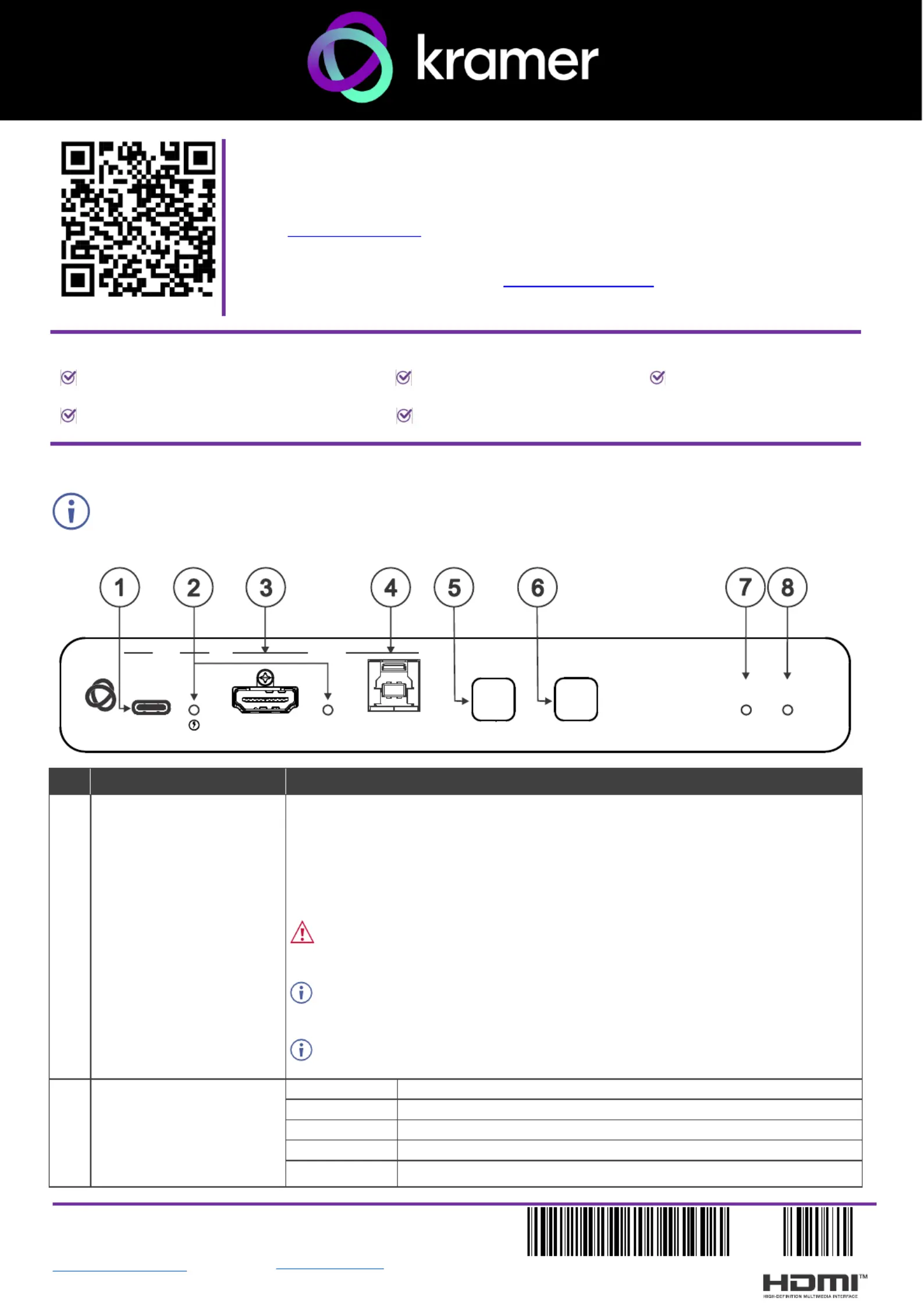
Step 2: -Get to know your SWT3 21- - HU TR
Configuring the device as transmitter (Tx) or receiver (Rx, default) is done via the embedded webpages
settings.
# ction Feature Fun
1
USB-C IN 1 Port
Connect to a USB- LAN): C host (AV + USB +
• that supports DisplayPort Alternate Mode, (for example, a share content.laptop) to
• to communicate with the USB devices (for example, a PTZ camera) that are
connected to the unit,
• to connect to the LAN
• to charge the connected sources (that support USB Power Delivery 2.0).s
Make sure to disconnect the USB C cable from your host device before modifying -
the USB type, or before performing a factory reset.
After modifying the USB device type via the web, power cycle the unit after the
webpage indicates that the process is complete.
While charging, the charging icon (to the right of the connector) becomes visible
and lights orange.
2 IN 1 / IN 2 Status LED
(per input port)
LED Status
Indicates
Lights blue
An input is selected and connected with an active AV or AV+USB source.
Flashes blue
An input is selected and has no active AV signal.
Lights magenta
An input is selected and connected with an active USB host only (no AV).
Off
No input is selected.
SWT3- - -21 HU TR
STATUS
NET
SELECT
ON
HDMI IN
HOST
INPUT
DISPLAY
IN IN 1 2
USB-C
Produkspesifikasjoner
| Merke: | Kramer |
| Kategori: | Bryter |
| Modell: | SWT3-21-HU-TR |
Trenger du hjelp?
Hvis du trenger hjelp med Kramer SWT3-21-HU-TR still et spørsmål nedenfor, og andre brukere vil svare deg
Bryter Kramer Manualer
21 August 2025
19 August 2025

2 Februar 2025

20 Desember 2024

20 Desember 2024

20 Desember 2024

20 Desember 2024

20 Desember 2024

19 Desember 2024
Bryter Manualer
- D-Link
- Brilliant
- Noble
- Elation
- Sonance
- Biltema
- Ebara
- LevelOne
- Draytek
- Mikrotik
- Advantech
- Suevia
- Doepke
- HELGI
- Cambium Networks
Nyeste Bryter Manualer
20 Oktober 2025

19 Oktober 2025
19 Oktober 2025

9 Oktober 2025
8 Oktober 2025
8 Oktober 2025
7 Oktober 2025
6 Oktober 2025
6 Oktober 2025
6 Oktober 2025